How do I Get Faces With Normals Facing Away?
A user asked
Can anyone tell me how to get faces that have normals pointing outside of the current viewport?
Answer
You can get the face normal in viewspace, then you just have to check the sign of the Z component. If it is negative, it is facing away from the camera!
SCRIPT
   (
       theObj = Teapot segs:10 --create ateapot
       convertToMesh theObj --convert to EMesh
       theMeshCount = theObj.numfaces --get the number of faces in the object
       selArray = #() --init. an array to collect faces
       for f = 1 to theMeshCount do --loop through all faces
       (
           in coordsys (inverse (viewport.GetTM())) theFN = getFaceNormal theObj f
           if theFN.z < 0 then append selArray f -- if Z is negative, add to array
       )
       setFaceSelection theObj selArray --set the face selection in the EMesh
       max modify mode --go to modify mode
       select theObj --select the mesh
       subObjectLevel = 3 --go to Face SO level
       modPanel.addModToSelection (deleteMesh()) --add a delete mesh, preserving the SO selection
   )
Result:All triangles facing away from the camera will be deleted!
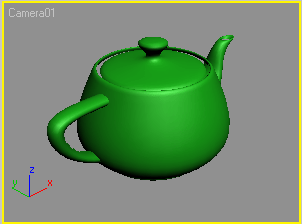
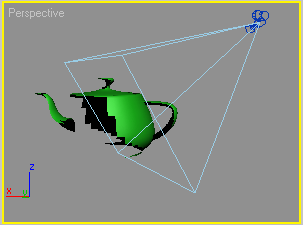
The image on the left shows the teapot with deleted backfaces as seen from a camera viewport. The image on the right shows the teapot and the camera as seen from the side. Note that for the screenshot, the backface culling was disabled (you can see the backfaces on the right image), but the left image looks just like it would with backface culling enabled! This is because the script deletes the same faces the viewport backface culling would skip!