How To ... Develop a Bitmap Painting Tool - Smooth Brushes
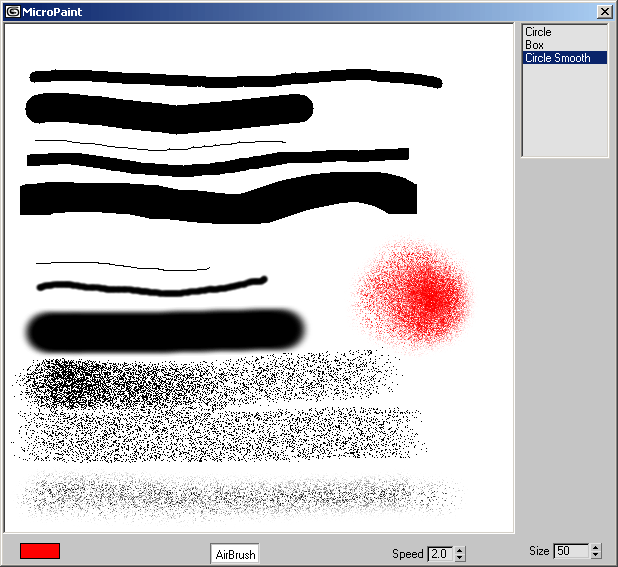
In this step of the Bitmap Painting tool development, we will add optional smooth falloff to the brush.
NATURAL LANGUAGE
We will add a new item to the brushes listbox.
We will extend the paintbrush function with a new case calculating the new color using the existing one and a falloff based on the pixel's distance to the center of the brush.
SCRIPT:
macroScript MicroPaint category: "HowTo"
(
    global MicroPaint_CanvasRollout
    try (destroyDialog MicroPaint_CanvasRollout) catch()
    local isDrawing = false
    local bitmapX = bitmapY = 512
    local theCanvasBitmap = bitmap bitmapX bitmapY color:white
    local currentPos = lastPos = [0,0]

    rollout MicroPaint_CanvasRollout "MicroPaint"
    (
        bitmap theCanvas pos:[0,0] width:bitmapX height:bitmapY bitmap:theCanvasBitmap
        colorpicker inkColor height:16 modal:false color:black across:4
        checkbutton airBrush "AirBrush" width:50
        spinner AirBrushSpeed "Speed" range:[0.1,50,10] fieldwidth:30
        spinner BrushSize "Size" range:[1,50,10] type:#integer fieldwidth:40
        listbox BrushShape items:#("Circle","Box","Circle Smooth") pos:[bitmapX+5,0] width:90

        fn paintBrush pos =
        (
            case BrushShape.selection of
            (
                1:
                (
                    if distance pos currentPos <= BrushSize.value/2 do
                        setPixels theCanvasBitmap pos #(inkColor.color)
                )
                2: setPixels theCanvasBitmap pos #(inkColor.color)
                3:
                (
                    theFactor = (distance pos currentPos) / (BrushSize.value/2.0)
                    if theFactor <= 1.0 do
                    (
                        theFactor = sin ( 90.0 * theFactor)
                        thePixels = getPixels theCanvasBitmap pos 1
                        if thePixels[1] != undefined do
                        (
                            thePixels[1] = (thePixels[1] * theFactor) + (inkColor.color * (1.0 - theFactor))
                            setPixels theCanvasBitmap pos thePixels
                        )
                    )
                )--end case 3
            )--end case
        )--end fn

        fn drawStroke lastPos pos =
        (
            currentPos = lastPos
            deltaX = pos.x - lastPos.x
            deltaY = pos.y - lastPos.y
            maxSteps = amax #(abs(deltaX),abs(deltaY))
            deltaStepX = deltaX / maxSteps
            deltaStepY = deltaY / maxSteps
            for i = 0 to maxSteps do
            (
                if airBrush.checked then
                (
                    for b = 1 to (BrushSize.value / AirBrushSpeed.value) do
                        paintBrush (currentPos + (random [-BrushSize.value/2,-BrushSize.value/2] [BrushSize.value/2,BrushSize.value/2] ))
                )
                else
                    for b = -BrushSize.value/2 to BrushSize.value/2 do
                        for c = -BrushSize.value/2 to BrushSize.value/2 do
                            paintBrush (currentPos + [c,b])
                currentPos += [deltaStepX, deltaStepY]
            )
            theCanvas.bitmap = theCanvasBitmap
        )

        on MicroPaint_CanvasRollout lbuttondown pos do
        (
            lastPos = pos
            isDrawing = true
            drawStroke lastPos pos
        )
        on MicroPaint_CanvasRollout lbuttonup pos do isDrawing = false
        on MicroPaint_CanvasRollout mousemove pos do
        (
            if isDrawing do drawStroke lastPos pos
            lastPos = pos
        )
    )
    createDialog MicroPaint_CanvasRollout (bitmapx+100) (bitmapy+30)
)
Step-By-Step
--Code in italic has no changes since the previous version. macroScript MicroPaint category:"HowTo"
(
global MicroPaint_CanvasRollout
try(destroyDialog CanvasRollout)catch()
local isDrawing = false
local bitmapX = bitmapY = 512
local theCanvasBitmap = bitmap bitmapX bitmapY color:white
local currentPos = lastPos = [0,0]

rollout MicroPaint_CanvasRollout "MicroPaint"
(
bitmap theCanvas pos:[0,0] width:bitmapX height:bitmapY bitmap:theCanvasBitmap
colorpicker inkColor height:16 modal:false color:black across:4
checkbutton airBrush "AirBrush" width:50
spinner AirBrushSpeed "Speed" range:[0.1,50,10] fieldwidth:40
spinner BrushSize "Size" range:[1,50,10] type:#integer fieldwidth:40
 listbox BrushShape items:#("Circle", "Box", "Circle Smooth") pos:[bitmapX+5,0] width:90
We add a new brush to our "toolbox" - "Circle Smooth".
fn paintBrush pos =
(
case BrushShape.selection of
(
1: (
if distance pos currentPos <= BrushSize.value/2 do
setPixels theCanvasBitmap pos #(inkColor.color)
)
2: setPixels theCanvasBitmap pos #(inkColor.color)

3: (
When the "Circle Smooth" brush is selected,
theFactor =(distance pos currentPos)/ (BrushSize.value/2.0)we calculate the distance from the pixel to be drawn to the center of the brush and divide by the radius of the brush.
if theFactor <= 1.0 do
(
If the result is less than 1.0, the pixel lies inside the circle.
theFactor = sin ( 90.0 * theFactor)In that case, we multiply the value by 90 and use the Sine function to calculate a nice falloff curve. Note that remarking this line gives you a linear falloff curve instead of the sine-based falloff curve.
thePixels = getPixels theCanvasBitmap pos 1Next, we read a single pixel from the position we are about to write to.
if thePixels[1] != undefined do
(
If the single pixel in the array is a valid color,
thePixels[1] = (thePixels[1] * theFactor) + (inkColor.color * (1.0 - theFactor))we blend the color of the background with the brush color based on the distance factor. If the factor is 0.5, the two colors will be blended 50-50%. If the factor is 1 (at the edge of the circle, the background color will be used 100% and the ink will be 0%.
setPixels theCanvasBitmap pos thePixelsFinally, we write the color back into the bitmap.
)
)
)
)
)

fn drawStroke lastPos pos =
(
currentPos = lastPos
deltaX = pos.x - lastPos.x
deltaY = pos.y - lastPos.y
maxSteps = amax #(abs(deltaX),abs(deltaY))
deltaStepX = deltaX / maxSteps
deltaStepY = deltaY / maxSteps
for i = 0 to maxSteps do
(
if airBrush.checked then
(
for b = 1 to (BrushSize.value / AirBrushSpeed.value) do
paintBrush (currentPos + (random [-BrushSize.value/2,-BrushSize.value/2] [BrushSize.value/2,BrushSize.value/2] ))
)
else
for b = -BrushSize.value/2 to BrushSize.value/2 do
for c = -BrushSize.value/2 to BrushSize.value/2 do
paintBrush (currentPos + [c,b])
currentPos += [deltaStepX, deltaStepY]
)
theCanvas.bitmap = theCanvasBitmap
)

on MicroPaint_CanvasRollout lbuttondown pos do
(
lastPos = pos
isDrawing = true
drawStroke lastPos pos
)
on MicroPaint_CanvasRollout lbuttonup pos do isDrawing = false
on MicroPaint_CanvasRollout mousemove pos do
(
if isDrawing do drawStroke lastPos pos
lastPos = pos
)
)
createDialog MicroPaint_CanvasRollout (bitmapx+100) (bitmapy+30)
)
Result
Previous Tutorial:
How To ... Develop a Bitmap Painting Tool - Airbrush and Shapes
Next Tutorial: