Creating A Simple DotNet MonthCalendar And Changing Its Colors
The following example creates a simple dialog with a MonthCalendar dotNet control and assigns a mousedown event handler that prints the properties, methods, and events:
EXAMPLE
   rollout test "test" height:200 width:220
   (
       dotNetControl f1 "MonthCalendar" align:#left height:180 width:200
       on f1 mousedown val do
       (
           format "in mousedown handler: arg: %\n" val
           format "showproperties:\n"
           showproperties val
           format "showmethods:\n"
           showmethods val
           format "showevents:\n"
           showevents val
           format "getpropnames : %\n" (getpropnames val)
           format "prop values:\n"
       )
   )
   createdialog test escapeEnable:true
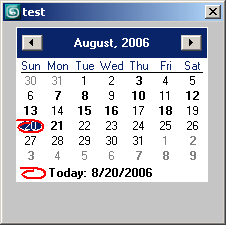
After evaluation, a dialog showing a Month Calendar DotNet Control is displayed with default settings. You can see the constructor of the control using the dotnet.showconstructors() method:
EXAMPLE
   --see the constructor of the control
   dotnet.showConstructors test.f1
   System.Windows.Forms.MonthCalendar()
   true
You can also change the calendar's appearance by modifying its colors.
EXAMPLE
   --First we list all properties of the control
   --and look to find those controlling some of its colors:
   showproperties test.f1
   .AccessibilityObject : <System.Windows.Forms.AccessibleObject>, read-only
   .AccessibleDefaultActionDescription : <System.String>
   .AccessibleDescription : <System.String>
   .AccessibleName : <System.String>
   .AccessibleRole : <System.Windows.Forms.AccessibleRole>
   .AllowDrop : <System.Boolean>
   .Anchor : <System.Windows.Forms.AnchorStyles>
   .AnnuallyBoldedDates : <System.DateTime[]>
   .AutoScrollOffset : <System.Drawing.Point>
   .AutoSize : <System.Boolean>
   .BackColor : <System.Drawing.Color>
   .BackgroundImage : <System.Drawing.Image>
   .BackgroundImageLayout : <System.Windows.Forms.ImageLayout>
   .BindingContext : <System.Windows.Forms.BindingContext>
   .BoldedDates : <System.DateTime[]>
   .Bottom : <System.Int32>, read-only
   .Bounds : <System.Drawing.Rectangle>
   .CalendarDimensions : <System.Drawing.Size>
   .CanFocus : <System.Boolean>, read-only
   .CanSelect : <System.Boolean>, read-only
   .Capture : <System.Boolean>
   .CausesValidation : <System.Boolean>
   .CheckForIllegalCrossThreadCalls : <System.Boolean>, static
   .ClientRectangle : <System.Drawing.Rectangle>, read-only
   .ClientSize : <System.Drawing.Size>
   .CompanyName : <System.String>, read-only
   .Container : <System.ComponentModel.IContainer>, read-only
   .ContainsFocus : <System.Boolean>, read-only
   .ContextMenu : <System.Windows.Forms.ContextMenu>
   .ContextMenuStrip : <System.Windows.Forms.ContextMenuStrip>
   .Controls : <System.Windows.Forms.Control+ControlCollection>, read-only
   .Created : <System.Boolean>, read-only
   .Cursor : <System.Windows.Forms.Cursor>
   .DataBindings : <System.Windows.Forms.ControlBindingsCollection>, read-only
   .DataContext : <System.Object>
   .DefaultBackColor : <System.Drawing.Color>, read-only, static
   .DefaultFont : <System.Drawing.Font>, read-only, static
   .DefaultForeColor : <System.Drawing.Color>, read-only, static
   .DeviceDpi : <System.Int32>, read-only
   .DisplayRectangle : <System.Drawing.Rectangle>, read-only
   .Disposing : <System.Boolean>, read-only
   .Dock : <System.Windows.Forms.DockStyle>
   .Enabled : <System.Boolean>
   .FirstDayOfWeek : <System.Windows.Forms.Day>
   .Focused : <System.Boolean>, read-only
   .Font : <System.Drawing.Font>
   .ForeColor : <System.Drawing.Color>
   .Handle : <System.IntPtr>, read-only
   .HasChildren : <System.Boolean>, read-only
   .Height : <System.Int32>
   .ImeMode : <System.Windows.Forms.ImeMode>
   .InvokeRequired : <System.Boolean>, read-only
   .IsAccessible : <System.Boolean>
   .IsAncestorSiteInDesignMode : <System.Boolean>, read-only
   .IsDisposed : <System.Boolean>, read-only
   .IsHandleCreated : <System.Boolean>, read-only
   .IsMirrored : <System.Boolean>, read-only
   .LayoutEngine : <System.Windows.Forms.Layout.LayoutEngine>, read-only
   .Left : <System.Int32>
   .Location : <System.Drawing.Point>
   .Margin : <System.Windows.Forms.Padding>
   .MaxDate : <System.DateTime>
   .MaximumSize : <System.Drawing.Size>
   .MaxSelectionCount : <System.Int32>
   .MinDate : <System.DateTime>
   .MinimumSize : <System.Drawing.Size>
   .ModifierKeys : <System.Windows.Forms.Keys>, read-only, static
   .MonthlyBoldedDates : <System.DateTime[]>
   .MouseButtons : <System.Windows.Forms.MouseButtons>, read-only, static
   .MousePosition : <System.Drawing.Point>, read-only, static
   .Name : <System.String>
   .Padding : <System.Windows.Forms.Padding>
   .Parent : <System.Windows.Forms.Control>
   .PreferredSize : <System.Drawing.Size>, read-only
   .ProductName : <System.String>, read-only
   .ProductVersion : <System.String>, read-only
   .RecreatingHandle : <System.Boolean>, read-only
   .Region : <System.Drawing.Region>
   .Right : <System.Int32>, read-only
   .RightToLeft : <System.Windows.Forms.RightToLeft>
   .RightToLeftLayout : <System.Boolean>
   .ScrollChange : <System.Int32>
   .SelectionEnd : <System.DateTime>
   .SelectionRange : <System.Windows.Forms.SelectionRange>
   .SelectionStart : <System.DateTime>
   .ShowToday : <System.Boolean>
   .ShowTodayCircle : <System.Boolean>
   .ShowWeekNumbers : <System.Boolean>
   .SingleMonthSize : <System.Drawing.Size>, read-only
   .Site : <System.ComponentModel.ISite>
   .Size : <System.Drawing.Size>
   .TabIndex : <System.Int32>
   .TabStop : <System.Boolean>
   .Tag : <System.Object>
   .Text : <System.String>
   .TitleBackColor : <System.Drawing.Color>
   .TitleForeColor : <System.Drawing.Color>
   .TodayDate : <System.DateTime>
   .TodayDateSet : <System.Boolean>, read-only
   .Top : <System.Int32>
   .TopLevelControl : <System.Windows.Forms.Control>, read-only
   .TrailingForeColor : <System.Drawing.Color>
   .UseWaitCursor : <System.Boolean>
   .Visible : <System.Boolean>
   .Width : <System.Int32>
   .WindowTarget : <System.Windows.Forms.IWindowTarget>
   true
Using DotNet Color Presets
You can change the color properties of the control. First, take a look at their own properties:
   showproperties test.f1.ForeColor --see all properties of the color
   .A : <System.Byte>, read-only
   .AliceBlue : <System.Drawing.Color>, read-only, static
   .AntiqueWhite : <System.Drawing.Color>, read-only, static
   .Aqua : <System.Drawing.Color>, read-only, static
   .Aquamarine : <System.Drawing.Color>, read-only, static
   .Azure : <System.Drawing.Color>, read-only, static
   .B : <System.Byte>, read-only
   .Beige : <System.Drawing.Color>, read-only, static
   .Bisque : <System.Drawing.Color>, read-only, static
   .Black : <System.Drawing.Color>, read-only, static
   .BlanchedAlmond : <System.Drawing.Color>, read-only, static
   .Blue : <System.Drawing.Color>, read-only, static
   .BlueViolet : <System.Drawing.Color>, read-only, static
   .Brown : <System.Drawing.Color>, read-only, static
   .BurlyWood : <System.Drawing.Color>, read-only, static
   .CadetBlue : <System.Drawing.Color>, read-only, static
   .Chartreuse : <System.Drawing.Color>, read-only, static
   .Chocolate : <System.Drawing.Color>, read-only, static
   .Coral : <System.Drawing.Color>, read-only, static
   .CornflowerBlue : <System.Drawing.Color>, read-only, static
   .Cornsilk : <System.Drawing.Color>, read-only, static
   .Crimson : <System.Drawing.Color>, read-only, static
   .Cyan : <System.Drawing.Color>, read-only, static
   .DarkBlue : <System.Drawing.Color>, read-only, static
   .DarkCyan : <System.Drawing.Color>, read-only, static
   .DarkGoldenrod : <System.Drawing.Color>, read-only, static
   .DarkGray : <System.Drawing.Color>, read-only, static
   .DarkGreen : <System.Drawing.Color>, read-only, static
   .DarkKhaki : <System.Drawing.Color>, read-only, static
   .DarkMagenta : <System.Drawing.Color>, read-only, static
   .DarkOliveGreen : <System.Drawing.Color>, read-only, static
   .DarkOrange : <System.Drawing.Color>, read-only, static
   .DarkOrchid : <System.Drawing.Color>, read-only, static
   .DarkRed : <System.Drawing.Color>, read-only, static
   .DarkSalmon : <System.Drawing.Color>, read-only, static
   .DarkSeaGreen : <System.Drawing.Color>, read-only, static
   .DarkSlateBlue : <System.Drawing.Color>, read-only, static
   .DarkSlateGray : <System.Drawing.Color>, read-only, static
   .DarkTurquoise : <System.Drawing.Color>, read-only, static
   .DarkViolet : <System.Drawing.Color>, read-only, static
   .DeepPink : <System.Drawing.Color>, read-only, static
   .DeepSkyBlue : <System.Drawing.Color>, read-only, static
   .DimGray : <System.Drawing.Color>, read-only, static
   .DodgerBlue : <System.Drawing.Color>, read-only, static
   .Firebrick : <System.Drawing.Color>, read-only, static
   .FloralWhite : <System.Drawing.Color>, read-only, static
   .ForestGreen : <System.Drawing.Color>, read-only, static
   .Fuchsia : <System.Drawing.Color>, read-only, static
   .G : <System.Byte>, read-only
   .Gainsboro : <System.Drawing.Color>, read-only, static
   .GhostWhite : <System.Drawing.Color>, read-only, static
   .Gold : <System.Drawing.Color>, read-only, static
   .Goldenrod : <System.Drawing.Color>, read-only, static
   .Gray : <System.Drawing.Color>, read-only, static
   .Green : <System.Drawing.Color>, read-only, static
   .GreenYellow : <System.Drawing.Color>, read-only, static
   .Honeydew : <System.Drawing.Color>, read-only, static
   .HotPink : <System.Drawing.Color>, read-only, static
   .IndianRed : <System.Drawing.Color>, read-only, static
   .Indigo : <System.Drawing.Color>, read-only, static
   .IsEmpty : <System.Boolean>, read-only
   .IsKnownColor : <System.Boolean>, read-only
   .IsNamedColor : <System.Boolean>, read-only
   .IsSystemColor : <System.Boolean>, read-only
   .Ivory : <System.Drawing.Color>, read-only, static
   .Khaki : <System.Drawing.Color>, read-only, static
   .Lavender : <System.Drawing.Color>, read-only, static
   .LavenderBlush : <System.Drawing.Color>, read-only, static
   .LawnGreen : <System.Drawing.Color>, read-only, static
   .LemonChiffon : <System.Drawing.Color>, read-only, static
   .LightBlue : <System.Drawing.Color>, read-only, static
   .LightCoral : <System.Drawing.Color>, read-only, static
   .LightCyan : <System.Drawing.Color>, read-only, static
   .LightGoldenrodYellow : <System.Drawing.Color>, read-only, static
   .LightGray : <System.Drawing.Color>, read-only, static
   .LightGreen : <System.Drawing.Color>, read-only, static
   .LightPink : <System.Drawing.Color>, read-only, static
   .LightSalmon : <System.Drawing.Color>, read-only, static
   .LightSeaGreen : <System.Drawing.Color>, read-only, static
   .LightSkyBlue : <System.Drawing.Color>, read-only, static
   .LightSlateGray : <System.Drawing.Color>, read-only, static
   .LightSteelBlue : <System.Drawing.Color>, read-only, static
   .LightYellow : <System.Drawing.Color>, read-only, static
   .Lime : <System.Drawing.Color>, read-only, static
   .LimeGreen : <System.Drawing.Color>, read-only, static
   .Linen : <System.Drawing.Color>, read-only, static
   .Magenta : <System.Drawing.Color>, read-only, static
   .Maroon : <System.Drawing.Color>, read-only, static
   .MediumAquamarine : <System.Drawing.Color>, read-only, static
   .MediumBlue : <System.Drawing.Color>, read-only, static
   .MediumOrchid : <System.Drawing.Color>, read-only, static
   .MediumPurple : <System.Drawing.Color>, read-only, static
   .MediumSeaGreen : <System.Drawing.Color>, read-only, static
   .MediumSlateBlue : <System.Drawing.Color>, read-only, static
   .MediumSpringGreen : <System.Drawing.Color>, read-only, static
   .MediumTurquoise : <System.Drawing.Color>, read-only, static
   .MediumVioletRed : <System.Drawing.Color>, read-only, static
   .MidnightBlue : <System.Drawing.Color>, read-only, static
   .MintCream : <System.Drawing.Color>, read-only, static
   .MistyRose : <System.Drawing.Color>, read-only, static
   .Moccasin : <System.Drawing.Color>, read-only, static
   .Name : <System.String>, read-only
   .NavajoWhite : <System.Drawing.Color>, read-only, static
   .Navy : <System.Drawing.Color>, read-only, static
   .OldLace : <System.Drawing.Color>, read-only, static
   .Olive : <System.Drawing.Color>, read-only, static
   .OliveDrab : <System.Drawing.Color>, read-only, static
   .Orange : <System.Drawing.Color>, read-only, static
   .OrangeRed : <System.Drawing.Color>, read-only, static
   .Orchid : <System.Drawing.Color>, read-only, static
   .PaleGoldenrod : <System.Drawing.Color>, read-only, static
   .PaleGreen : <System.Drawing.Color>, read-only, static
   .PaleTurquoise : <System.Drawing.Color>, read-only, static
   .PaleVioletRed : <System.Drawing.Color>, read-only, static
   .PapayaWhip : <System.Drawing.Color>, read-only, static
   .PeachPuff : <System.Drawing.Color>, read-only, static
   .Peru : <System.Drawing.Color>, read-only, static
   .Pink : <System.Drawing.Color>, read-only, static
   .Plum : <System.Drawing.Color>, read-only, static
   .PowderBlue : <System.Drawing.Color>, read-only, static
   .Purple : <System.Drawing.Color>, read-only, static
   .R : <System.Byte>, read-only
   .Red : <System.Drawing.Color>, read-only, static
   .RosyBrown : <System.Drawing.Color>, read-only, static
   .RoyalBlue : <System.Drawing.Color>, read-only, static
   .SaddleBrown : <System.Drawing.Color>, read-only, static
   .Salmon : <System.Drawing.Color>, read-only, static
   .SandyBrown : <System.Drawing.Color>, read-only, static
   .SeaGreen : <System.Drawing.Color>, read-only, static
   .SeaShell : <System.Drawing.Color>, read-only, static
   .Sienna : <System.Drawing.Color>, read-only, static
   .Silver : <System.Drawing.Color>, read-only, static
   .SkyBlue : <System.Drawing.Color>, read-only, static
   .SlateBlue : <System.Drawing.Color>, read-only, static
   .SlateGray : <System.Drawing.Color>, read-only, static
   .Snow : <System.Drawing.Color>, read-only, static
   .SpringGreen : <System.Drawing.Color>, read-only, static
   .SteelBlue : <System.Drawing.Color>, read-only, static
   .Tan : <System.Drawing.Color>, read-only, static
   .Teal : <System.Drawing.Color>, read-only, static
   .Thistle : <System.Drawing.Color>, read-only, static
   .Tomato : <System.Drawing.Color>, read-only, static
   .Transparent : <System.Drawing.Color>, read-only, static
   .Turquoise : <System.Drawing.Color>, read-only, static
   .Violet : <System.Drawing.Color>, read-only, static
   .Wheat : <System.Drawing.Color>, read-only, static
   .White : <System.Drawing.Color>, read-only, static
   .WhiteSmoke : <System.Drawing.Color>, read-only, static
   .Yellow : <System.Drawing.Color>, read-only, static
   .YellowGreen : <System.Drawing.Color>, read-only, static
   .Empty : <System.Drawing.Color>, read-only, static
   true
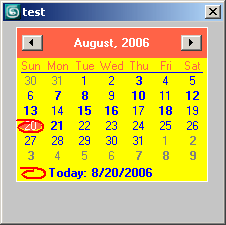
The color property itself has properties, some of them read-only definitions of typical colors. This means that you can set the .ForeColor and .BackColor properties to the static read-only values that are already defined:
   test.f1.ForeColor = test.f1.ForeColor.Blue
   --> dotNetObject:System.Drawing.Color
   test.f1.BackColor = test.f1.BackColor.Yellow
   --> dotNetObject:System.Drawing.Color
   test.f1.TitleBackColor = test.f1.TitleBackColor.Tomato
   --> dotNetObject:System.Drawing.Color
Using User-Defined Colors
You can create your own DotNet colors instead of using the presets.
Take a look at the methods that a System.Drawing.Color object exposes:
   showMethods test.f1.backcolor
   .<System.Boolean>Equals <System.Drawing.Color>other
   .<System.Boolean>Equals <System.Object>obj
   .[static]<System.Boolean>Equals <System.Object>objA <System.Object>objB
   .[static]<System.Drawing.Color>FromArgb <System.Int32>argb
   .[static]<System.Drawing.Color>FromArgb <System.Int32>alpha <System.Drawing.Color>baseColor
   .[static]<System.Drawing.Color>FromArgb <System.Int32>red <System.Int32>green <System.Int32>blue
   .[static]<System.Drawing.Color>FromArgb <System.Int32>alpha <System.Int32>red <System.Int32>green <System.Int32>blue
   .[static]<System.Drawing.Color>FromKnownColor <System.Drawing.KnownColor>color
   .[static]<System.Drawing.Color>FromName <System.String>name
   .<System.Single>GetBrightness()
   .<System.Int32>GetHashCode()
   .<System.Single>GetHue()
   .<System.Single>GetSaturation()
   .<System.Type>GetType()
   .[static]<System.Boolean>ReferenceEquals <System.Object>objA <System.Object>objB
   .<System.Int32>ToArgb()
   .<System.Drawing.KnownColor>ToKnownColor()
   .<System.String>ToString()
   true
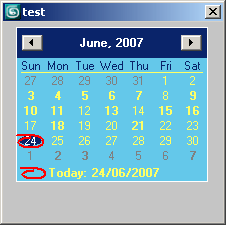
As you can see, the .FromARGB() method allows to provide Red, Green, and Blue values, and it constructs a DotNet color value:
   test.f1.forecolor = test.f1.backcolor.FromArgb 255 255 100
   test.f1.backcolor = test.f1.backcolor.FromArgb 100 200 234
   dotNetObject:System.Drawing.Color