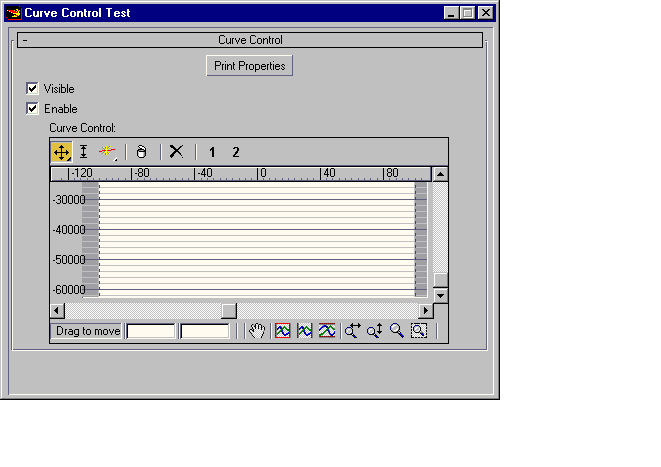
Curve Control
You can create CurveControls in scripted rollouts by using the following syntax:
CurveControl <name> [<caption>] \
[visible:<boolean>] [numCurves:<integer>] \
[x_range:<point2> ] [y_range:<point2>] \
[x_value:<float> ] \
[zoomValues:<point2>] [scrollValues:<point2>] \
[displayModes:<bitarray>] \
[commandMode:<#move_xy | #move_x | #move_y | #scale | #corner | #bezier] \
[uiFlags:<array_of_ui_flags> ] \
[rcmFlags:<array_of_rcm_flags>] [asPopup:<boolean>]uiFlags:Any combination of the following flags:
#drawBG - Specifies to draw the white background in the graph window.
#drawgrid - Specifies to draw the grid lines and coordinates in the graph window.
#upperToolbar - Specifies to draw the upper toolbar above the control.
#showReset - Specifies to display the Reset button in the upper toolbar.
#lowerToolbar - Specifies to draw the lower toolbar beneath the control.
#scrollBars - Specifies to draw the horizontal and vertical scroll bars for the control.
#autoScroll - Specifies to do auto scrolling. Auto scroll happens when you drag a CurvePoint out of the currently visible range. In case you're zoomed in, the window will automatically scroll.
#ruler - Specifies to draw a small moveable ruler window (measures horizontal coordinates).
#constrainY - Specifies that no points (or handles) can be moved out of the value that is set bySetYRange().
#hideDisabled - Specifies that disabled curves won't be displayed at all.
#all - All the listed uiFlags are on except #singleSelect, #noFilterButtons, and #xvalue
#xvalue - Specifies to draw a vertical bar over the graph to show the current X value
#singleSelect - this flag allows the user to single select a point. Normally if a bunch of points are stacked in area if you click on the area you get all of them. With this flag you get the first one
#noFilterButtons - this flag turns off the curve visible/editable toggle in the top of the menu barrcmFlags:Any combination of the following flags:
#move_xy,
#move_x,
#move_y,
#scale,
#corner,
#bezier,
#delete,
#all
Properties
<curvecontrol>.visible : BooleanWhen set to false, the CurveControl is invisible. When set to true, it is visible.
<curvecontrol>.x_range : Point2Specifying x_range sets the absolute position of the first and last CurvePoints. That is, the X value for the first and last CurvePoints is always specified by x_range.
<curvecontrol>.y_range : Point2Sets the absolute upper and lower Y-constraint. This method only has an effect if the uiFlags option #constrainY is specified.
<curvecontrol>.x_value : FloatThis property is used to show a vertical line in the graph window if the uiFlags option #xvalue is specified.
<curvecontrol>.displayModes : BitArrayThe Bits in the BitArray control which of the available Curves are displayed. When the BitArray is empty {}, no curves are shown, when bit 1 is set {1}, the first curve is displayed, when bit 2 is set {2}, the second curve is displayed and so on. When two or more bits are set, multiple curves are displayed at the same time, for example {1..2} shows the first two curves, {1,3} shows curves 1 and 3, and so on.
<curvecontrol>.commandMode : NameGet/Set the current command mode. Possible values are: #move_xy, #move_x, #move_y, #scale, #corner, #bezier .
<curvecontrol>.zoomValues : Point2Get/Set the horizontal and vertical zoom values. The higher the value, the closer the zoom (the lower the displayed values relative to the x and y ranges).
<curvecontrol>.scrollValues : Point2Get/Set the horizontal and vertical scroll values.
<curvecontrol>.curves : Array, read-onlyReturns an array of curves of type MAXCurve
Methods
zoom <curvecontrol> #allPerform a zoom extents all.
Events
In the following events <ci> represents the active Curve Index.
on <curvecontrol> selChanged <ci> <val> do <expr>Sent when a point is selected or deselected. <val> is the number of points, which are selected.
on <curvecontrol> ptChanged <ci> <val> do <expr>Sent when a point is changed, <val> is the index of the changed point
on <curvecontrol> tangentChanged <ci> <val> type do <expr>Sent when a point's in or out tangent is changed, <val> is the index of the changed point.
type is #inTangent or #outTangent, depending on what changed.
on <curvecontrol> deleted <ci> <val> do <expr>Sent when a point is deleted, val is the index of the deleted point.
on <curvecontrol> reset <ci> do <expr>Sent when a curve is reset
on <curvecontrol> rightClick do <expr>Called when the user right-clicks the Curvecontrol control.
If not defined, the curve control provides its own internal right-click handler.
Available in 3ds Max 2010 and higher.
ccCurve
ccCurve represents a single curve in a curve control
Properties
<ccCurve>.animatable : BooleanWhen set to true, the curve points can be keyframed.
<ccCurve>.color : ColorGet/Set the color of the curve when it is enabled.
<ccCurve>.disabledColor : ColorGet/Set the color of the curve when it is disabled.
<ccCurve>.width : IntegerGet/Set the width of the curve when it is enabled.
<ccCurve>.disabledWidth : IntegerGet/Set the width of the curve when it is disabled.
<ccCurve>.disabledStyle : Name<ccCurve>.style : NameThese are the drawing styles for the curve when disabled and enabled. Possible values are:
#solid, #dash, #dot, #dashDot, #dashDotDot, #null, #insideFrame<ccCurve>.lookupTableSize : IntegerThis method sets the size of the Curve Control lookup table. The lookup table allows users of the Curve Control to easily speed up their value access. The default value for the lookup table size is 1000. Used when getValue() is called on the curve.
<ccCurve>.numPoints : IntegerGet/Set the number of points in the curve.
<ccCurve>.points : Array, read-onlyReturns a CurvePointsArray
Methods
getValue ccCurve <time_value> <float_x> [lookup:<false>]Returns a Point2 value corresponding to the specified X position along the curve at the specified time.
isAnimated ccCurve <index>Returns a true if the curve's indexed point is animated (has keys), false otherwise.
getSelectedPts ccCurveReturns a BitArray with bits set for selected points.
setSelectedPts <ccCurve> <bitarray> [#select] [#deSelect] [#clear]Selects the points specified by the bits in the bitArray.
setPoint <ccCurve> <index> <ccpoint> [checkConstraints:<true>]Sets the indexed point on the curve to the specified value. If checkConstraints is set to true, the point will be constrained.
getPoint <ccCurve> <index>Returns the Point2 value of the indexed point on the curve.
insertPoint <ccCurve> <index> <ccpoint>Inserts a new point at the indexed position with the specified value.
deletePoint <ccCurve> <index>Deletes the indexed point from the curve.
CurvePointsArray represents an array of curve points.
CurvePointValue represents a curve point.
CurvePointValue
CurvePointValue represents a curve point. You can create a curve point as follows:
ccPoint <pt_point2> <in_point> <out_point2> \ [bezier:<false>] [corner:<false>] [lock_x:<false>] \ [lock_y:<false>] \ [select:<false>] [end:<false>] \ [noXConstraint:<false>]Properties
<ccpoint>.value : Point2Returns the Point2 value of the point.
<ccpoint>.inTangent : Point2Returns the Point2 value of the point's inTangent.
<ccpoint>.outTangent : Point2Returns the Point2 value of the point's outTangent.
<ccpoint>.bezier : BooleanWhen set to true, the point behaves as a Bezier point.
<ccpoint>.corner : BooleanWhen set to true, the point behaves as a Corner point. If the .bezier property is set to true, the point becomes a Bezier-Corner.
<ccpoint>.lock_x : BooleanWhen set to true, the point is locked along X.
<ccpoint>.lock_y : BooleanWhen set to true, the point is locked along Y.
<ccpoint>.selected : BooleanWhen set to true, the point is selected.
<ccpoint>.end : BooleanWhen true, no point is an end point.
<ccpoint>.noXConstraint : BooleanWhen set to false, the X coordinate is constrained. When set to true, no X constraints are imposed on the point.
EXAMPLE
   rollout uTestCurveControl "Curve Control"
   (
       -- Curve control Properties
       local ccProps = #(
           #visible,
           #numCurves,
           #x_range,
           #y_range,
           #displayModes,
           #zoomValues,
           #scrollValues,
           #commandMode)
       -- Curve properties
       local curveProps = #(
           #name,
           #animatable,
           #color,
           #disabledColor,
           #width,
           #disabledWidth,
           #style,
           #disabledStyle,
           #numPoints,
           #lookupTableSize)
       -- Curve Point properties
       local cpProps = #(
           #value,
           #inTangent,
           #outTangent,
           #bezier,
           #corner,
           #lock_x,
           #lock_y,
           #selected,
           #end,
           #noXConstraint)
       button btn_props "Print Properties"
       checkBox chk_visible "Visible" checked:true
       checkBox chk_enable "Enable" checked:true
       CurveControl cc_test "Curve Control:"
           height:200
           width:400
           align:#center
           numCurves:2
           visible:true
           x_range:[-100,100]
           y_range:[-100,100]
           scrollValues:[-100,100]
           commandMode:#move_xy
           -- The following parameters default to all flags if not specified
           --uiFlags:#(#drawBG, #drawgrid, #upperToolbar, #showReset, #scrollBars, #constrainY, #xvalue)
           rcmFlags:#(#delete)
           asPopup:false
       on chk_visible changed state do cc_test.visible = state
       on chk_enable changed state do cc_test.enabled = state
       on uTestCurveControl open do
       (
           zoom cc_test #all
           local colors = #(red, green, blue)
           local styles = #(#solid, #dash, #dot, #dashDot, #dashDotDot, #null, #insideFrame)
           local num = cc_test.numCurves
           -- Initialize curve properties
           for i=2 to num do
           (
               local crv = cc_test.curves[i]
               local ci = ((mod (i-1) colors.count)+1) as integer
               local si = ((mod (i-1) styles.count)+1) as integer
               crv.name = "Curve" + i as string
               crv.color = colors[ci]
               crv.disabledColor = colors[ci]*0.5
               crv.style = styles[si]
               --crv.width = crv.disabledWidth = i
               crv.numPoints = i*2
               local del = (cc_test.x_range.y - cc_test.x_range.x)/(crv.numPoints-1)
               -- format "del:%\n" del
               -- Place intermediate points equally spaced
               for j=1 to crv.numPoints do
               (
                   local cp = crv.points[j]
                   format "% end: % -> " j cp.end
                   --cp.corner = true
                   cp.value = [cc_test.x_range.x+(j-1)*del, cp.value.y]
                   cp.inTangent = [0.2,0.2]
                   cp.outTangent = [0.2,-0.2]
                   crv.points[j] = cp
                   format "%\n" crv.points[j].end
                   format "value: %\n"crv.points[j].value
               )
           )
       )
       on btn_props pressed do
       (
           local tab ="\t"
           -- print the CC properties
           format "Curve Control Properties\n"
           for p in ccProps do
               format (tab +"% : %\n") (p as string) (getProperty cc_test p)
           format (tab + "Curves:\n")
           tab += "\t"
           for i=1 to cc_test.numCurves do
           (
               local crv = cc_test.curves[i]
               -- print each Curve's properties
               format (tab + "Curve%\n") i
               for p in curveProps do
                   format (tab + "\t% : %\n") (p as string) (getProperty crv p)
               format (tab + "\tPoints:\n")
               for j=1 to crv.numPoints do
               (
                   local cp = crv.points[j]
                   format (tab + "\t\tPoint%\n") j
                   -- Print each curve point properties
                   for pp in cpProps do
                   format (tab + "\t\t\t% : %\n") (pp as string) (getProperty cp pp)
               )
           )
       )
       -- Curve control event handlers
       on cc_test selChanged ci val do format "curve % numSelected : %\n" ci val
       on cc_test ptChanged ci val do format "curve % ptChanged : %\n" ci val
       on cc_test tangentChanged ci val type do format "curve % tangentChanged : % %\n"ci val (type as string)
       on cc_test deleted ci pi do format "curve % deleted : %\n" ci pi
       on cc_test reset ci do format "curve % resetted\n" ci
   )
   curveFloater = newRolloutFloater "Curve Control Test" 500 400
   addRollout uTestCurveControl curveFloater