The Paint tab provides tools for interactively painting skin weights on the active layer.
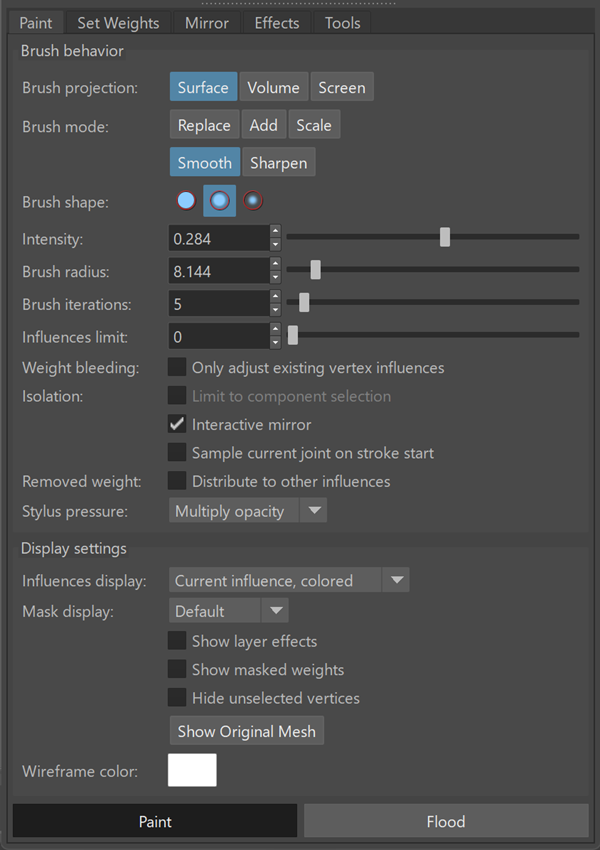
Painting operates on the selected influence and uses brush settings to control how weights are applied.
Brush behavior
| Brush projection | Determines how brush strokes are projected onto the mesh and which vertices are affected.
|
| Brush mode | Defines how the brush modifies existing skin weights.
|
| Brush shape | Controls the falloff shape of the brush. |
| Intensity | Controls the strength of the brush effect. |
| Brush radius | Controls the size of the brush. |
| Brush iterations | Specifies how many times the brush operation is applied per stroke. |
| Influences limit | Limits the maximum number of influences per vertex during painting. |
| Weight bleeding | Limits painting to existing vertex influences. |
| Isolation | Restricts painting to the current component selection. |
| Interactive mirror: Mirrors brush strokes across the symmetry axis. | |
| Sample current joint on stroke start: Updates the active influence when beginning a stroke. | |
| Removed weight | Distribute to other influences: Redistributes removed weight to the remaining influences on each vertex to maintain normalization. |
| Stylus pressure | Specifies how stylus input affects brush behavior during painting.
Unused: Disables stylus pressure. Brush behavior remains constant. Multiply intensity: Multiplies brush intensity based on stylus pressure. Multiply opacity: Multiplies the brush opacity on weights based on stylus pressure. Multiply radius: Adjusts the brush radius based on stylus pressure. |
Display settings
Controls how skin weights and layer data are displayed in the viewport while painting.
| Influences display | Specifies how the active influence is displayed in the viewport.
All influences, multiple colors: Displays all influences using distinct colors. Current influence, grayscale: Displays the active influence using a grayscale gradient. Current influence, colored: Displays the active influence using color. |
| Mask display | Specifies how layer masks are displayed.
Default: Displays the mask using the default visualization. Color ramp: Displays the mask using a color gradient. |
| Show layer effects | Displays the result of active layer effects. |
| Show masked weights | Displays masked weight values in the viewport. |
| Hide unselected vertices | Hides vertices that are not part of the current selection. |
| Show Original Mesh | Toggle between displaying the original mesh and the painted mesh showing weight values. |
| Wireframe color | Specifies the wireframe color used in the viewport display. |