The Effects tab controls layer properties and output-level behavior.
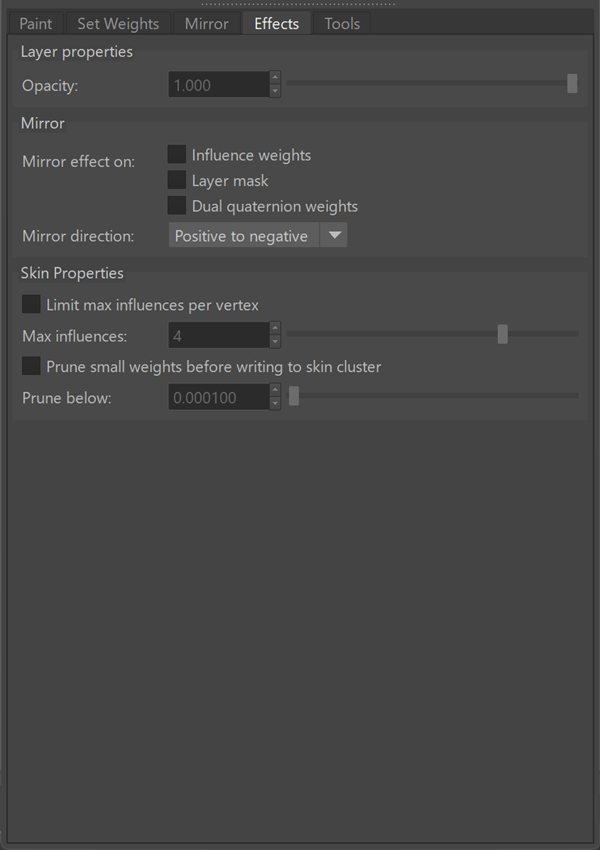
Layer properties
| Opacity | Controls the contribution of the selected layer to the final result. |
Note: Layer effects are applied when skin layers are evaluated and written to the skinCluster.
Effects are not stored in individual layers and are only reflected in the final combined weights.
Mirror
Applies mirroring as a layer effect.
| Mirror effect on |
|
| Mirror direction |
Specifies how the mirror effect is applied across the symmetry axis.
Positive to negative: Applies the mirror effect from the positive side of the axis to the negative side. Negative to positive: Applies the mirror effect from the negative side of the axis to the positive side. Flip: Swaps values between both sides of the axis. |
Skin Properties
Controls how layer data is evaluated when applied to the skinCluster.
| Limit max influences per vertex | Enforces a maximum number of influences. |
| Max influences | Specifies the maximum number of influences per vertex. |
| Prune small weights before writing to skin cluster | Removes small weights when computing the final weights applied to the skinCluster. |
| Prune below | Specifies the pruning threshold. |