Compression surfaces
In compression type molding process simulations, surfaces in your model can be assigned the compression surface property type. The software uses this to identify where compression will occur. Areas of the cavity which do not have compression should be modeled using regular part elements.
Midplane models
For Midplane analyses, select the elements of the model where press movement occurs and assign the property type compression surface. The nodes associated with these elements are then considered to change thickness as the press plate moves.
3D models
For 3D analyses, select the surface elements in areas of the cavity where press movement occurs and assign them the property type Compression element (3D). Unless you manually intervene, the software will then automatically assign the fixed and moving side based on your analysis setup.
Automatic assignment of element properties
Usually the automatic assignment will provide an accurate simulation of the molding process. The compression direction can be set either in the +Z or the -Z direction; the default direction is -Z.
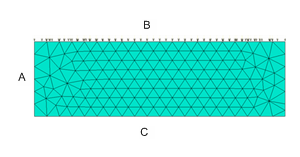
Automatic assignment of model surfaces
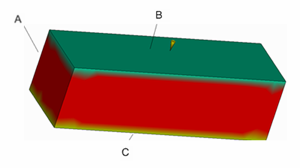
Compression surface property result
Where A = side surface, B = compression surface, and C = fixed surface
Manual assignment of surface properties
Sometimes, particularly with complex geometries, poor mesh quality, or special, proprietary processes, the assignment will need to be refined. In these cases the three compression surface types, shown in the preceding figures, can be assigned manually.
There are four (4) compression surface property options:
Automatic
The determination is performed by the code. This is the default setting.
Compression (moving) surface
The compression (moving) surface is considered to be the press side of the cavity and will follow the press movement exactly.
Fixed surface
The fixed surface is considered to be the fixed side of the cavity. No movement occurs during compression.
Side surface
The side surface is illustrated by A in the preceding figure. There is no movement of nodes with this compression surface property in the direction normal to the compression direction, but there can be movement in the compression direction.