Saved Viewpoints Window
The Saved Viewpoints window is a dockable window that enables you to jump to preset viewpoints without having to navigate each time to reach an item.
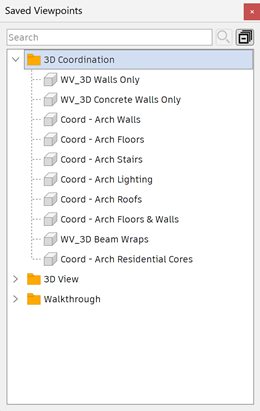
Viewpoint animations are also saved with the viewpoints, as they are simply a list of viewpoints treated as keyframes. In fact, viewpoint animations can be made by dragging preset viewpoints onto an empty viewpoint animation. You can organize your viewpoints and viewpoint animations using folders.
Icons are used in the Saved Viewpoints window to represent different elements:
 - represents a folder which may contain all other elements (including other folders).
 - represents a viewpoint saved in orthographic mode.
 - represents a viewpoint saved in perspective mode.
 - represents a viewpoint animation clip.
 - represents a cut inserted into a viewpoint animation clip.
You can select more than one viewpoint by using Ctrl or Shift+Click.
Toggle the Saved Viewpoints Window
- Click Viewpoint tab > Save, Load & Playback panel > Saved Viewpoints tool launcher
 .
.
Search for a Saved Viewpoint
- Use the seacrh field to search for saved viewpoints by name.