Change a Transform in a 3D Model or 2D Sheet
Tip: You can adjust units and transforms for multiple 3D files or 2D sheets at a time.
Change a transform in a 3D model
Right-click the desired 3D model in the Selection Tree.
Click Units and Transform on the context menu to open the Units and Transforms dialog box.
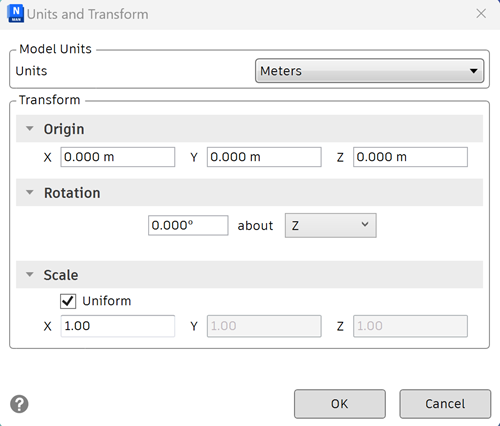
Use the Model Units area to select the units that the transform values are shown in.
Use the Origin area to change the model’s location:
- Enter values for the X, Y and Z axis.
Use the Rotation area to change the model’s rotation:
- Enter an angle of rotation.
- Select the axis to rotate about (by typing a value greater than 0). This will rotate the model about its origin point.
Use the Scale area to change the model’s scale:
- Enter values for the X, Y and Z axis.
- To proportionally scale an object, ensure the X, Y, and Z values are equal.
- Enter a negative value to flip the model inside out.
Click OK.
Change a Transform in a 2D Sheet
Right-click the desired 2D sheet in the Scene View.
Click Units and Transform on the context menu to open the Units and Transforms dialog box.
Use the Origin section to change the sheet’s location:
- Enter values for the X and Y axis.
Use the Rotation area to change the sheet’s rotation:
- Enter an angle of rotation to rotate the sheet about its origin point.
Use the Scale area to change the sheet’s scale:
- Enter values for the X and Y axis.
- To proportionally scale a sheet, ensure the X and Y values are equal.
Click OK.