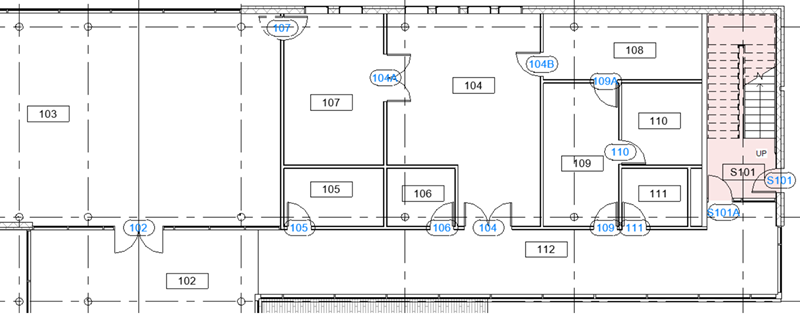
Create a template to number doors based on the room they open into.
The door number is equal to the room number, unless there is more than one door per room, otherwise it's 101A, 101B, etc. The example also shows how to exclude some doors from numbering, by specifying a filter criterion (Comments = Exclude).
Steps:
- Open numbering options and create a new template called Doors by Room.
-
Filter - click Filters to open the Filters dialog.
- Create a filter that selects the Doors category.
- Optionally, in filter rules, select the Comments parameter and set the rule "does not equal" and value "Exclude". In the project, adding Exclude to a door will remove it from the scope of numbering.
Note: You can use a similar approach to filter out nested shared families in a Door family, so that those parts are not numbered.
- Numbering parameter - select Mark.
-
Partitioning - click Edit next to Partitioning to open the Partitioning dialog.
- Check the box next to Partition by parameter value.
- In the Select parameters from drop-down, select To Room.
- In the list of parameters, select To Room: Number and add it to the list on the right. This will define partitions or number sequences based on the room number each door opens into.
- Element matching - OFF.
-
Number formatting - click Edit next Number formatting to open the Number formatting dialog.
- In the First number in sequence drop-down, select Skip.
- In the Show <Number> value as drop-down, select Uppercase letters.
- In the Select parameters from drop-down, select To Room.
- Add parameter To Room: Number.
- Optionally, add a common value to the Sample Value field, e.g., 101.
- Click Apply in the Numbering Options dialog to apply the template.
- Optionally, review the identified partitions by going to the Number Sequences dialog.
Note: The "To Room" / "From Room" properties are based on the room calculation point for doors. If you want the room to update when you flip the door inside the project, you can edit the door family and toggle on the visibility of the room calculation point.