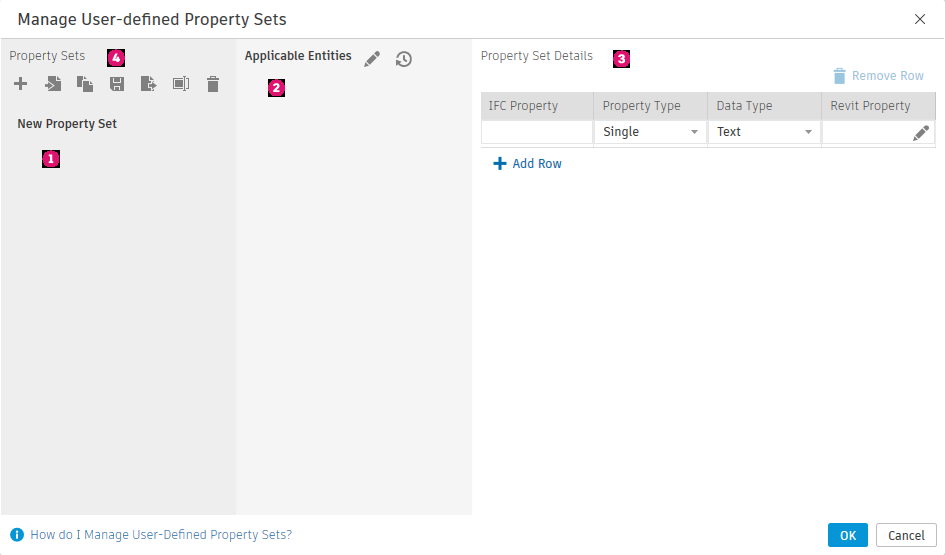
Create and manage property sets for use when exporting Revit models to IFC.
Export User Defined Property Sets
Select the property set for use when exporting to IFC. Use the default templates, or duplicate, edit, and save custom templates. IFC parameter mapping files (.txt) can be imported and exported from the dialog.
 (Create new property set) - Create a new property set for IFC export parameter mapping.
-
 (Import property set) - Import property set file (.txt) for use when exporting a model.
 (Duplicate property set) - Create a duplicate of the selected property set.
-
 (Save changes) - Save changes made to the selected property set.
-
 (Export property set) - Export the selected property set to an external .txt file.
 (Rename property set) - Rename the selected property set.
 (Delete property set) - Delete the selected property set.
Property Set Settings
Make changes to the property sets when exporting an IFC file.
 - Switch between available property sets.
 - Control which property sets are exported with the IFC file.
 - Select
Revit IFC properties and map them to Revit properties.
- Select
Revit IFC properties and map them to Revit properties.
 - Create, Import, Save, and Export property sets.