Choose how to align the bars in path free form rebar distributions and also make the bars in the set be parallel to the planar face selected in the Align or Align/Close bar handles for Path Shape Distribution and for the Aligned Distribution, respectively.
To set the alignment options for path free form rebar sets, use the Bar Alignment parameter in the Properties palette of the structural rebar.
| Aligned to Path | Parallel to Face |
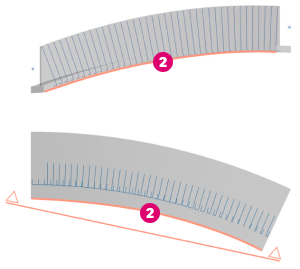
|
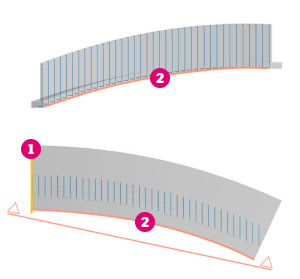
|
| Perpendicular to Face | Vertical |
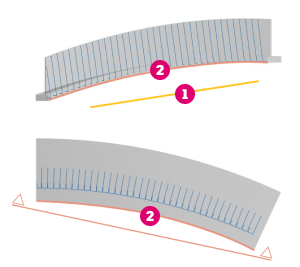
|
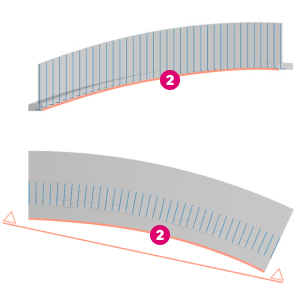
|
 Alignment Face.
 Path.
Path.
Toggle Bar Alignment Options In Canvas
You can also easily switch between the different bar alignment options, using the in-canvas toggle:
 (Aligned to Path)
 (Vertical)
 (Parallel to Face)
 (Perpendicular to Face)
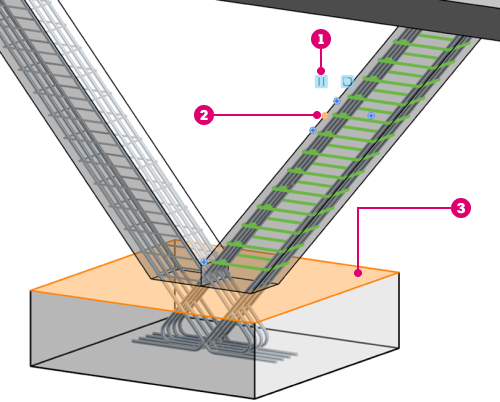
Bar Alignment options toggle.
Align/Close bar handle.
 The face selected for the the Align or Align/Close bar handle; the bars will either be parallel or perpendicular to this face.