Vulkan Improvements
In VRED 2027.1, Vulkan shows ray-traced ambient occlusion and environment shadows in ray-traced reflections. The Vulkan renderer also adds Raytraced Diffuse Global Illumination (GI), bringing multi-bounce indirect lighting to the real-time pipeline for more physically accurate lighting and improved scene fidelity.
Support for Ray-traced Ambient Occlusion & Ray-traced Environment Shadows in Ray-traced Reflections
In Vulkan, ray-traced ambient occlusion and ray-traced environment shadows now appear in ray-traced reflections as well. This can make scenes look more realistic, but scene appearance may differ from previous VRED versions. Note that you cannot control the reflection depth of these shadows.
 For more information, see Realtime Light and Shadows.
Raytraced Diffuse Global Illumination
In VRED 2027.1, we added Raytraced Diffuse GI to the Vulkan renderer, bringing dynamic multi-bounce indirect illumination to the real-time pipeline. This produces more realistic, physically accurate lighting and improves overall scene fidelity for automotive interiors, architectural visualizations, product design, and other workflows.
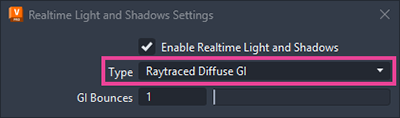
The new setting can be found under Visualization > Rasterization Settings > Realtime Light and Shadows (previously called Realtime Environment Shadows). Raytraced Diffuse GI requires Raytraced Reflections, which are automatically enabled when Raytraced Diffuse GI is turned on.
For more information, see Realtime Light and Shadows.