Point オブジェクトは、たとえばオブジェクトのスナップ先またはオブジェクトのオフセットの基準となるノードや参照点として便利なオブジェクトです。点のスタイルと、スクリーンに対する相対サイズまたは絶対値を設定できます。
Database オブジェクトの Pdmode および Pdsize プロパティによって Point オブジェクトの外観をコントロールします。Pdmode の値 0、2、3、および 4 は、点を通過して描画する図形を指定します。値 1 を指定すると、何も表示されません。

上述の値に 32、64、または 96 を指定すると、点を通過する図形の他に、その点の回りに描かれる形状も選択されます。
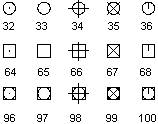
Pdsize は、Pdmode が 0 と 1 の場合を除き、点の形状のサイズをコントロールします。0 を設定すると、グラフィックス領域の高さの 5% の位置に点が生成されます。Pdsize に正の値を設定すると、点の形状の絶対サイズが指定されます。負数の値は、ビューポート サイズのパーセンテージと解釈されます。すべての点のサイズは、図面が再作図されると計算し直されます。
Pdmode および Pdsize の変更後、次に図面を再作図すると、既存の点の外観が変わります。
点オブジェクトを作成してから外観を変更する
次のサンプル コードは、モデル空間の座標(5, 5, 0)に Point オブジェクトを作成します。次に、Pdmode および Pdsize プロパティが更新されます。
C# の例
using Autodesk.AutoCAD.Runtime;
using Autodesk.AutoCAD.ApplicationServices;
using Autodesk.AutoCAD.DatabaseServices;
using Autodesk.AutoCAD.Geometry;

[CommandMethod("AddPointAndSetPointStyle")]
public static void AddPointAndSetPointStyle()
{
    // Get the current document and database
    Document acDoc = Application.DocumentManager.MdiActiveDocument;
    Database acCurDb = acDoc.Database;

    // Start a transaction
    using (Transaction acTrans = acCurDb.TransactionManager.StartTransaction())
    {
        // Open the Block table for read
        BlockTable acBlkTbl;
        acBlkTbl = acTrans.GetObject(acCurDb.BlockTableId,
                                     OpenMode.ForRead) as BlockTable;

        // Open the Block table record Model space for write
        BlockTableRecord acBlkTblRec;
        acBlkTblRec = acTrans.GetObject(acBlkTbl[BlockTableRecord.ModelSpace],
                                        OpenMode.ForWrite) as BlockTableRecord;

        // Create a point at (4, 3, 0) in Model space
        using (DBPoint acPoint = new DBPoint(new Point3d(4, 3, 0)))
        {
            // Add the new object to the block table record and the transaction
            acBlkTblRec.AppendEntity(acPoint);
            acTrans.AddNewlyCreatedDBObject(acPoint, true);
        }

        // Set the style for all point objects in the drawing
        acCurDb.Pdmode = 34;
        acCurDb.Pdsize = 1;

        // Save the new object to the database
        acTrans.Commit();
    }
}