アクティブなビューポートは、Viewports テーブルでは「*Active」という名前のレコードで表されますが、この名前は一意ではありません。[モデル]タブに現在表示されているすべてのタイル ビューポートは「*Active」という名前であるからです。表示される各タイル ビューポートには番号が割り当てられます。アクティブなビューポートの番号は次の方法で取得できます。
- システム変数 CVPORT の値を取得する
- Editor オブジェクトの ActiveViewportId プロパティを使用して、アクティブなビューポートのオブジェクト ID を取得し、Viewport オブジェクトを開いてその Number プロパティにアクセスします。
アクティブなビューポートがわかれば、その表示プロパティをコントロールし、グリッドやスナップなどのビューポートの作図補助機能を有効にすると共に、ビューポート自体のサイズをコントロールします。タイル ビューポートは、左下と右上の 2 つのコーナー点によって定義されます。LowerLeftCorner プロパティと UpperRightCorner プロパティは、画面上でビューポートのグラフィックスの位置を示します。
単一のタイル ビューポートの設定では、左下コーナーが(0,0)、右上コーナーが(1,1)になります。[モデル]タブのタイル ビューポートの数にかかわらず、作図ウィンドウの左下コーナーは常に(0,0)で表され、右上コーナーは(1,1)で表されます。複数のタイル ビューポートが表示されている場合、左下コーナーと右上コーナーはそれぞれ異なりますが、1 つのビューポートは左下コーナーが(0,0)になり、また別のビューポートは右上コーナーが(1,1)になります。
これらのプロパティを、次のように定義します(例として 4 分割を示します)。
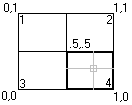
この例では
- ビューポート 1-LowerLeftCorner = (0, .5), UpperRightCorner = (.5, 1)
- ビューポート 2-LowerLeftCorner = (.5, .5), UpperRightCorner = (1, 1)
- ビューポート 3-LowerLeftCorner = (0, 0), UpperRightCorner = (.5, .5)
- ビューポート 4-LowerLeftCorner = (.5, 0), UpperRightCorner = (1, .5)
2 つの水平なウィンドウを使用して新しいタイル ビューポートの設定を作成する
次の例では、名前の付いたビューポート設定として、2 つの水平なビューポートを作成し、アクティブな表示を再定義します。
C# の例
using Autodesk.AutoCAD.ApplicationServices;
using Autodesk.AutoCAD.DatabaseServices;
using Autodesk.AutoCAD.Runtime;
using Autodesk.AutoCAD.Geometry;

[CommandMethod("CreateModelViewport")]
public static void CreateModelViewport()
{
    // Get the current database
    Document acDoc = Application.DocumentManager.MdiActiveDocument;
    Database acCurDb = acDoc.Database;

    // Start a transaction
    using (Transaction acTrans = acCurDb.TransactionManager.StartTransaction())
    {
        // Open the Viewport table for read
        ViewportTable acVportTbl;
        acVportTbl = acTrans.GetObject(acCurDb.ViewportTableId,
                                        OpenMode.ForRead) as ViewportTable;

        // Check to see if the named view 'TEST_VIEWPORT' exists
        if (acVportTbl.Has("TEST_VIEWPORT") == false)
        {
            // Open the View table for write
            acTrans.GetObject(acCurDb.ViewportTableId, OpenMode.ForWrite);

            // Add the new viewport to the Viewport table and the transaction
            using (ViewportTableRecord acVportTblRecLwr = new ViewportTableRecord())
            {
                acVportTbl.Add(acVportTblRecLwr);
                acTrans.AddNewlyCreatedDBObject(acVportTblRecLwr, true);

                // Name the new viewport 'TEST_VIEWPORT' and assign it to be
                // the lower half of the drawing window
                acVportTblRecLwr.Name = "TEST_VIEWPORT";
                acVportTblRecLwr.LowerLeftCorner = new Point2d(0, 0);
                acVportTblRecLwr.UpperRightCorner = new Point2d(1, 0.5);

                // Add the new viewport to the Viewport table and the transaction
                using (ViewportTableRecord acVportTblRecUpr = new ViewportTableRecord())
                {
                    acVportTbl.Add(acVportTblRecUpr);
                    acTrans.AddNewlyCreatedDBObject(acVportTblRecUpr, true);

                    // Name the new viewport 'TEST_VIEWPORT' and assign it to be
                    // the upper half of the drawing window
                    acVportTblRecUpr.Name = "TEST_VIEWPORT";
                    acVportTblRecUpr.LowerLeftCorner = new Point2d(0, 0.5);
                    acVportTblRecUpr.UpperRightCorner = new Point2d(1, 1);

                    // To assign the new viewports as the active viewports, the
                    // viewports named '*Active' need to be removed and recreated
                    // based on 'TEST_VIEWPORT'.

                    // Step through each object in the symbol table
                    foreach (ObjectId acObjId in acVportTbl)
                    {
                        // Open the object for read
                        ViewportTableRecord acVportTblRec;
                        acVportTblRec = acTrans.GetObject(acObjId,
                                                          OpenMode.ForRead) as ViewportTableRecord;

                        // See if it is one of the active viewports, and if so erase it
                        if (acVportTblRec.Name == "*Active")
                        {
                            acTrans.GetObject(acObjId, OpenMode.ForWrite);
                            acVportTblRec.Erase();
                        }
                    }

                    // Clone the new viewports as the active viewports
                    foreach (ObjectId acObjId in acVportTbl)
                    {
                        // Open the object for read
                        ViewportTableRecord acVportTblRec;
                        acVportTblRec = acTrans.GetObject(acObjId,
                                                          OpenMode.ForRead) as ViewportTableRecord;

                        // See if it is one of the active viewports, and if so erase it
                        if (acVportTblRec.Name == "TEST_VIEWPORT")
                        {
                            ViewportTableRecord acVportTblRecClone;
                            acVportTblRecClone = acVportTblRec.Clone() as ViewportTableRecord;

                            // Add the new viewport to the Viewport table and the transaction
                            acVportTbl.Add(acVportTblRecClone);
                            acVportTblRecClone.Name = "*Active";
                            acTrans.AddNewlyCreatedDBObject(acVportTblRecClone, true);
                        }
                    }

                    // Update the display with the new tiled viewports arrangement
                    acDoc.Editor.UpdateTiledViewportsFromDatabase();
                }
            }

            // Commit the changes
            acTrans.Commit();
        }

        // Dispose of the transaction
    }
}