ソリッドの作成後は、ソリッドを組み合わせる、または削除することで、より複雑な形状を作成することができます。ソリッドは、接合、くりぬき、共通部分の抽出を行うことができます。これらの組み合わせを行うには、BooleanOperation メソッドを使用します。CheckInterference メソッドを使用すると、2 つのソリッドが互いに重なっているかどうかを判断できます。
ソリッドは、ソリッドの 2D 断面を取得するかソリッドを 2 つに切断することによってさらに修正されます。ソリッドの断面を取得するには、GetSection メソッドを使用します。ソリッドを 2 つに分割するには、Slice メソッドを使用します。
ソリッド間の干渉を検出する
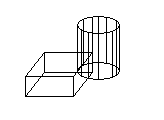
次の例では、ボックスと円柱を作成します。次にこの 2 つのソリッド間の干渉を検出し、その干渉から新しいソリッドを作成します。見やすいように、直方体は白、円柱はシアン、干渉ソリッドは赤にそれぞれ色付けします。
C# の例
using Autodesk.AutoCAD.Runtime;
using Autodesk.AutoCAD.ApplicationServices;
using Autodesk.AutoCAD.DatabaseServices;
using Autodesk.AutoCAD.Geometry;

[CommandMethod("FindInterferenceBetweenSolids")]
public static void FindInterferenceBetweenSolids()
{
    // Get the current document and database, and start a transaction
    Document acDoc = Application.DocumentManager.MdiActiveDocument;
    Database acCurDb = acDoc.Database;

    using (Transaction acTrans = acCurDb.TransactionManager.StartTransaction())
    {
        // Open the Block table record for read
        BlockTable acBlkTbl;
        acBlkTbl = acTrans.GetObject(acCurDb.BlockTableId,
                                     OpenMode.ForRead) as BlockTable;

        // Open the Block table record Model space for write
        BlockTableRecord acBlkTblRec;
        acBlkTblRec = acTrans.GetObject(acBlkTbl[BlockTableRecord.ModelSpace],
                                        OpenMode.ForWrite) as BlockTableRecord;

        // Create a 3D solid box
        using (Solid3d acSol3DBox = new Solid3d())
        {
            acSol3DBox.CreateBox(5, 7, 10);
            acSol3DBox.ColorIndex = 7;

            // Position the center of the 3D solid at (5,5,0)
            acSol3DBox.TransformBy(Matrix3d.Displacement(new Point3d(5, 5, 0) -
                                                         Point3d.Origin));

            // Add the new object to the block table record and the transaction
            acBlkTblRec.AppendEntity(acSol3DBox);
            acTrans.AddNewlyCreatedDBObject(acSol3DBox, true);

            // Create a 3D solid cylinder
            // 3D solids are created at (0,0,0) so there is no need to move it
            using (Solid3d acSol3DCyl = new Solid3d())
            {
                acSol3DCyl.CreateFrustum(20, 5, 5, 5);
                acSol3DCyl.ColorIndex = 4;

                // Add the new object to the block table record and the transaction
                acBlkTblRec.AppendEntity(acSol3DCyl);
                acTrans.AddNewlyCreatedDBObject(acSol3DCyl, true);

                // Create a 3D solid from the interference of the box and cylinder
                Solid3d acSol3DCopy = acSol3DCyl.Clone() as Solid3d;

                // Check to see if the 3D solids overlap
                if (acSol3DCopy.CheckInterference(acSol3DBox) == true)
                {
                    acSol3DCopy.BooleanOperation(BooleanOperationType.BoolIntersect,
                                                 acSol3DBox.Clone() as Solid3d);

                    acSol3DCopy.ColorIndex = 1;
                }

                // Add the new object to the block table record and the transaction
                acBlkTblRec.AppendEntity(acSol3DCopy);
                acTrans.AddNewlyCreatedDBObject(acSol3DCopy, true);
            }
        }

        // Save the new objects to the database
        acTrans.Commit();
    }
}
ソリッドを 2 つのソリッドに分割する
次の例では、直方体をモデル空間に作成します。次に 3 つの点で定義した平面に基づいて直方体を切断します。断片は 3DSolid として返されます。
C# の例
using Autodesk.AutoCAD.Runtime;
using Autodesk.AutoCAD.ApplicationServices;
using Autodesk.AutoCAD.DatabaseServices;
using Autodesk.AutoCAD.Geometry;

[CommandMethod("SliceABox")]
public static void SliceABox()
{
    // Get the current document and database, and start a transaction
    Document acDoc = Application.DocumentManager.MdiActiveDocument;
    Database acCurDb = acDoc.Database;

    using (Transaction acTrans = acCurDb.TransactionManager.StartTransaction())
    {
        // Open the Block table record for read
        BlockTable acBlkTbl;
        acBlkTbl = acTrans.GetObject(acCurDb.BlockTableId,
                                     OpenMode.ForRead) as BlockTable;

        // Open the Block table record Model space for write
        BlockTableRecord acBlkTblRec;
        acBlkTblRec = acTrans.GetObject(acBlkTbl[BlockTableRecord.ModelSpace],
                                        OpenMode.ForWrite) as BlockTableRecord;

        // Create a 3D solid box
        using (Solid3d acSol3D = new Solid3d())
        {
            acSol3D.CreateBox(5, 7, 10);
            acSol3D.ColorIndex = 7;

            // Position the center of the 3D solid at (5,5,0)
            acSol3D.TransformBy(Matrix3d.Displacement(new Point3d(5, 5, 0) -
                                                      Point3d.Origin));

            // Add the new object to the block table record and the transaction
            acBlkTblRec.AppendEntity(acSol3D);
            acTrans.AddNewlyCreatedDBObject(acSol3D, true);

            // Define the mirror plane
            Plane acPlane = new Plane(new Point3d(1.5, 7.5, 0),
                                      new Point3d(1.5, 7.5, 10),
                                      new Point3d(8.5, 2.5, 10));

            Solid3d acSol3DSlice = acSol3D.Slice(acPlane, true);
            acSol3DSlice.ColorIndex = 1;

            // Add the new object to the block table record and the transaction
            acBlkTblRec.AppendEntity(acSol3DSlice);
            acTrans.AddNewlyCreatedDBObject(acSol3DSlice, true);
        }

        // Save the new objects to the database
        acTrans.Commit();
    }
}