AutoCAD では、画層設定情報は LayerTable オブジェクトの拡張ディクショナリに保存されます。画層状態を初めて保存するときに、AutoCAD は以下を実行します。
- 画層テーブルに拡張ディクショナリを作成します。
- 拡張ディクショナリ内に、ACAD_LAYERSTATE という名前の Dictionary オブジェクトを作成します。
- ACAD_LAYERSTATE ディクショナリの XRecord オブジェクト内の図面に、それぞれの画層のプロパティを保存します。すべての画層設定が XRecord に保存されますが、ユーザーが選択して保存した特定の設定が識別されます。ユーザが画層設定を復元すると、選択して保存した設定のみが復元されます。
図面の別の画層設定を保存するたびに、AutoCAD は保存された設定を記述する別の XRecord オブジェクトを作成し、その XRecord を ACAD_LAYERSTATE ディクショナリに追加します。次の図に処理を示します。
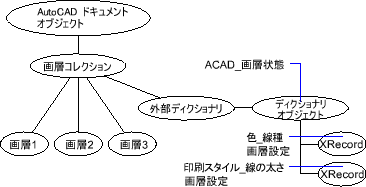
画層状態を操作するときは、項目を直接操作する必要はありません(操作を試みないでください)。LayerStateManager オブジェクトの関数を使用し、ディクショナリにアクセスします。ディクショナリを参照できるようになったら、DBDictionaryEntry オブジェクトとして表される各項目を確認できます。
図面に保存した画層状態を一覧表示する
画層状態が現在の図面に保存されている場合、次の例はすべての画層状態の名前を一覧表示します。
C# の例
using Autodesk.AutoCAD.Runtime;
using Autodesk.AutoCAD.ApplicationServices;
using Autodesk.AutoCAD.DatabaseServices;

[CommandMethod("ListLayerStates")]
public static void ListLayerStates()
{
    // Get the current document and database
    Document acDoc = Application.DocumentManager.MdiActiveDocument;
    Database acCurDb = acDoc.Database;

    // Start a transaction
    using (Transaction acTrans = acCurDb.TransactionManager.StartTransaction())
    {
        LayerStateManager acLyrStMan;
        acLyrStMan = acCurDb.LayerStateManager;

        DBDictionary acDbDict;
        acDbDict = acTrans.GetObject(acLyrStMan.LayerStatesDictionaryId(true),
                                        OpenMode.ForRead) as DBDictionary;

        string sLayerStateNames = "";

        foreach (DBDictionaryEntry acDbDictEnt in acDbDict)
        {
            sLayerStateNames = sLayerStateNames + "\n" + acDbDictEnt.Key;
        }

        Application.ShowAlertDialog("The saved layer settings in this drawing are:" +
                                    sLayerStateNames);

        // Dispose of the transaction
    }
}