すべての図形オブジェクトおよび属性参照オブジェクトを、指定したベクトルに沿って移動することができます。
オブジェクトを移動するには、変換マトリックスの Displacement 関数を使用します。この関数では、入力として Vector3d オブジェクトが必要です。必要なベクトルがわからない場合は、Point3d オブジェクトを作成し、GetVectorTo メソッドを使用して、2 点間のベクトルを取得できます。変位ベクトルは、特定のオブジェクトを移動する距離と方向を示します。
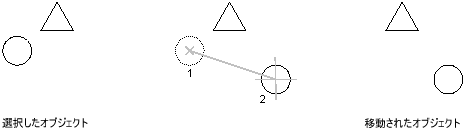
ベクトルに沿って円を移動する
この例は、円を作成し、その円を X 軸に沿って 2 単位移動します。
C# の例
using Autodesk.AutoCAD.Runtime;
using Autodesk.AutoCAD.ApplicationServices;
using Autodesk.AutoCAD.DatabaseServices;
using Autodesk.AutoCAD.Geometry;

[CommandMethod("MoveObject")]
public static void MoveObject()
{
    // Get the current document and database
    Document acDoc = Application.DocumentManager.MdiActiveDocument;
    Database acCurDb = acDoc.Database;

    // Start a transaction
    using (Transaction acTrans = acCurDb.TransactionManager.StartTransaction())
    {
        // Open the Block table for read
        BlockTable acBlkTbl;
        acBlkTbl = acTrans.GetObject(acCurDb.BlockTableId,
                                     OpenMode.ForRead) as BlockTable;

        // Open the Block table record Model space for write
        BlockTableRecord acBlkTblRec;
        acBlkTblRec = acTrans.GetObject(acBlkTbl[BlockTableRecord.ModelSpace],
                                        OpenMode.ForWrite) as BlockTableRecord;

        // Create a circle that is at 2,2 with a radius of 0.5
        using (Circle acCirc = new Circle())
        {
            acCirc.Center = new Point3d(2, 2, 0);
            acCirc.Radius = 0.5;

            // Create a matrix and move the circle using a vector from (0,0,0) to (2,0,0)
            Point3d acPt3d = new Point3d(0, 0, 0);
            Vector3d acVec3d = acPt3d.GetVectorTo(new Point3d(2, 0, 0));

            acCirc.TransformBy(Matrix3d.Displacement(acVec3d));

            // Add the new object to the block table record and the transaction
            acBlkTblRec.AppendEntity(acCirc);
            acTrans.AddNewlyCreatedDBObject(acCirc, true);
        }

        // Save the new objects to the database
        acTrans.Commit();
    }
}