鏡像化は、軸または鏡像の対称線でオブジェクトを反転させます。図形オブジェクトはすべて鏡像化できます。
オブジェクトを鏡像化するには、変換マトリックスの Mirroring 関数を使用します。この関数では、鏡像の対称線を定義するために Point3d、Plane、または Line3d オブジェクトが必要です。鏡像化は変換マトリックスを使用して行われるため、新しいオブジェクトは作成されません。元のオブジェクトを残しておきたい場合は、最初にオブジェクトのコピーを作成してから、鏡像化する必要があります。

Text オブジェクトの反転プロパティを管理するには、システム変数 MIRRTEXT を使用します。システム変数 MIRRTEXT の既定設定はオン(1)で、これにより Text オブジェクトは他のオブジェクトと同じように鏡像化されます。システム変数 MIRRTEXT がオフ(0)の場合、文字は鏡像化されません。GetSystemVariable メソッドと SetSystemVariable メソッドを使用して、システム変数 MIRRTEXT の設定を確認したり、設定することができます。
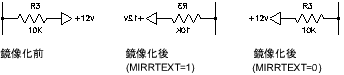
ビューポート オブジェクトは、ペーパー空間で鏡像化できます。しかしこうしても、そのモデル空間ビューやモデル空間オブジェクトには影響ありません。
軸を中心にポリラインを鏡像化する
次の例は、最適化ポリラインを作成し、軸を中心にそのポリラインを鏡像化します。新しく作成したポリラインは赤く色付けします。
C# の例
using Autodesk.AutoCAD.Runtime;
using Autodesk.AutoCAD.ApplicationServices;
using Autodesk.AutoCAD.DatabaseServices;
using Autodesk.AutoCAD.Geometry;

[CommandMethod("MirrorObject")]
public static void MirrorObject()
{
    // Get the current document and database
    Document acDoc = Application.DocumentManager.MdiActiveDocument;
    Database acCurDb = acDoc.Database;

    // Start a transaction
    using (Transaction acTrans = acCurDb.TransactionManager.StartTransaction())
    {
        // Open the Block table for read
        BlockTable acBlkTbl;
        acBlkTbl = acTrans.GetObject(acCurDb.BlockTableId,
                                     OpenMode.ForRead) as BlockTable;

        // Open the Block table record Model space for write
        BlockTableRecord acBlkTblRec;
        acBlkTblRec = acTrans.GetObject(acBlkTbl[BlockTableRecord.ModelSpace],
                                        OpenMode.ForWrite) as BlockTableRecord;

        // Create a lightweight polyline
        using (Polyline acPoly = new Polyline())
        {
            acPoly.AddVertexAt(0, new Point2d(1, 1), 0, 0, 0);
            acPoly.AddVertexAt(1, new Point2d(1, 2), 0, 0, 0);
            acPoly.AddVertexAt(2, new Point2d(2, 2), 0, 0, 0);
            acPoly.AddVertexAt(3, new Point2d(3, 2), 0, 0, 0);
            acPoly.AddVertexAt(4, new Point2d(4, 4), 0, 0, 0);
            acPoly.AddVertexAt(5, new Point2d(4, 1), 0, 0, 0);

            // Create a bulge of -2 at vertex 1
            acPoly.SetBulgeAt(1, -2);

            // Close the polyline
            acPoly.Closed = true;

            // Add the new object to the block table record and the transaction
            acBlkTblRec.AppendEntity(acPoly);
            acTrans.AddNewlyCreatedDBObject(acPoly, true);

            // Create a copy of the original polyline
            Polyline acPolyMirCopy = acPoly.Clone() as Polyline;
            acPolyMirCopy.ColorIndex = 5;

            // Define the mirror line
            Point3d acPtFrom = new Point3d(0, 4.25, 0);
            Point3d acPtTo = new Point3d(4, 4.25, 0);
            Line3d acLine3d = new Line3d(acPtFrom, acPtTo);

            // Mirror the polyline across the X axis
            acPolyMirCopy.TransformBy(Matrix3d.Mirroring(acLine3d));

            // Add the new object to the block table record and the transaction
            acBlkTblRec.AppendEntity(acPolyMirCopy);
            acTrans.AddNewlyCreatedDBObject(acPolyMirCopy, true);
        }

        // Save the new objects to the database
        acTrans.Commit();
    }
}