すべての図面オブジェクトおよび属性参照オブジェクトを回転できます。
オブジェクトを回転させるには、変換マトリックスの Rotation 関数を使用します。この関数は、ラジアン単位の回転角度、回転軸、基点を必要とします。回転軸は Vector3d オブジェクトとして表し、基点は Point3d オブジェクトとして表す必要があります。この角度は、基点を中心にして、オブジェクトが現在の位置からどれくらい回転するかを決定します。
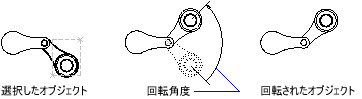
基点を中心にポリラインを回転する
次の例は、閉じたライトウェイト ポリラインを作成し、次に基点(4, 4.25, 0)を中心に 45 度回転します。
C# の例
using Autodesk.AutoCAD.Runtime;
using Autodesk.AutoCAD.ApplicationServices;
using Autodesk.AutoCAD.DatabaseServices;
using Autodesk.AutoCAD.Geometry;

[CommandMethod("RotateObject")]
public static void RotateObject()
{
    // Get the current document and database
    Document acDoc = Application.DocumentManager.MdiActiveDocument;
    Database acCurDb = acDoc.Database;

    // Start a transaction
    using (Transaction acTrans = acCurDb.TransactionManager.StartTransaction())
    {
        // Open the Block table for read
        BlockTable acBlkTbl;
        acBlkTbl = acTrans.GetObject(acCurDb.BlockTableId,
                                     OpenMode.ForRead) as BlockTable;

        // Open the Block table record Model space for write
        BlockTableRecord acBlkTblRec;
        acBlkTblRec = acTrans.GetObject(acBlkTbl[BlockTableRecord.ModelSpace],
                                        OpenMode.ForWrite) as BlockTableRecord;

        // Create a lightweight polyline
        using (Polyline acPoly = new Polyline())
        {
            acPoly.AddVertexAt(0, new Point2d(1, 2), 0, 0, 0);
            acPoly.AddVertexAt(1, new Point2d(1, 3), 0, 0, 0);
            acPoly.AddVertexAt(2, new Point2d(2, 3), 0, 0, 0);
            acPoly.AddVertexAt(3, new Point2d(3, 3), 0, 0, 0);
            acPoly.AddVertexAt(4, new Point2d(4, 4), 0, 0, 0);
            acPoly.AddVertexAt(5, new Point2d(4, 2), 0, 0, 0);

            // Close the polyline
            acPoly.Closed = true;

            Matrix3d curUCSMatrix = acDoc.Editor.CurrentUserCoordinateSystem;
            CoordinateSystem3d curUCS = curUCSMatrix.CoordinateSystem3d;

            // Rotate the polyline 45 degrees, around the Z-axis of the current UCS
            // using a base point of (4,4.25,0)
            acPoly.TransformBy(Matrix3d.Rotation(0.7854,
                                                 curUCS.Zaxis,
                                                 new Point3d(4, 4.25, 0)));

            // Add the new object to the block table record and the transaction
            acBlkTblRec.AppendEntity(acPoly);
            acTrans.AddNewlyCreatedDBObject(acPoly, true);
        }

        // Save the new objects to the database
        acTrans.Commit();
    }
}