Views with tech preview accelerated graphics enabled may be limited in ways non-accelerated views are not.
- Graphical views are supported with the following exceptions:
- Sheets, activated viewports on sheets, drafting views, and legends
- Materials are not supported in textures and realistic view types
- Walkthroughs and Solar Studies are not supported
- 3D Geometry is supported with the following exception:
- Coordination models and point clouds are not displayed
- Graphic appearance is consistent with non-accelerated views with the following exceptions:
- Lines and edges do not have line patterns or lineweight.
- Drafting patterns, cut patterns, and pattern overrides do not display.
- Annotation and detailing is supported with the following exceptions:
- Raster images, room color fills, and sort order
- Annotation display can be edited but is not accelerated. The will be limited performance in heavily annotated views.
- In views with unsupported capabilities enabled, enabling accelerated graphics is not prevented, but will have no effect. Unsupported capabilities include:
- Advanced view effects, i.e. shadows, backgrounds, sketchy lines, depth cueing
- View cropping, views will display uncropped except for rectangular cropping (non-rectangular and split crop region are not yet supported).
- Discipline view effects will not display.
- View range is not fully respected in plan views.
- All output, print, export, and render will display the non-accelerated state of the view.
Starting with Revit 2026.4, it supports all types of images for background display. The image displays according to background scaling and offset parameters:
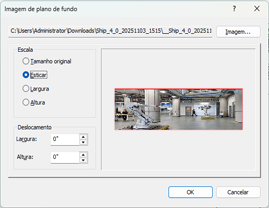
Section boxes applied to views with accelerated graphics turned on can be adjusted live. As you make adjustments to the section box, the model is sectioned as the plane of the section box is moved.

Note: check the
Tech Preview Terms of Use for more information about the terms of use for tech previews.