Manage Meetings
After creating and conducting meetings, you can share meeting information, export documentation and manage a meeting series. These actions help you distribute meeting outcomes and maintain organised records.
Share Meetings
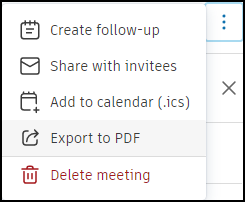
Use the More menu  to share meeting information:
- Share with invitees: Send an email with meeting details and a join link
- Share with all invitees
- Share with selected invitees
- Share with non-members
Export Meeting Information
Create documentation and records of your meetings:
- Add to calendar (.ics): Download an ICS file to add to your calendar or send to other invitees
- Export to PDF: Create a PDF of all meeting information. The PDF will download to your local machine.
Follow-up Meetings
Create a follow-up meeting that automatically inherits relevant information from the current meeting, including description, open agenda items, invitees and location. Closed items and summary content are not carried over.
To create a follow-up meeting from the meeting view:
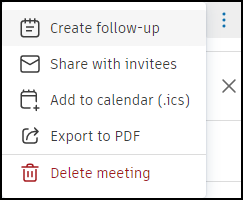
Use the More menu
next to the meeting.Select Create follow-up.
Choose a date for the follow-up meeting.
To create a follow-up meeting from the list view:
- Click + Follow-up next to the meeting series.
Any inherited information can be edited before saving. Follow-up meetings are automatically grouped in the meeting series with sequential numbering. If the original meeting isn't part of an existing series, a new series will be created using the first meeting's title.
Delete Meetings
Remove meetings from your project when necessary:
- Delete the most recent meeting in a series and change the status of that meeting to Agenda
- Delete a follow-up meeting before deleting its predecessor
What's Next
After managing your meetings:
- Run your follow-up meetings to continue discussions
- Filter and search to find specific meetings or items
- Review the complete workflow for your next meeting cycle