Filter Meetings and Items
As your meeting and items list grows, finding specific information becomes challenging. Use filters to quickly locate meetings, meeting series or specific action items.
Filter Meetings List
Access the calendar filter from the filter icon  to reduce the list size.
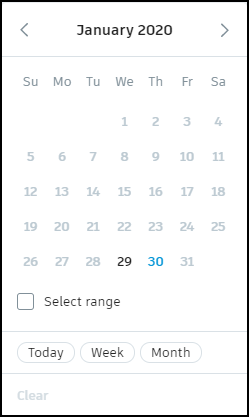
Available filters:
- Select a day – View meetings for a specific date
- Select Today – Show only today's meetings
- Select Week – See all meetings in the current week (or next 14 days)
- Select Month – See all meetings in the current month
- Toggle Select range – View meetings in a custom date range
- Select the meeting's status – Filter by meeting status
To remove all active filters, click Clear.
Filter Items List
All items mentioned in the meetings are listed in the Items tab. You can quickly filter the items list by clicking the filter icon.
Available filters:
- Assigned to – See all items assigned to one or more members
- Select Today – Show only today's items
- Select Week – See all items in the current week (or next 14 days)
- Select Month – See all items in the current month
- Toggle Select range – View items in a custom date range
- Select the meeting's status – Filter by item's status
Also, you can toggle Flagged items to see items that are flagged in all meetings or in the selected filtering options.
Click My action items to quickly see all items assigned to you.
Filter Items During a Meeting
While conducting a meeting, you can filter items within the current meeting to focus on specific assignees, statuses or flagged items. Click the filter icon in the meeting view.
Available in-meeting filters:
- My action items – View items assigned to you
- Assigned to – View unassigned or assigned items
- Status – Filter by Open, Ongoing or Closed status
- Flagged items – Display flagged items only
This helps you stay focused during the meeting discussion without losing track of important action items.
What's Next
After finding your meeting:
- Review meeting details and notes
- Create follow-up meetings for ongoing items
- Export meeting information as needed