Submittal Packages
This page explains how to create and use custom packages to group multiple related submittals. It covers:
- Understanding how packages organise submittals
- Creating new packages
- Grouping and filtering the items list by package
Packages allow you to bundle multiple submittals that pertain to the same portion of work, such as by physical location or project area. You can view items grouped by package directly in the main items list.
Packages provide two viewing modes for better organisation and management:
The standard view displays all submittal items in a flat list structure, showing items from all packages together. This view is optimal for:
- Cross-package searching and filtering
- Bulk operations across multiple packages
- General submittal management tasks
An alternative view that groups submittal items by their associated packages. This view provides:
- Clear visual separation of items by package
- Package-level information
- Streamlined bulk actions for items in the package
- Better organisation for location-based or phase-based workflows
To switch between views, use the view toggle controls in the Submittals interface.
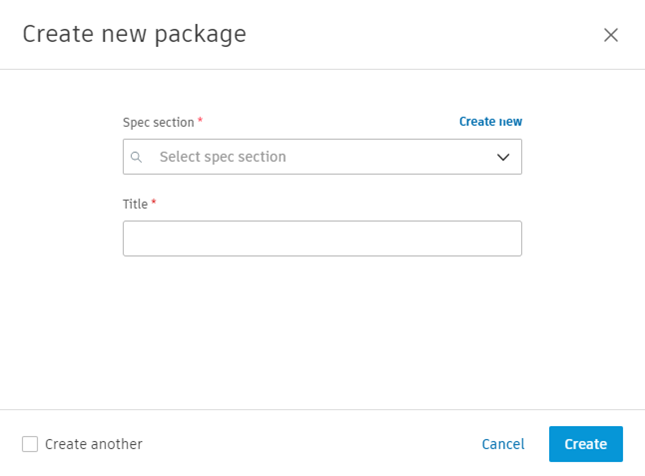
Here are step-by-step instructions on creating a Submittal Package within the Submittals tool.
- From the Items list, click Create package.
- Select Spec section.
- Enter Title.
Once created, packages can be edited or deleted as needed.
Here's how packages can be defined and utilised:
- Broader Categorisation: Unlike spec sections, which categorise submittals in a more abstract manner (such as materials or types of work), submittal packages allow for a tangible categorisation based on physical aspects like floors, rooms or specific locations within the project.
- Enhanced Organisation: By grouping related submittals into packages based on their relevance to a particular area, you can create a more structured and organised approach to managing submittals, making it easier to track progress and ensure quality.
- Streamlined Communication: When submittals that pertain to the same physical area are packaged together, communication among the project team is more streamlined. Team members can quickly understand which areas of the project the submittals refer to and make more informed decisions.
- Efficient Review Process: Reviewing submittals by packages can save time, as the reviewers can focus on specific areas of the project. This facilitates a more efficient and thorough review process.
Submittal items can be added to a package in two ways:
- Open the submittal item and select the package from a drop-down list.
- Select multiple items using tick boxes and use the Add to package bulk action to add them to a package.