Submittal Attachments
This page explains how to add, manage and work with attachments in the Submittals tool. It covers:
- The different types of submittal attachments
- Adding attachments from various sources
- Annotating and editing PDF attachments
- Managing attachments through the workflow
Attachments allow you to include supplemental documents and files along with submittal items. They can be used for reference or review purposes at different stages.
They can be found in the following:
- Attachments column in the Workflow Table
- Step transition windows
- Final response attachments in the final response
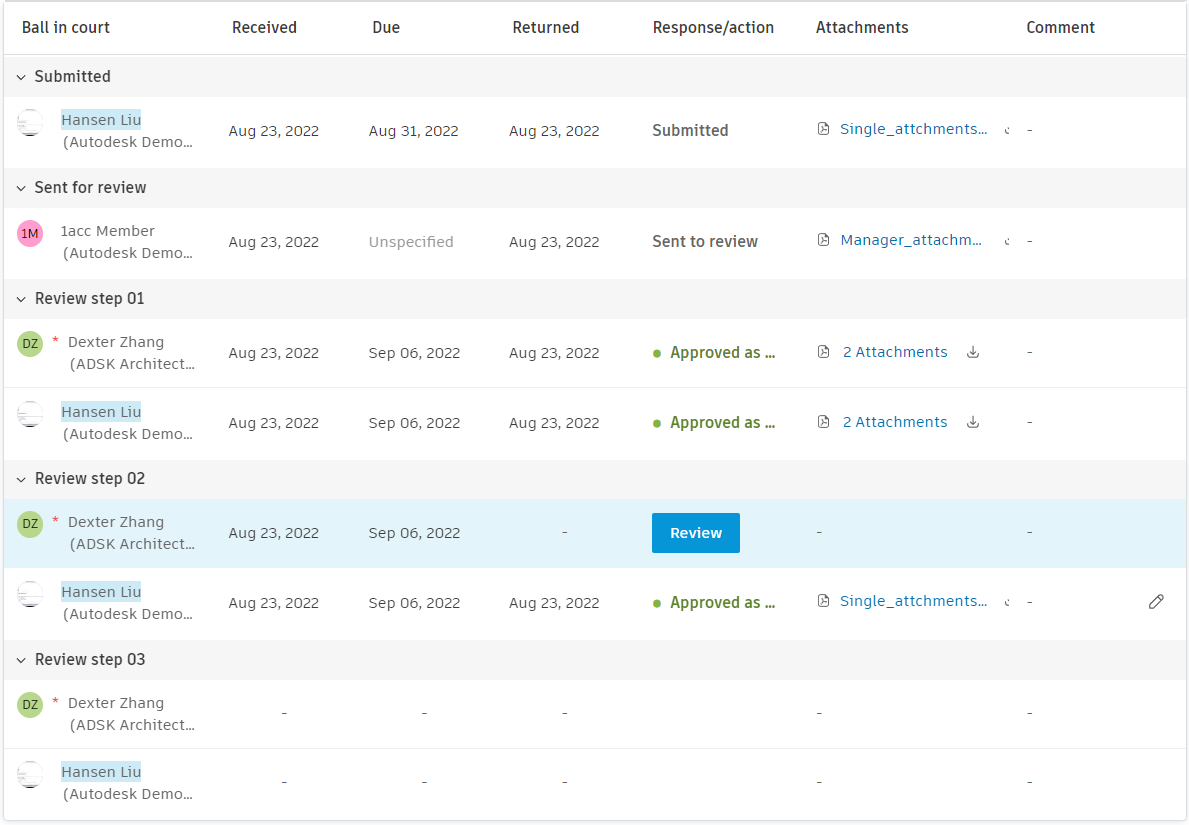
There are four main types of submittal attachments, as follows:
- Submission: Added by the responsible contractor
- For Review: Sent by the manager for review
- Review Response: Included by reviewers with their feedback
- Final Response: Selected by manager as part of final response
Any attachment manipulations (upload, annotate, copy, delete) happen in transition windows:
- When items are Submitted to the Manager/Submitted for review/Closed and distributed
- When setting a response.
Submittal attachments can be added from Project Files or a local machine. Attachments can also be copied or annotated from previous assignees. Adding attachments from the Files tool creates a copy of the file within the individual submittal. The original file will remain unchanged.
Responsible contractor submits attachments to the Submittal Manager.
When submitting the item for review, Managers need to select the attachments to send to the reviewers.
There are three options to add attachments:
- Drag and drop new attachments or upload them from Project Files or the local machine
- Copy attachments:
- Click the Copy button. The attachment is copied to the current user's section
- Open an attachment and add annotations (optional)
Reviewers review the items and can see the current status of all reviewers in the workflow table. The review interface provides enhanced visibility into the review process:
Review Status Display
- Pending Reviewers: The workflow clearly shows which reviewers haven't responded yet in the current step
- Completed Reviews: Previously submitted responses are visible with timestamps and reviewer information
- Review Order: Required reviewers are prioritised and clearly marked, followed by optional reviewers
- Response Chronology: All responses are displayed chronologically to provide a complete review history
To Close and distribute, submittal item Managers need to select attachments for the final response.
Attachments can be uploaded, annotated or copied.
Final response attachments are added to the final response.
To download all final response attachments at once:
- Open the submittal item.
- Click Download all attachments in the final response tile.
- The attachments are downloaded as a zip file to your local machine.
This feature streamlines access to all final response attachments, especially useful for projects with numerous attachment files.
Submittal Attachment Annotations
To edit and add annotations to submittal PDF attachments, open the editor in transitions. Reviewers can annotate the Manager's attachments or attachments of previous reviewers.
Editor functionalities include:
Built-in cover page
 , Custom cover page and Blank page to add a cover page to submittal attachment.
- Built-in cover page contains information on current submittal Status, Spec Section, Manager, Responsible contractor and Reviewer
- Custom cover page needs to be uploaded in PDF format
Pen
 and Freeform highlight to draw and highlight by hand. Settings:
- colour
- background colour and opacity
- line width
Text
 and Text Highlighter to create text fields and highlight text. Settings:
- text colour
- background colour and opacity
- font, font size, text alignment
Shape
 to draw select shapes. Settings:
- colour
- background colour and opacity
- line width and type
Cloud
 to draw cloud-like rectangle. Settings:
- colour
- background colour and opacity
- line width and type
Polygon
 to draw polygon by hand. Settings:
- colour
- background colour and opacity
- line width and type
Stamp
 to create stamp from built-in template or add custom stamps from local machine. To create stamp from built-in template:
- Click the Stamp icon
- Select Create stamp
- Select a response from the list
- Add stamp text (optional)
- Choose stamp colour
- Name of the user and company and date of creation of the stamp are added automatically
- Click the Stamp icon