As-Built Export
The As-Built Export feature in Autodesk Build improves the handover process by giving teams the ability to easily filter, find and export all relevant as-built information. As-built information includes Sheets, RFI’s and Submittals and carrying over any links to other related documents like files or photos. With the elimination of manual processes used in the past, this feature not only speeds up the handover process, but it also improves the accuracy of handover documentation and increases overall client satisfaction.
Note: European customers will not see this feature until midSeptember.
Key Features
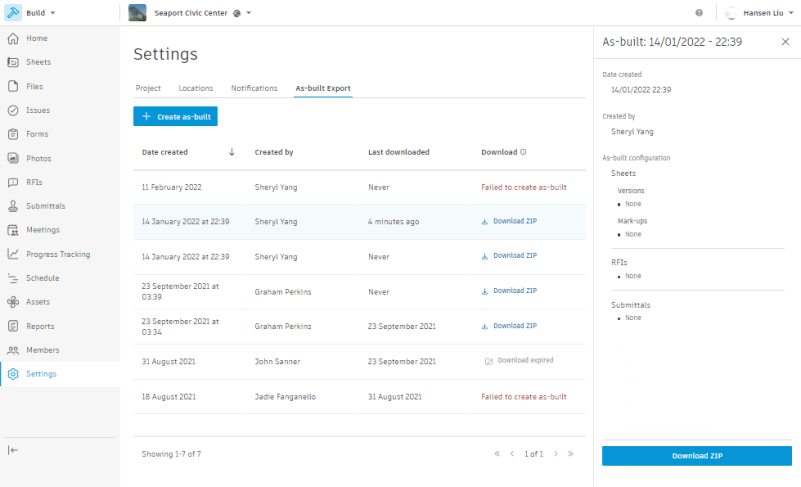
- Project Administrators can view by selecting the ‘Settings’ tool within Autodesk Build and navigating to the As-Built Export tab
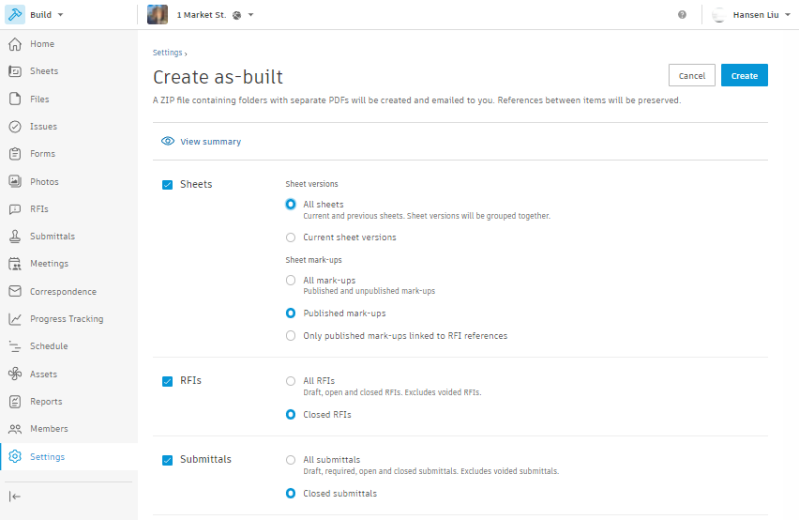
- From here, you can configure As-Builts:
- RFIs
- Filter by All or Only Answered
- Submittals
- Filter by All or Only Answered
- Sheets
- Filter by Published or Unpublished
- Filter by Published All Mark-ups or Published RFI Mark-ups only
- Filter by Current Set
- Once it is configured, you can create and then download from the export log list
- The As Built output will be exported as PDFs and saved in zipped folders for RFIs, Submittals and Sheets
- All links between RFIs and sheets will be included as local URL links in the PDF
- Any photos linked to an RFI will show up as thumbnails in the PDF
- Any files linked to an RFI will be download and included in the RFI folder
- RFIs