To produce a suitable rainfall event from a total depth and duration, it is necessary to add a shape, or profile, to a storm which is characteristic of the geographical location. These shapes are usually expressed as a Temporal Pattern. If you combine an average intensity read from the User Defined table with a Temporal Pattern, the result is a rainfall profile (hyetograph) which shows the variation of rainfall throughout the whole storm. This can then be used by the analysis to produce a result for the given system.
Toolbar
New – Allows a new Temporal Pattern to be created.
Load – Allows a Temporal Pattern to be loaded from file. These include:
-
IDF File (.idtpx) – The InfoDrainage file format for Temporal Patterns.
-
Text File (.csv,.txt) – Allows a Temporal Pattern to be loaded from comma separate files via the Universal Importer.
-
Excel File (.xls,.xlsx) – Allows a Temporal Pattern to be loaded from Microsoft Excel format.
Save – Save the current Temporal Pattern to a .idtpx file so it can be reused elsewhere.
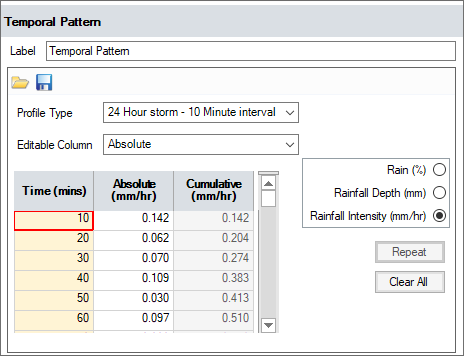
Label – This is the name given to the temporal pattern.
Profile Type – The information can be entered in a variety of different profile types. These are:
-
Custom Minute – Allows the information to be entered in non-uniform time intervals. Note: The length entered will dictate the storm duration that can be created.
-
Custom Dimensionless – Allows the information to be entered in non-uniform percentage intervals. Note: ANY storm duration can be created with this format.
-
24-Hour storm – 10-Minute interval – Allows the information to be entered to describe a 24-hour storm at a 10-minute interval. Note: The storm duration that can be created will be limited to 24 hours.
-
24-Hour storm – 15-Minute interval – Allows the information to be entered to describe a 24-hour storm at a 15-minute interval. Note: The storm duration that can be created will be limited to 24 hours.
-
24-Hour storm – 30-Minute interval – Allows the information to be entered to describe a 24-hour storm at a 30-minute interval. Note: The storm duration that can be created will be limited to 24 hours.
-
48-Hour storm – 30-Minute interval – Allows the information to be entered to describe a 48-hour storm at a 30-minute interval. Note: The storm duration that can be created will be limited to 48 hours.
-
7-Day storm – 1-Hour interval – Allows the information to be entered to describe a 7-day storm at a 1-hour interval. Note: The storm duration that can be created will be limited to 7 days.
-
Dimensionless – 1% interval – Allows the information to be entered at a 1% interval. Note: ANY storm duration can be created with this format.
-
Dimensionless – 2% interval – Allows the information to be entered at a 2% interval. Note: ANY storm duration can be created with this format.
Editable Column – Select whether to use Absolute or Cumulative values.
Value Options – The Temporal Pattern can be entered as three different values: Rainfall percentage, Rainfall Depth or Rainfall Intensity. Select the option that is appropriate for the data to be entered.
- Rain (%) – The percent of rainfall that falls for the given storm duration.
- Rainfall Depth – The depth of rainfall that falls for the given storm duration.
- Rainfall Intensity – The average intensity for the rainfall that falls for the given storm duration.
Spreadsheet
Time – The time that value applies to.
Absolute – The value for the given time.
Cumulative – The cumulative total of all the values to this point.
Buttons
Repeat – Repeats the currently selected value down the spreadsheet.
Clear All – Clears ALL of the information in the spreadsheet.