Autodesk Product Help MCP Server
Connect your AI client to Autodesk Help documentation (110+ products, multiple languages)—then retrieve trusted help content in seconds.
- Best for: ChatGPT, Claude Desktop, Claude Code, Cursor IDE, Microsoft Copilot, MCP-capable HTTP clients
- Source: Autodesk Help and Support content (live content)
- Use it to: discover products, search by keywords, and retrieve trusted documentation (tool availability varies by endpoint/audience)
Start Here (2–5 minutes)
1) Set the endpoint
This server uses Streamable HTTP transport (MCP over HTTP).
Use the Autodesk-hosted production endpoint:
| Endpoint | Audience | Auth required |
|---|---|---|
https://developer.api.autodesk.com/knowledge/public/v1/mcp |
Public | No |
2) Connect your client
- ChatGPT: See Supported clients and IDEs. Available in the ChatGPT app directory, or add it as a custom connector in developer mode.
- Cursor IDE: See Supported clients and IDEs.
- Claude Desktop: See Supported clients and IDEs. Available in the Claude connector directory.
- Claude Code: See Supported clients and IDEs.
- Microsoft Copilot: See Supported clients and IDEs. Available as a connector in Microsoft Marketplace.
- HTTP clients: Use any MCP-capable HTTP client against the endpoint above.
3) Verify it works
In your client, try one of these:
- Tool discovery: Ask the client to list available tools (or run the MCP "tools/list" capability).
- Basic retrieval: "List available products" or "Search help content for 'install' in Revit 2026".
Common Workflows
Use these as repeatable patterns for common product support scenarios.
| Scenario | Tools (typical order) | Prompt template | Next step |
|---|---|---|---|
| Validate product + version (so you can scope searches) | get_available_products |
"List available products. For <product>, list supported releases and the exact values I should use." |
Use the resolved product + release in your follow-up prompts. |
| Troubleshoot an error message / code | search_help_content |
"Search help content for \"<exact error text>\" in <product> <version> in <locale>." |
Open the best match and ask for the fix steps + prerequisites. |
| Installation, upgrade, or uninstall steps | search_help_content |
"Search help content for <install/upgrade/uninstall keywords> in <product> <version> in <locale>." |
Ask for a short checklist (steps + what to verify after). |
| Licensing / sign-in / entitlement issues | search_help_content |
"Search help content for <license/sign-in keywords> in <product> <version> in <locale>." |
Ask for a decision tree (common causes → how to confirm). |
| Feature how-to / workflow guidance | search_help_content |
"Search help content for <feature keywords> in <product> <version> in <locale>." |
Ask for the canonical steps and any version-specific differences. |
| System requirements / compatibility | search_help_content |
"Search help content for system requirements for <product> <version> in <locale>." |
Ask for a summarized requirements list (OS, CPU, RAM, GPU). |
Features
- Retrieve Autodesk Help and Support content in real time.
- Discover products and supported releases before running product-scoped searches.
- Support multiple languages for global documentation workflows.
Technical notes (for MCP client setup)
- Rely on tool discovery: MCP clients discover tools dynamically at runtime; available tools may change over time.
- Input validation: Tool calls validate required fields and return structured error messages when inputs are invalid.
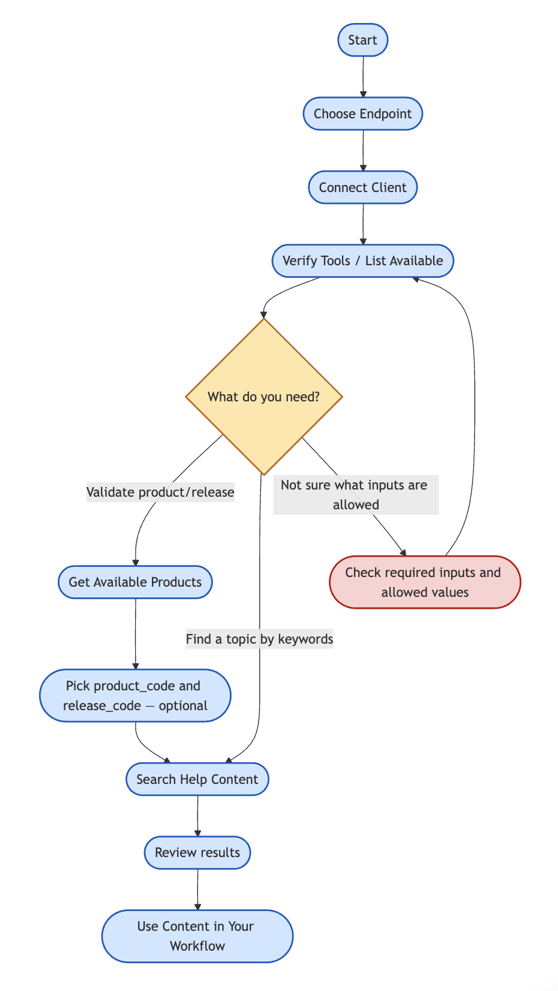
Recommended flow
Example prompts
Use these with your MCP-enabled client:
| Application | Prompt |
|---|---|
| Tool discovery | "List the available tools for this server and what each one does." |
| Find the right product/version | "List available products." |
| Validate product + release | "For Revit, list the supported releases and the exact values I should use." |
| Search | "Search help content for 'install network license' in AutoCAD 2025 in English (en_US)." |
| Locale/language | "I want results in German—what locale should I provide for tool inputs (for example de_DE)?" |