Viewer Settings
Viewer settings let you configure how designs are displayed and how you interact with them in Autodesk Viewer. Settings are grouped into tabs — Configuration, Navigation, and Appearance — and vary depending on whether you are viewing a 3D model or a 2D file.
To access the viewer settings, click Settings in the viewer toolbar. The Settings modal is displayed:
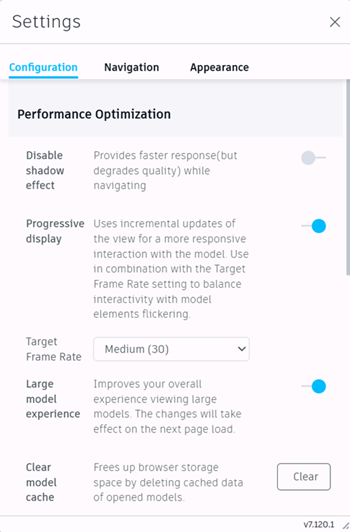
At the bottom of each tab, you can click Restore all default settings to reset that tab's settings to their defaults.
3D Models
When viewing 3D models in Autodesk Viewer, the Settings modal tabs contain the following options:
Configuration
Performance optimization
Disable shadow effect: Provides a faster response, but reduces visual quality during navigation.
Progressive display: Uses incremental view updates for more responsive interaction with the model. Most effective when combined with the Target Frame Rate setting to balance performance and model loading.
- Target Frame Rate: Specifies the targeted number of frames per second. A higher frame rate will provide smoother navigation and increased responsiveness, but some elements may flicker. Choose from low, moderate, medium, or high. This option is only available when Progressive display is turned on.
Large model experience: Provides an improved viewing experience for large models. After turning on this option, refresh your browser and reload your models or views for it to take effect. This option is not available when the WebGPU graphics option is enabled.
WebGPU graphics: Uses the latest web graphics technology to deliver improved performance and rendering quality when working with complex 3D models.
After turning on this option, refresh your browser and reload your models or views for the setting to apply.Tip: WebGPU is not supported in Firefox or Safari.When WebGPU is turned on, the following behaviors differ from the standard renderer:
Feature Behavior with WebGPU Ground reflection Not supported. Ground reflection (Appearance tab) will have no effect when WebGPU is active. Ghost hidden objects Only object edges are displayed for ghosted objects, rather than a semi-transparent surface. Prism materials Prism materials are replaced with standard materials that preserve the main color and texture characteristics. Levels hover effects Hover effects between floors are not shown. When selecting a floor, other floors will not appear in a ghosted style on hover. Line appearance Models with many 3D lines may show visual inconsistencies, such as lines not rendering as intended or incorrect line colors. Large model experience Enabling WebGPU automatically incorporates the Large model experience. The Large model experience option is disabled and cannot be turned off independently. 2D Appearance settings The 2D sheet color and Loading animation appearance settings cannot be turned on while WebGPU is active. Clear model cache: Deletes cached data for the open model, to free up browser storage.
Display
- Ghost hidden objects: Leaves hidden objects slightly visible. Applies to objects hidden using the model tree and those hidden during clash review. Does not apply to objects filtered out in the Model Browser.
- Display lines: Toggles the display of line objects.
- Display points: Toggles the display of point objects.
- Display edges: Shows the outline of model surfaces.
- Display section hatches: Shows a hatch pattern for section planes. Does not apply to section boxes.
- Display units: By default, uses the units from the uploaded file. Choose a different unit of measurement from the drop-down menu.
- Precision: By default, uses the precision from the uploaded file. Choose a specific precision value from the drop-down menu.
Selection
- Selection mode: Determines which level of object in the model tree is selected when you click in the viewer.
- Leaf object: Selects the lowest-level object within a composite. For example, clicking part of a curtain wall selects the individual panel or mullion.
- First object: Selects the highest-level object (for example, an entire model).
- Last object: Selects the lowest-level object, but treats composite objects as a whole. For example, clicking any part of a curtain wall selects the entire curtain wall.
Navigation
ViewCube
- Show ViewCube: Shows or hides the ViewCube navigation control.
- ViewCube acts on pivot: When enabled, the ViewCube orbits the view around the active pivot point. When disabled, it orbits around the center of the view.
Orbit
- Fusion-style orbit: Enables Fusion-style orbit with a locked orbit axis.
- Orbit past world poles: Allows the view to rotate past the model's North Pole.
Zoom
- Zoom toward pivot: When off, zoom centers on the cursor position.
- Reverse mouse zoom direction: Reverses the scroll wheel zoom direction.
- Scroll speed: Controls how fast the view zooms when using the scroll wheel.
- Drag speed: Controls how fast the view moves when using the zoom drag tool.
Mouse
- Left-handed mouse setup: Swaps the primary and secondary mouse buttons.
- Set pivot with left mouse button: Allows you to set a new pivot point with a click, overriding the selected object.
- Open properties on select: Opens the Properties panel automatically when you select an object.
- Enable gravity - Toggles gravity on and off when navigating in first person mode.
Appearance
Visual quality optimization
- Anti-aliasing: Smooths jagged edges on lines and surfaces.
- Ambient shadows: Improves shading of surfaces in occluded areas.
- Ground shadow: Adds a simulated shadow on an artificial ground plane.
- Ground reflection: Adds a blurred mirror reflection on an artificial ground plane. This setting has no effect when the WebGPU graphics option is enabled.
- Environment preset: Choose from available environment and lighting presets.
- Environment image visible: Shows the lighting environment image as the viewer background.
2D Files
When viewing 2D files in Autodesk Viewer, the Settings modal tabs contain the following options:
Configuration
Performance optimization
- Progressive display: Uses incremental view updates for more responsive interaction with the file.
Display
- Display units: By default, uses the units from the uploaded file. Choose a different unit of measurement from the drop-down menu.
- Precision: By default, uses the precision from the uploaded file. Choose a specific precision value from the drop-down menu.
Navigation
Zoom
- Reverse mouse zoom direction: Reverses the scroll wheel zoom direction.
- Scroll speed: Controls how fast the view zooms when using the scroll wheel.
- Drag speed: Controls how fast the view moves when using the zoom drag tool.
Mouse
- Open properties on select: Opens the Properties panel automatically when you select an object.
- Left-handed mouse setup: Swaps the primary and secondary mouse buttons.
Appearance
- 2D sheet color: Switches the sheet background between white and black.
- Loading animation: Animates lines while the file is loading.