5.9.5.0
22 October 2026
Arnold for 3ds Max 5.9.5.0 uses Arnold 7.5.4.0 and is a minor feature release.
Arnold 7.5.4.0 is a feature release that includes a new Shader Imager for interactive compositing, a faster and more responsive accelerated viewport, the ability to pause and resume renders, a new Rim Light shader, faster scene updates for deforming meshes and GPU renders, and more.
MAXtoA 5.9.5.0 adds support for the new Shader Imager with imager presets and example OSL filters, a new Arnold Viewport that renders Arnold inside the 3ds Max viewport, pause and resume for production renders, a Frame Time Limit for batch renders, custom AOV creation in the AOV Manager, new ways to render VDB files as implicit surfaces or points, and a new Arnold Implicit object.
Flow Render Tech Preview
MAXtoA includes a Tech Preview of Flow Render, an Arnold cloud-rendering solution. We are providing 2400 minutes (per user, per month) of rendering time to Arnold users for testing and evaluating the service. Please report any feedback or issues in the Arnold feedback forums.
In this release, Flow Render adds support for custom OCIO configs, UDIM tile tokens in texture filenames, and a per-frame render time limit.
See the Flow Render Tech Preview documentation for more information.
Installation
- Download Arnold for 3ds Max from your Autodesk Account. See Download Arnold for more information about downloading MAXtoA from your Autodesk Account.
- Follow these installation instructions.
Enhancements
Arnold Viewport Enhancements
Arnold Viewport: The new Arnold Viewport renders Arnold interactively right inside the active 3ds Max viewport. Arnold Viewport updates quickly while you navigate and edit, using DLSS on the GPU. Gizmos, grids, and wireframe overlays stay drawn on top. It uses your production Render Setup settings, so what you see matches what you render, but the framing follows the viewport rather than the render resolution. The same fast mode is available in the Arnold RenderView as Accelerated Rendering. Imagers, including the new Shader Imager, are not applied in Arnold Viewport or Accelerated Rendering. ActiveShade is unchanged and still available. Arnold Viewport renders in one viewport at a time, and you can't run it at the same time as the Arnold RenderView. While Arnold is the production renderer, every viewport shows an Arnold Viewport label next to the 3ds Max viewport labels. Turn on its checkbox to start Arnold Viewport in that viewport, and turn it off to stop it. Click the rest of the label to open the settings flyout. A [GPU] or [CPU] tag on the label shows the render device. By default, Arnold Viewport renders at half resolution so that it stays responsive while you navigate. See Arnold Viewport. (MAXTOA-2238, MAXTOA-2270, MAXTOA-2316, MAXTOA-2327, MAXTOA-2329, MAXTOA-2340, ARNOLD-18151)
Responsive navigation: When you move the camera, Arnold Viewport gets to an interactive frame rate quickly and holds it, then returns to full quality once the camera settles. To keep up, it can drop several quality settings in one step and render at a reduced resolution. Max Upscale in the settings flyout sets how far the resolution may drop, on top of DLSS, while the camera moves. The default is 6, and 1 turns it off. If that is still too slow, Arnold Viewport can switch to an unlit preview that shades each surface by its facing ratio. Moving the Quality ↔ Speed slider all the way to Quality turns the unlit preview off. These navigation optimizations apply to GPU rendering only. (ARNOLD-18083, ARNOLD-18181, ARNOLD-17770)
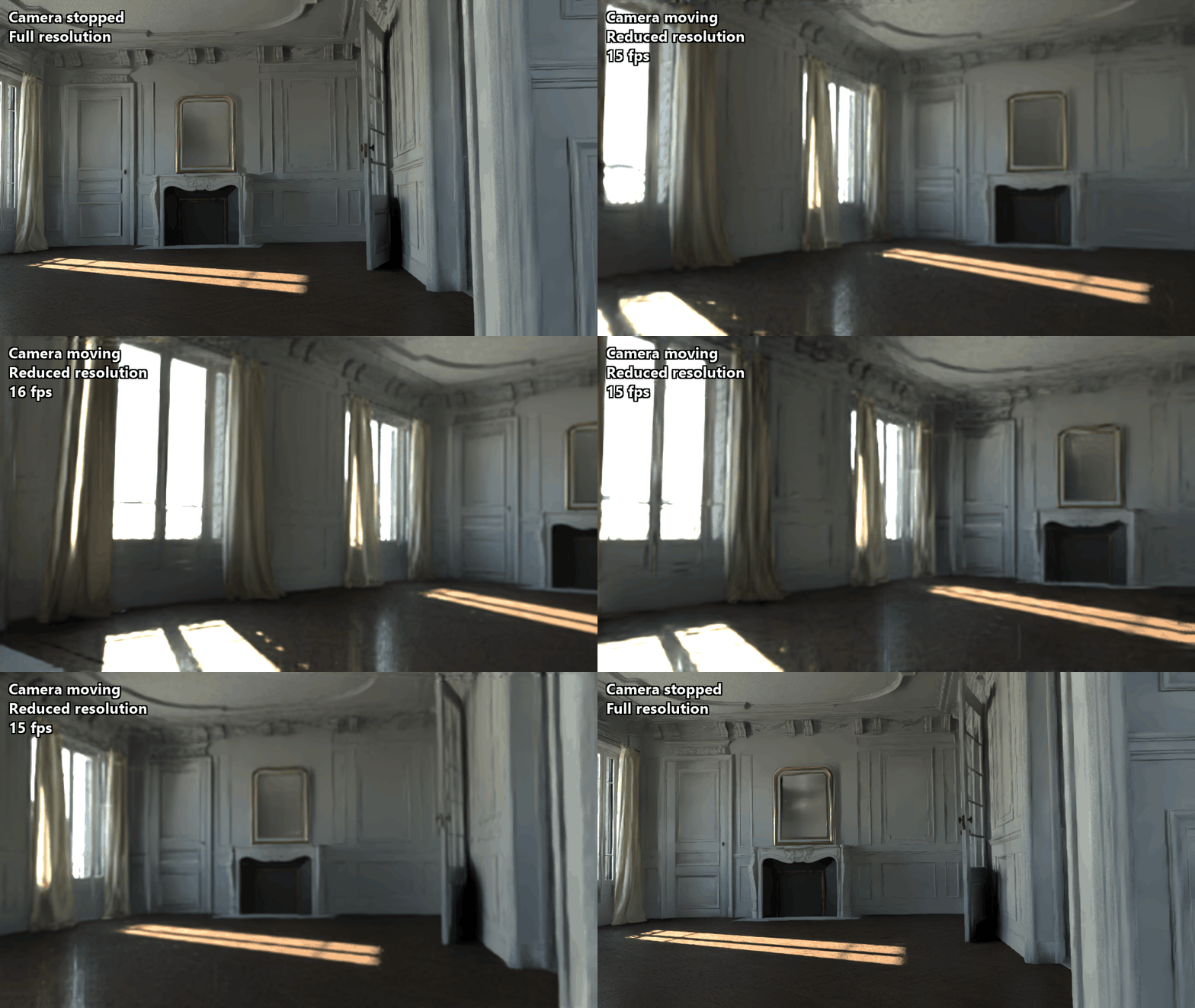 |
| Arnold Viewport (GPU) in real time with Max Upscale 4: the resolution drops while the camera moves and returns to full resolution once it stops. |
A cleaner, sharper image: Arnold Viewport shows a cleaner, sharper image closer to the final result while you navigate and edit the scene. (ARNOLD-18001, ARNOLD-18113, ARNOLD-18197, ARNOLD-18252, ARNOLD-18418, ARNOLD-18401, ARNOLD-18459, ARNOLD-18572, ARNOLD-18608)
CPU rendering: Arnold Viewport can also render on the CPU. Set Render Device to CPU in the settings flyout. A GPU device is still required for the viewport processing stage. Without one, Arnold logs a warning and falls back to a normal render. (ARNOLD-18154, ARNOLD-18214, ARNOLD-17853, ARNOLD-18133)
Imager Enhancements
- Shader Imager: The new Shader imager runs a shader network on the rendered image, so you can build stylized looks and do slap compositing while you render interactively. Add it from the imagers list in the Arnold RenderView and connect any map network to its Shader slot. The network can read AOVs through OSL shaders or an image node, with filenames such as aov:diffuse and aov:albedo. MAXtoA ships a set of example OSL filter shaders, including painterly, film grain, and lens effects. You'll find them in the Material Editor under the OSL > Arnold Shader Imager category. Their source and a README are in the OSL folder of the MAXtoA installation. Start from EXAMPLE_filter.osl to write your own filter. It is heavily commented, and also makes a good example to give a coding assistant. Scripting users can add imagers by name with ArnoldRenderView.addImager, which now accepts all imager types including Shader. ArnoldRenderView.getImagerTypes() lists the valid names. See Imager Shader in the Arnold documentation. (MAXTOA-2230, MAXTOA-2281, ARNOLD-10321, ARNOLD-18335)
 |
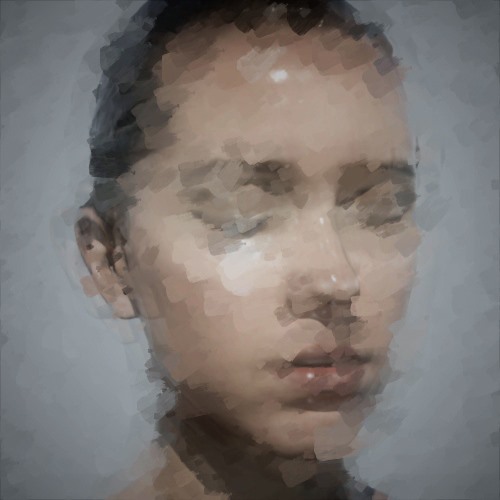 |
| Different OSL-authored styles applied to the same render via the Shader Imager | Painterly brush strokes applied to a portrait render via the Shader Imager |
Edit a Shader imager's map in the Arnold RenderView: When you select a Shader imager in the Post tab of the Arnold RenderView, the rollouts of the map connected to it now appear below the imager's own rollouts, titled with the map's name. You can adjust the map, such as one of the example OSL filters, without opening the Material Editor. Arnold shaders and OSL maps are shown in full. Standard 3ds Max maps, such as Bitmap, can't be shown in the Post tab, and a note points you to the Material Editor instead. The panel updates when you swap or disconnect the map, or change an OSL map's code. See Imagers. (MAXTOA-2320, MAXTOA-2323)
Imager presets: The new Presets button in the Imagers rollout (Render Setup > Arnold Renderer tab), and in the Post tab of the Arnold RenderView, opens the Imager Presets dialog. You can pick a ready-made look there, with a preview image and a description for each preset. A preset replaces your imagers and adds the AOVs that its imagers read, on an In Memory driver. MAXtoA ships several imager presets, such as Advanced Toon Setup and Pencil Sketch. They use new example OSL filters, including Raindrops on Glass, Lens Dirt, Sketch Lines, Pencil Tones, and Glitchy CRT / VHS.
- Export can now save the AOV setup that your imagers need along with the imager chain, and Import loads it back. Import now also restores the map network connected to a Shader imager, instead of only the imagers themselves.
- To make your own preset, export an imager chain to your presets folder, and optionally add a PNG thumbnail and a Markdown (.md) description with the same name. Open My Presets Folder in the dialog takes you there. (MAXTOA-2328, MAXTOA-2343, MAXTOA-2350)
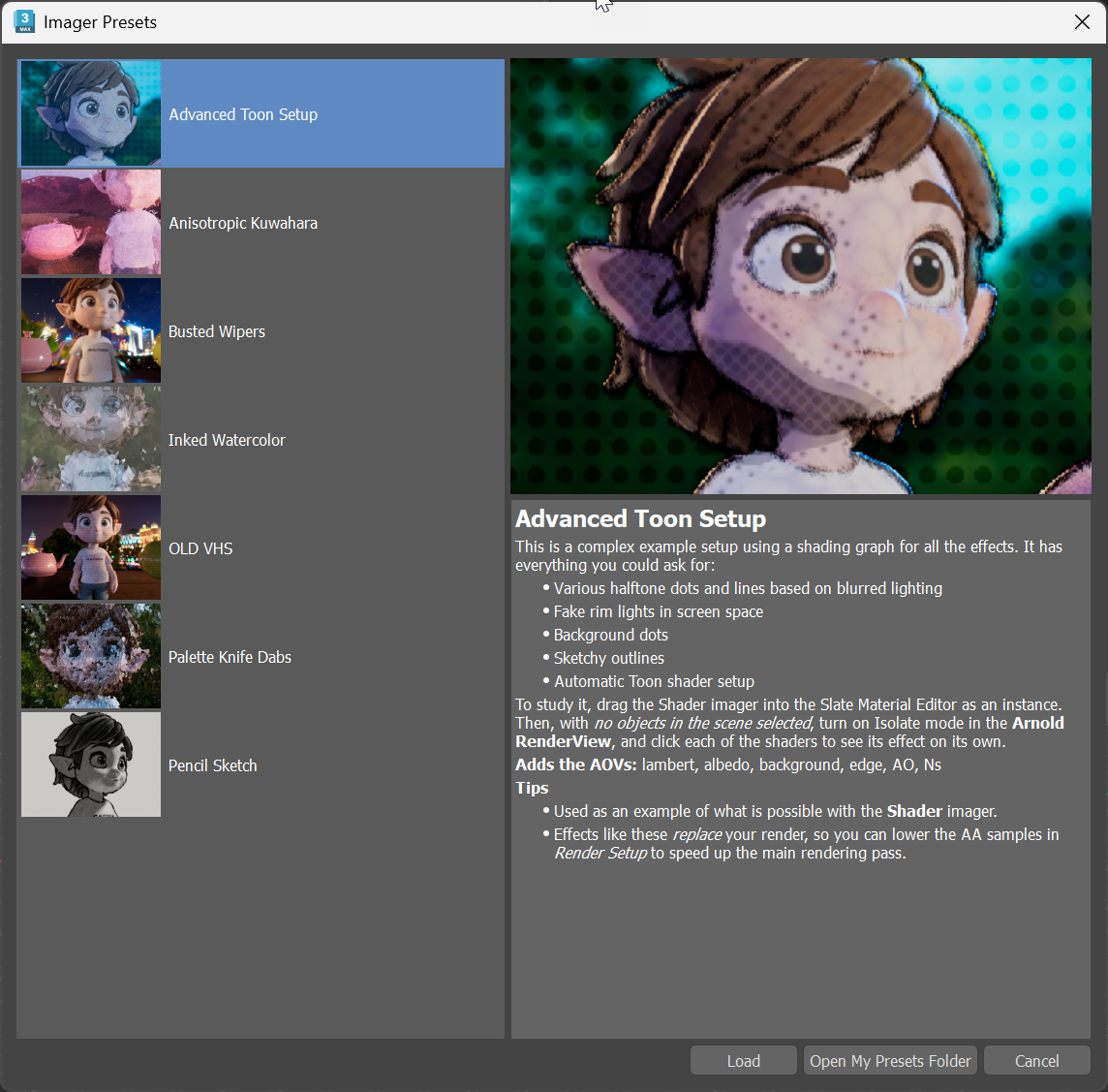 |
| Imager presets included with MAXtoA |
In Memory AOV driver: The AOV Manager has a new In Memory driver type for AOVs that only feed imagers, for example a Shader imager that reads
aov:edge_mask. These AOVs are rendered and appear in the Arnold RenderView, but nothing is written to disk, so they don't need an output path. AOV presets now also save each driver's type. Before, every driver loaded back from a preset as EXR. Loading an AOV preset now adds to your existing setup: a driver with the same type and suffix only gains the AOVs it is missing, and custom or shader AOVs whose names are already in use are skipped. (MAXTOA-2325)Control how often imagers refresh during interactive rendering: The new Imager Refresh Frequency setting sets the percentage of render time that imagers may spend refreshing the image while you render in ActiveShade or the Arnold RenderView. It's in the Imager Settings group on the System tab of Render Setup. Raise it to see imager results, such as the Shader imager, update more often, at the cost of a slower render. At 0, imagers run only once, when the frame is complete. The default is 1, and the final image is the same at any setting. (MAXTOA-2277, MAXTOA-2350)
Faster imager updates: During CPU renders, intermediate imager results appear sooner and more regularly, especially with the Shader, Lens Effects and OIDN denoiser imagers, while the time spent running imagers stays closer to the Imager Refresh Frequency target. Changing an imager after a render has finished now reports progress until the imagers are done. (ARNOLD-18500, ARNOLD-12642, ARNOLD-15447, ARNOLD-16372)
Global Light Sampling Enhancements
- Control indirect light samples with Global Light Sampling: When Global Light Sampling is enabled (Light Samples above 0), Arnold previously used a single light sample per shading point on indirect (secondary) bounces. The new Indirect Light Samples setting, in the Global Light Sampling group of the Sampling and Ray Depth rollout, lets you increase the number of indirect lighting samples to reduce noise in scenes with many lights, at the cost of additional sampling. The default is 1, matching the previous behavior. (ARNOLD-17084)
 |
| Indirect passes brightened +2 EV. Left of each diagonal: Indirect Light Samples 1; right: Indirect Light Samples 16. |
Rendering Enhancements
Pause and resume production renders: The Pause button in the 3ds Max rendering progress dialog now works with Arnold. Pausing holds the render in place, and resuming continues exactly where it left off, keeping all the pixels already rendered. While paused, the progress dialog shows Rendering paused..., and you can still cancel without resuming first. Previously, Arnold did not support pausing. (MAXTOA-2224, ARNOLD-11048)
Stop a production render after a fixed time: The new Frame Time Limit stops a batch render after about that much time and saves the image reached so far. This is useful for shots that have to be delivered by a certain time. The time limit can be in seconds, minutes, or hours. The render uses progressive sampling, so the image is complete but noisier than a converged render. The limit is approximate, and the render can run longer if some pixels don't have valid data yet. It is ignored in interactive rendering. The default of 0 means no limit. (ARNOLD-18340)
More responsive interactive rendering: Interactive rendering in the Arnold RenderView and in ActiveShade now keeps up when you move the camera or objects quickly. Previously, fast viewport drags could stall the render, and nothing updated until you stopped moving. Now your changes reach Arnold promptly and the image keeps updating while you drag. (MAXTOA-2231)
Shader Enhancements
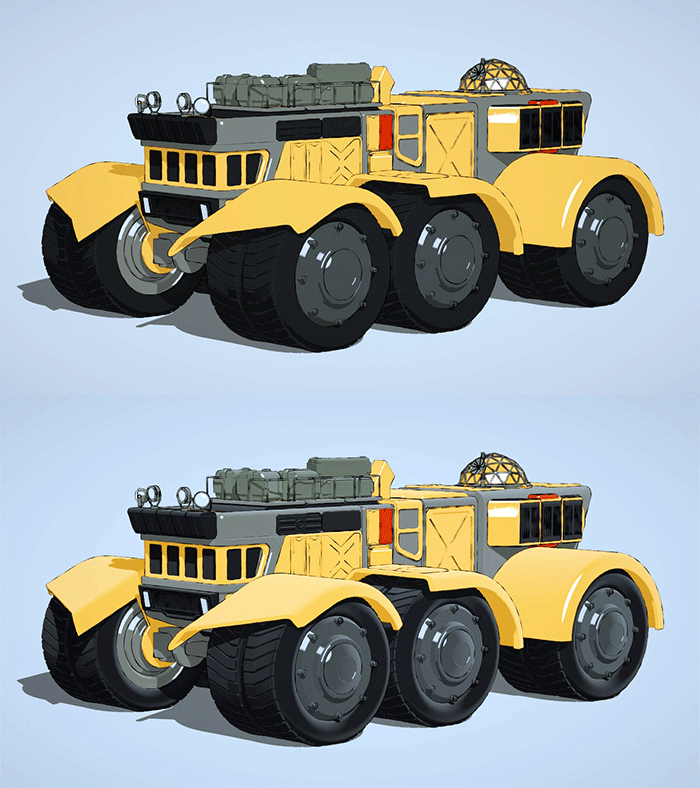
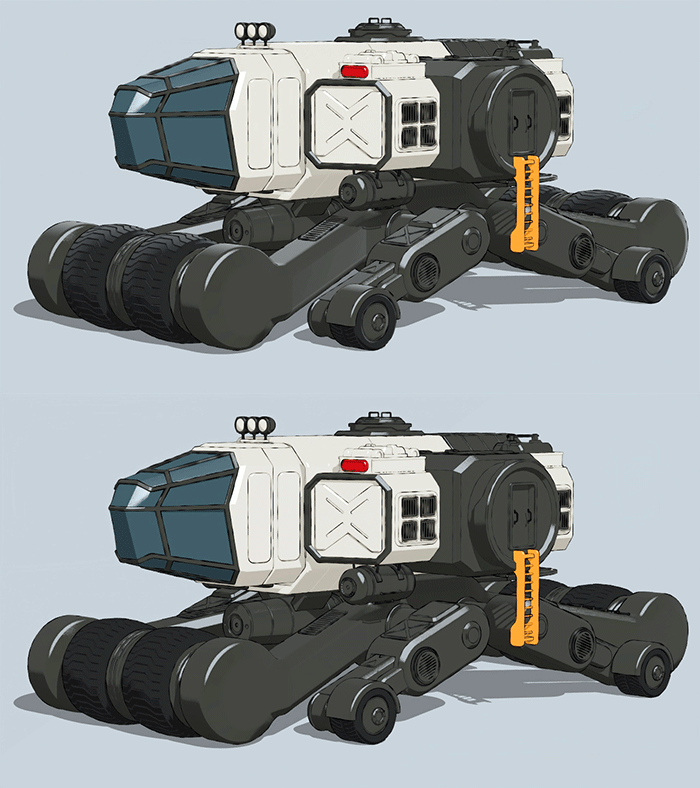
New Rim Light shader: The Rim Light shader is a standalone map that outputs the same rim lighting that you get from the Toon shader. For stylized rendering, such as non-photorealistic rendering (NPR), you can layer the rim light into any shader network, without using Toon, and use the rim lighting as a discrete RGB component rather than a fixed, built-in effect. (MAXTOA-2229, ARNOLD-17744)

 |
 |
Specular shader's Specular Weight renamed Reflectivity: The Specular Weight parameter of the Specular shader is now called Reflectivity, which describes better what it does: it multiplies the dielectric Fresnel reflectivity without affecting refraction. The old name is still accepted as a synonym, so existing scenes keep working. (ARNOLD-18136)
Detect Arnold from OSL shaders: OSL shaders can now call
getattribute("renderer:name", ...)andgetattribute("renderer:version", ...)to check whether they are running in Arnold, and in which version. This lets you write shaders that use Arnold-specific behavior and still work in other renderers. (ARNOLD-18066)
Denoising Enhancements
Noice denoiser:
--filter_strengthnow behaves consistently across all rendering filters, instead of requiring a different optimal value per filter as before. The recommended range is 0.6 to 0.8, depending on your preference for the detail/noise tradeoff. The default has increased from 0.45 to 0.6. (ARNOLD-18168)Automatic configuration of variance_filter parameters: The variance_filter, used by the Arnold Denoiser (Noice), has parameters
widthandfilter_weightsthat need to match the filter settings of the corresponding AOV. Incorrectly setting this will hurt denoiser quality. Arnold now sets thewidthandfilter_weightsautomatically, so you can ignore them. Using them will trigger a deprecation warning. A future version of Arnold will remove these now unused parameters. (ARNOLD-17982)
GPU Enhancements
Faster GPU scene updates: GPU renders of scenes with many objects or instances now start sooner and react faster to interactive edits, such as moving objects or adding, removing, or changing instances. In scenes with many instances, the GPU acceleration structures also use less memory. (ARNOLD-17900, ARNOLD-18140, ARNOLD-18160, ARNOLD-18179, ARNOLD-18376, ARNOLD-18380, ARNOLD-18384) For example:
- In a scene with 100,000 instances, the GPU scene update before rendering starts is 3x faster (660 ms to 214 ms). With 1 million instances, it went from 9.8 s to 4.1 s.
- In a scene with 500,000 instances, the GPU acceleration structure over them is 34% smaller (113 MB to 75 MB).
- When deforming every mesh in the Caldera USD scene interactively, the GPU scene update per frame is 10% faster (445 ms to 401 ms) and sends a third as much data to the GPU (371 MB to 120 MB).
Warning when the GPU is out of video memory: On Windows, Arnold now warns you when a GPU render is close to exceeding the GPU memory budget provided by the operating system. When GPU memory goes over budget, GPU renders become very slow, followed by possible crashes and hangs. (ARNOLD-17693)
Better accounting of GPU memory in stats: Previously unaccounted-for GPU memory is now reported in the stats as
compute stacks. This is the GPU memory allocated by each GPU thread to do its computation. This memory increases with the number of GPU cores, not with scene complexity, and is usually a few GBs in size. (ARNOLD-17310)
General Performance Enhancements
Faster updates when deforming meshes: When a mesh deforms in an interactive session, such as when animating or sculpting, Arnold can now process it faster (ARNOLD-18289, ARNOLD-18321, ARNOLD-18544). For example:
- Deforming a subdivided and displaced test character (17M polygons after subdivision) is 43% faster on both CPU and GPU.
- Deforming a non-subdivided test character (1M polygons) with authored normals is 65% faster on CPU and 68% faster on GPU
- Deforming every mesh in the 27,000-mesh Caldera USD scene is up to 78% faster on CPU and 75% faster on GPU.
Faster motion blur with varying motion keys: Arnold now renders scenes more efficiently when objects have different numbers of motion keys or different motion start and end values. Previously, these differences could cause significant slowdowns. In a test scene with 39k moving objects, render time dropped from 3.76s to 0.28s (13.4x faster) when 90% of objects had 5 keys and 10% had 2. Another scene with 30 different motion time ranges and 1–9 keys per object improved from 1.37s to 0.31s (4.4x faster). This optimization increases acceleration structure memory usage based on the maximum number of motion keys per object. Performance and memory usage remain unchanged for scenes where objects already use consistent motion keys. (ARNOLD-6597)
Faster light importance map calculation: Quad light importance maps are now multithreaded and significantly faster. For example, a 4096x4096 quad light map went from 3.7s to 0.12s. Skydome light importance maps are now built before rendering starts, and are up to 2x faster with 32 or more threads. Rendered results and memory use are unchanged. (ARNOLD-18155)
Faster BVH builds for objects with invalid geometry: Some objects contain primitives that are invalid or have unusable bounds, such as NaN or infinite vertex positions, or points with a negative radius. Building the BVH for these objects used to include a pass over every one of their primitives that ran on a single thread. That pass has been removed, so these objects no longer slow BVH builds down on machines with many cores. In a stress test with a 387-million-primitive object on a 24-core machine, this step went from 2.1s to under a millisecond. (ARNOLD-16616)
Optimized dependency graph: The Arnold dependency graph used in interactive sessions is now more efficient and uses about half as much memory. For example, in a test scene with 1 million dependencies between nodes, each dependency now uses 203 bytes instead of 405 bytes. (ARNOLD-16102)
Parallelized nodes destruction: When the Arnold universe is deleted, the nodes are now deleted in parallel, making the shutdown time faster. The USD Caldera scene is now 3.6x faster at render shutdown. (ARNOLD-16156)
Shaders support in the dependency graph: The shading trees are now properly handled by the node dependency graph. Shaders can now be deleted during interactive renders without requiring additional process on the plugin side. (ARNOLD-7064)
Other Enhancements
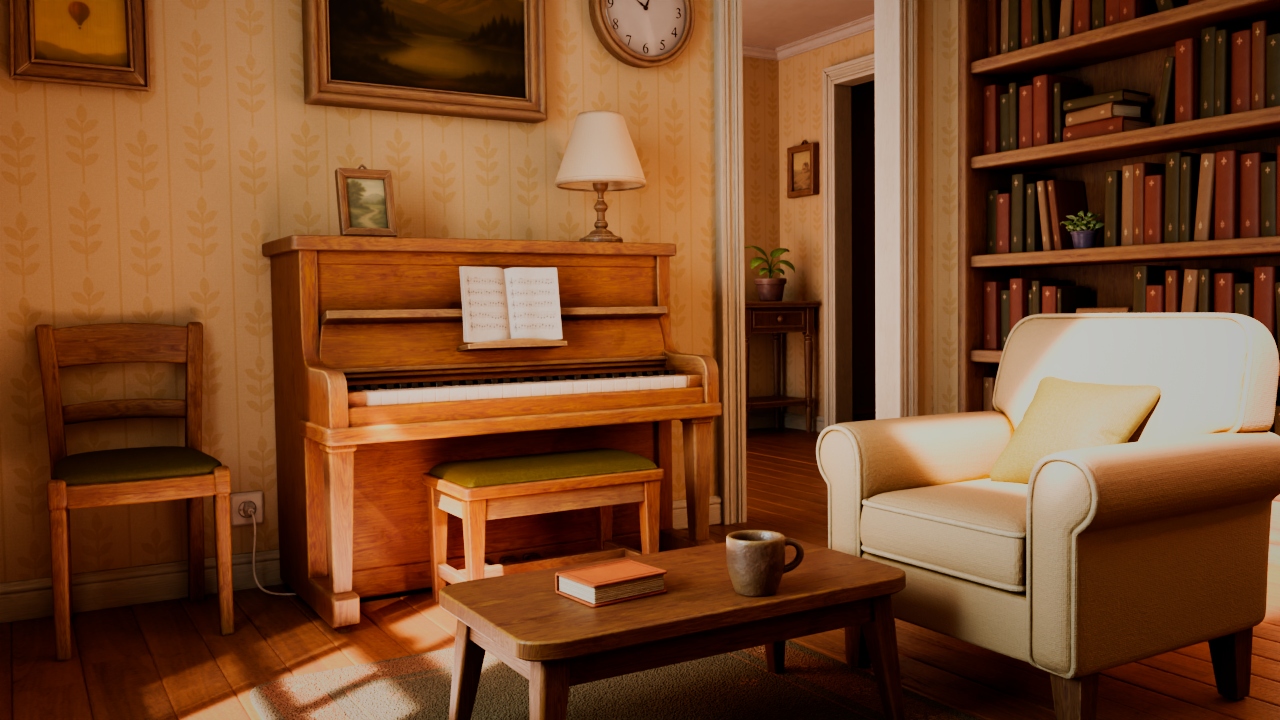
- New built-in roughness AOV: A new roughness AOV reports the surface roughness seen at the first bounce, so you can check the roughness maps across a whole shot at render time instead of building a custom AOV for every material. It is listed with the other built-in AOVs in the AOV Manager. It accumulates the roughness into a single value, without anisotropy. A material with several lobes returns a weighted average across them, and a surface with no microfacet roughness, and that is pure diffuse, hair, sheen, fuzz, and transmission, returns 1. (ARNOLD-17777)
 |
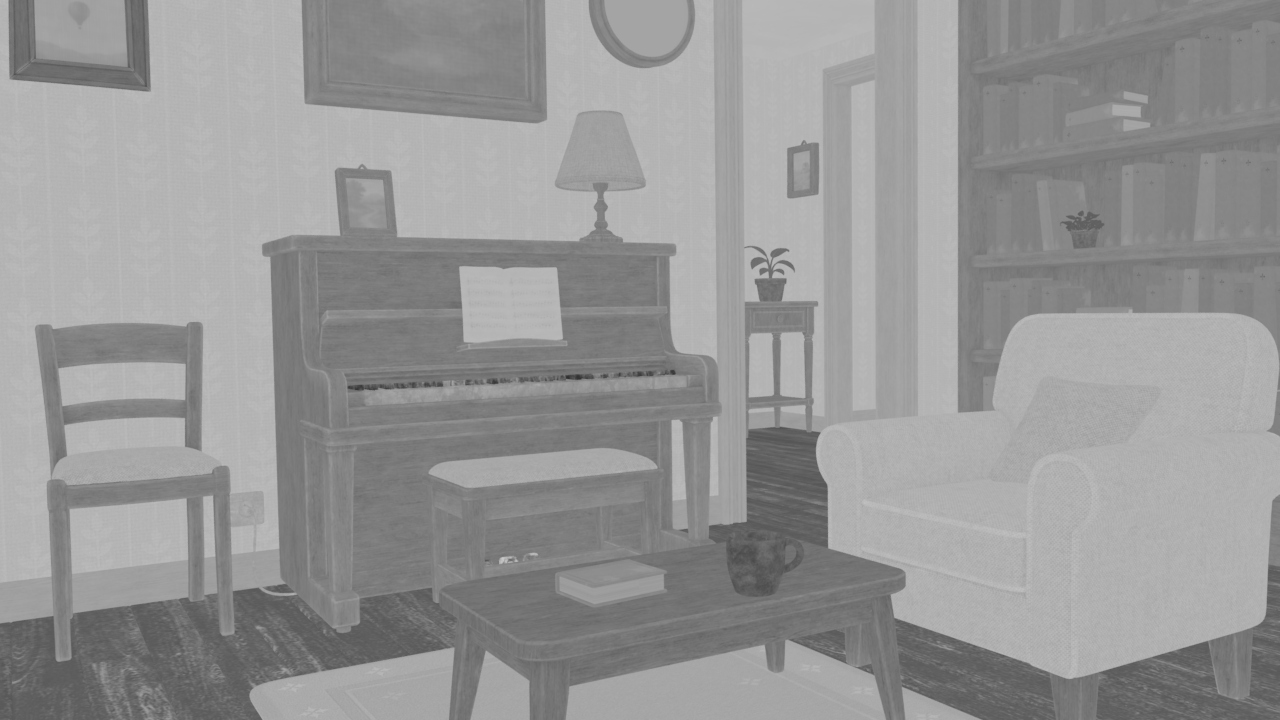 |
| Beauty | roughness AOV |
Thanks to Alex Mateo for the use of the Salita scene.
More detailed timing stats: Scene creation time now has two subsections: scene setup and scene load (this is for all scene formats, not just ASS scenes). In the general frame time, a new render setup time was added, which covers one-time setup (both CPU and GPU) and has a separate gpu context creation subsection for GPU. Finally, light-tree building is now correctly accounted for and included in light-accel building. (ARNOLD-16395)
Alembic procedural is now a built-in node: The
alembicnode is included in Arnold and is not a separate library in the plugins subdirectory. (ARNOLD-18288)Updated DLSS: The DLSS library used by Arnold Viewport and Accelerated Rendering is upgraded to version 310.9.1, which includes the newer DLSS 4.5 Ray Reconstruction model. (ARNOLD-18263)
Update network licensing: The Autodesk network licensing library is updated to version 3.4.0.4. (ARNOLD-18220)
MAXtoA Enhancements
Create custom AOVs directly in the AOV Manager: You can now create the AOVs you need without leaving the AOV Manager or wiring up chains of aov_write shaders by hand. Three new categories sit at the bottom of the AOV list. custom / LPE lets you add an AOV by name with Add New Custom AOV / LPE, optionally with a light path expression. scene AOVs automatically lists every AOV that materials and maps in your scene already write to. You can double-click one to edit its source in the Slate Material Editor. shader AOVs lets you pair an AOV name with any map (Add New Shader AOV), so you can render utility passes such as ambient occlusion or curvature in one step. Custom and shader AOVs are saved with the scene and support undo. AOV presets now include them too. A shader AOV's map is saved in a separate .ass file next to the preset. See AOVs. (MAXTOA-712)
Light group option disabled on AOVs that can't be split by light: In the AOV Manager, the Light Group option is now disabled, with a tooltip, on AOVs that can't be split by light. This includes data AOVs such as N, P, Z, ID, motion vectors and Cryptomatte, albedos, the background, and Shader AOVs. The light group option stays available on lighting AOVs and Custom LPE AOVs. A light group already set on a disabled AOV, for example in an older scene, is now ignored, and the AOV renders under its plain name. Before, a shader AOV with a light group rendered nothing at all. (MAXTOA-2344)
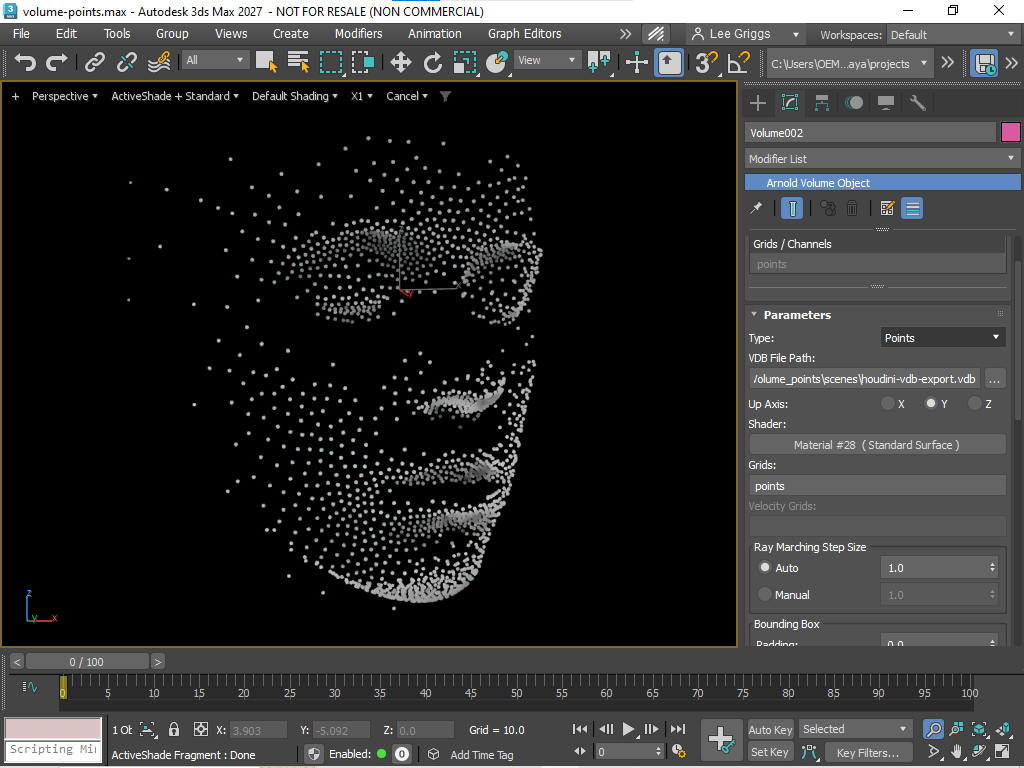
Render VDB files as volumes, implicit surfaces, or points: The Arnold Volume object has a new Type setting that controls how a VDB file renders.
- Volume renders it as a volume, as before.
- Implicit renders a level set or signed distance field grid as a solid surface. Its settings are in a new Implicit Surface group: Solver (default Level Set), Threshold, and Samples.
- Points renders an OpenVDB points grid as particles. Its settings are in a new Points group: Mode (Disk, Sphere, or Quad), Min Pixel Width, and the Position Attr, Radius Attr, and Velocity Attr attribute names.
 |
- The grid picker now tags each grid as
[sdf]or[points]and greys out grids that the current type can't use. A file that contains only points grids opens with Type set to Points. Existing scenes load as Volume, so they render as before. (MAXTOA-1916, MAXTOA-2239)
Arnold Implicit object: The new Implicit object (Create panel > Geometry > Arnold) renders a signed distance field shader as a solid surface. For example, you can use an OSL map that returns the distance to a shape. Connect the shader to the Field map slot. Assign a material to the object as usual to shade the surface. The object's box (Length, Width, Height) sets the bounds of the field, and nothing renders outside it. The Field group also has Solver, Threshold, Samples, and Step Size. See Implicit. (MAXTOA-2304)
- Solver defaults to Level Set, which is exact and fast for signed distance fields. Uniform steps through the field and works with any field.
- Threshold sets the field value where the surface sits. The default of 0 is the surface of a signed distance field.
Scripting support: MAXtoA is now easier to drive from MAXScript. (MAXTOA-2287)
- A MAXScript API reference for MAXtoA ships in the
docs\MaxScript-APIfolder of the MAXtoA installation, in HTML and Markdown. - New helper functions include
MAXtoAHelpers.ExportScene, which writes a .ass or USD file without rendering,MAXtoAHelpers.DescribeScene, which returns a short JSON summary of the scene, andMaxToAOps.CheckOSL, which compiles OSL code and reports errors and warnings. - Message boxes that scripts can trigger now respect 3ds Max quiet mode. In quiet mode the message goes to the 3ds Max log instead, so an unattended script doesn't stall waiting for a click.
- A MAXScript API reference for MAXtoA ships in the
Render Setup tooltips from Arnold: Tooltips for many Arnold render settings now come from the Arnold core descriptions, which are more up to date, instead of older copies kept in MAXtoA. (MAXTOA-2333)
Flow Render Enhancements
Custom OCIO config support: Custom OCIO configs are now supported when submitting scenes to Flow Render. (ARNOLD-17134)
Tile token support: The
<utile>and<vtile>tokens are now supported in texture filenames. (ARNOLD-18206)Frame time limit: The Flow Render Submitter has a new Frame Time Limit setting. A frame stops rendering when it reaches the time limit, and writes out the image rendered so far. The result is a complete image that is noisier than a fully rendered one. This is useful when shots have to be delivered by a certain time. (ARNOLD-18416)
USD Enhancements
- Render pause in Hydra: The Arnold render delegate now supports pausing usd#2719
- Accelerated Rendering: A new render setting "accelerated_rendering" allows to provide fast viewport updates (GPU-only) usd#2652
- Support points grids in Volumes: When a Volume primitive loads a VDB file having points grids, these grids are then rendered as points in Arnold usd#2740
- Per-render var EXR compression: EXR compression can now be set separately for each render var (AOV) with the
arnold:driver_exr:compressionattribute. The compression set on the render product is still used as a fallback. usd#2742 usd#2731 - UV camera ray direction and origin in Hydra: The
ray_directionandray_origininputs of theuv_cameraare now supported in Hydra, which fixes cage handling when baking textures in Solaris. usd#2710 - Sequence rendering with Hydra 2 render settings: Sequences now render correctly when the render settings change during the sequence. The render is interrupted before the render settings are updated, and existing Arnold nodes are reused instead of being recreated. usd#2754
- Interactive updates for shader imagers: When an imager shader, or a shading tree connected to it, is modified interactively, only the imager pass is updated instead of the whole render being restarted. usd#2758
- Mesh geometry deduplication in Hydra: The render delegate now finds identical meshes and curves and renders them as instances of one shared node. This reduces memory use and BVH build time in scenes with repeated assets, such as point instancer prototypes. For example, a production Houdini scene with many point instancers and repeated prototypes now uses 15 GB of memory instead of 50 GB. The
HDARNOLD_GEOM_DEDUPenvironment variable sets the mode:0(no deduplication),1(point instancer prototypes only; the default), or2(all duplicate geometry). usd#2749 - Turntable render settings: The turntable command now uses the render settings already in the scene instead of creating new ones with default values. A new option lets you choose a specific render settings prim. usd#2769
API Changes
Render pause API: New
AiRenderPause()andAiRenderIsPaused()functions let a host pause a running render without losing progress, then resume it with the existingAiRenderResume().AiRenderGetStatus()continues to reportAI_RENDER_STATUS_RENDERINGwhile a render is paused. CallAiRenderIsPaused()to check the pause state. (ARNOLD-11048)Imager interrupt and resume APIs: When an imager or a shader under its graph is modified interactively, the imager passes should be interrupted using
AiImagerInterrupt(). This interrupts only the imager passes, not the render itself. Once the imagers and its shaders have been modified, they can be resumed withAiImagerResume(), which replaces the previousrequest_imager_updaterender hint. (ARNOLD-11648)Detect shaders used only by imagers: New
AiShaderInImagerTree()function tells a host application whether a shader is used only by an Imager Shader. The host can call it on each shader edit during an interactive session, because it is fast enough to call every time. If it returns true, the host can make the edit betweenAiImagerInterrupt()andAiImagerResume()instead of interrupting the render. (ARNOLD-18297)OSL screen coordinates: OSL shaders evaluated by the Imager Shader can read the screen position of the current pixel, in the 0–1 range, with two new attributes.
getattribute("screen_uv", ...)hasv = 0at the bottom of the image, matching Arnold's convention and the Imager Shader's Screen UV mode.getattribute("screen_st", ...)hast = 0at the top of the image, matching OSL's texture convention, so you can pass it totexture()without flipping. Both return screen-space derivatives, sotexture()lookups are filtered correctly. See OSL Shaders. (ARNOLD-18419)Volume grid type API: New
AiVolumeFileGetChannelTypes()function lets you check whether a vdb grid is a volume channel or a points grid. (ARNOLD-18209)AiGetRenderOutput() output properties:
AiGetRenderOutput()takes a new optionalAtRenderOutputPropertiesargument that sets how an AOV is written into the destination. This lets hosts copy directly into their own buffers without an extra conversion pass.destination_row_pitchlets the render region be copied into a CPU buffer wider than itself, such as a mapped viewport framebuffer.half_floatconverts the AOV to 16-bit half float on the GPU before a CPU transfer, which halves both the destination size and the amount of data copied.alpha_modewrites the alpha as is, inverted, or as a constantalpha_value, for example 1.0 for an opaque result. The defaults keep the existing behavior, so existing code compiles without changes, but it must be recompiled (see below). (ARNOLD-18283, ARNOLD-18284, ARNOLD-18285)
Incompatible Changes
- AiGetRenderOutput() requires recompiling: Adding the
AtRenderOutputPropertiesargument changed the binary interface ofAiGetRenderOutput(). Plugins and applications built against Arnold 7.5.3 that callAiGetRenderOutput()must be recompiled against the 7.5.4 headers. No source changes are needed. Binaries that are not recompiled still load, but their calls toAiGetRenderOutput()may crash or write incorrect data. Plugins and applications that do not callAiGetRenderOutput()are not affected. (ARNOLD-18283)
Bug Fixes
- MAXTOA-1182 - Imagers that are turned off will be turned on when scene is saved. (5.0 for 2023)
- MAXTOA-2146 - Difference in Flow Render volume rendering
- MAXTOA-2225 - shadow matte does not put the shadow mask in the alpha
- MAXTOA-2250 - Arnold RenderView selection highlight doesn't clear after mouse release
- MAXTOA-2252 - Crash when editing a Multi-material during Arnold IPR in the Arnold Render View
- MAXTOA-2288 - Crash tweaking an OSL parameter in the imager graph during IPR (second tweak)
- MAXTOA-2295 - ARV's AiProfileReset() in InitRender() wipes the host's scene translation from the profile trace
- ARNOLD-6597 - Missing geometry from motion-blurred objects inside moving procedurals when procedural instancing optimization is enabled
- ARNOLD-9430 - Interactive modification of displacement shaders works
- ARNOLD-11648 - Make full frame imager updates thread safe
- ARNOLD-11706 - Tiny transmittance in interiors generates NaNs in CPU rendering
- ARNOLD-14047 - Light linking is not respected through transmission in skydome light
- ARNOLD-15234 - Crash in profiler with multiple render sessions
- ARNOLD-16231 - OSL opacity mask does not respect missingcolor
- ARNOLD-16386 - [GPU] Complex OSL and MaterialX shader networks could fail with an illegal memory access and render black
- ARNOLD-17468 - ar_orientations does not work for curves in Alembic files
- ARNOLD-17668 - kick: -o output file ignored when rendering USD scenes with open render window
- ARNOLD-17871 - Rare OSL crashes, particularly on macos
- ARNOLD-17988 - GPU OIDN crashes in Cinema 4D on Linux
- ARNOLD-18072 - Global operators must not change shared procedural content unless the selection matches every sharer
- ARNOLD-18142 - [FlowRender] Texture baking fails if multiple meshes have the same name
- ARNOLD-18279 - Viewport proxy of VDB points missing with custom point attribute
- ARNOLD-18322 - OSL texture() lookups on a missing file are slow
- ARNOLD-18333 - OSL camera:* attributes crash or return nothing when no object is being shaded
- ARNOLD-18356 - UsdLux: IES angle_scale in range (0, 1) renders too dark
- ARNOLD-18377 - OSL getattribute('uv'/'st') returns a transposed derivative block
- ARNOLD-18407 - Volume AOVs are black or dim in non-deep outputs when also rendering deep EXR or Cryptomatte
- ARNOLD-18446 - Crash when an imager was added to a driver's imager chain during an interactive render
- ARNOLD-18506 - [GPU] Crash at exit after a GPU render when AiEnd() is not called
- usd#2705 - Bind volume shaders on step-sized meshes
- usd#2730 - Use the OCIO config file path from the settings map when $OCIO is not set
- usd#2745 - Support renderingColorSpace in the hydra2 render_settings
- usd#2747 - Fix nodes destruction during interactive sessions under a procedural
System Requirements
- Autodesk 3ds Max 2025, 2026, and 2027
- Windows 10 or later, with the Visual Studio 2019 redistributable.
- CPUs need to support the SSE4.1 instruction set.
- GPU rendering and OptiX denoising require an NVIDIA GPU with the Maxwell architecture or later.
- On Windows, we recommend 591.28 or higher drivers.
- Intel OIDN runs on all CPUs. GPU support is limited to:
- Windows
- Intel Xe and Intel Arc dedicated and integrated GPUs
- NVIDIA GPUs with Turing, Ampere, Ada Lovelace, Hopper, and Blackwell architectures
- AMD GPUs with RDNA 2, RDNA 3, RDNA 3.5, and RDNA 4 architectures
- Windows