AOVs
Arbitrary output variables (AOVs) make it possible to output an image besides the beauty render, for use in compositing software.
To write an AOV to an image, add it to a driver with a render_output node. See Render outputs.
Light Path Expression AOVs
For Arnold, light path expressions are used to output light into specific AOVs, with the beauty RGBA AOV being the most commonly used one. Rather than writing to specific AOVs from shaders, LPEs can be used to extract specific light paths using regular expressions. Built-in LPEs are available for the common cases.
See Light Path Expression AOVs for more details.
Built-in AOVs
In addition to builtin LPEs, these builtin AOVs are available.
| Name | Type | |
|---|---|---|
A |
FLOAT |
Alpha channel |
Z |
FLOAT |
Z depth |
opacity |
RGB |
Per RGB channel alpha |
volume_opacity |
RGB |
Per RGB channel alpha, using volumes only |
ID |
UINT |
id parameter from object |
P |
VECTOR |
World space position |
Pref |
VECTOR |
Reference space position, from Pref user data |
N |
VECTOR |
Normal |
motionvector |
VECTOR2 |
Screen space motion vector |
shadow_matte |
RGBA |
Shadow |
cputime |
FLOAT |
Time taken to render pixel |
raycount |
FLOAT |
Number of rays traced to render pixel |
shader |
NODE |
Pointer to shader node, for filters and drivers |
object |
NODE |
Pointer to object node, for filters and drivers |
Custom AOVs
Shaders can output custom AOVs for cases that are not covered by LPEs and built-in AOVs. For exampl,e to output mattes or masks, ambient occlusion, textures, etc. AOVs are only written for camera rays.
Here's an example shader, writing a noise texture to a float AOV:
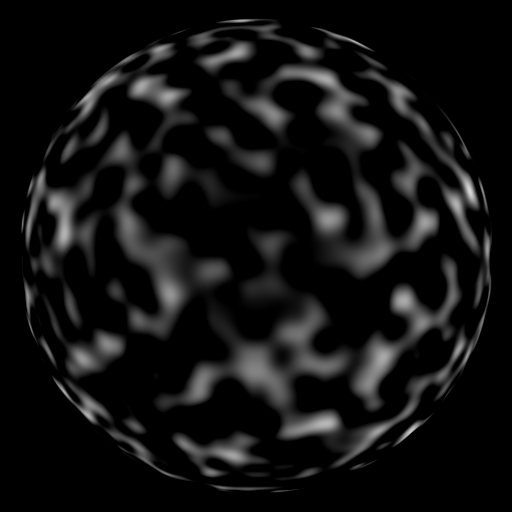
write_aov.cpp
#include <ai.h>

AI_SHADER_NODE_EXPORT_METHODS(WriteAovMtd);

struct WriteAovData
{
   AtString aov_name;
};

enum WriteAovParams
{
   p_aov_name,
};

node_parameters
{
   AiParameterStr("aov_name", "");
   AiMetaDataSetBool(nentry, "aov_name", "linkable", false);
}

node_initialize
{
   AiNodeSetLocalData(node, new WriteAovData());
}

node_update
{
   // register AOV
   WriteAovData *data = (WriteAovData*)AiNodeGetLocalData(node);
   data->aov_name = AiNodeGetStr(node, AtString("aov_name"));
   AiAOVRegister(data->aov_name, AI_TYPE_FLOAT, AI_AOV_BLEND_OPACITY);
}

node_finish
{
   WriteAovData *data = (WriteAovData*)AiNodeGetLocalData(node);
   delete data;
}

shader_evaluate
{
   const WriteAovData *data = (WriteAovData*)AiNodeGetLocalData(node);
   const float noise = AiPerlin3(sg->P);

   // write AOV only if in use
   if ((sg->Rt & AI_RAY_CAMERA) && AiAOVEnabled(data->aov_name, AI_TYPE_FLOAT))
      AiAOVSetFlt(sg, data->aov_name, noise);

   sg->out.FLT() = noise;
}

node_loader
{
   if (i != 0)
      return false;
   node->methods     = WriteAovMtd;
   node->output_type = AI_TYPE_FLOAT;
   node->name        = "write_aov";
   node->node_type   = AI_NODE_SHADER;
   strcpy(node->version, AI_VERSION);
   return true;
}
options
{
AA_samples 9
outputs "my_custom_aov FLOAT /out/arnold1:gaussian_filter /out/arnold1:exr"
aov_shaders "customaov"
camera "camera"
GI_diffuse_depth 1
GI_specular_depth 1
GI_diffuse_samples 3
}
write_aov
{
name customaov
aov_name "my_custom_aov"
}
driver_openexr
{
name /out/arnold1:exr
filename "av-custom_aov.exr"
}
gaussian_filter
{
name /out/arnold1:gaussian_filter
}
persp_camera
{
name camera
position 0 15 15
look_at 0 0 0
}
sphere
{
name ball
radius 10
}