6.5.4.0
22 October 2026
Arnold for Houdini 6.5.4.0 uses Arnold 7.5.4.0 and is a minor feature release.
Arnold 7.5.4.0 is a feature release that includes a new Shader Imager for interactive compositing, a faster and more responsive accelerated viewport, the ability to pause and resume renders, a new Rim Light shader, faster scene updates for deforming meshes and GPU renders, and more.
HtoA 6.5.4.0 adds support for the new Shader Imager, a new Accelerated Viewport and render pause in Solaris, a Frame Time Limit for batch renders, per-AOV compression for multipart EXRs in Solaris, cage baking and predictable texture-baking filenames, and shading controls and viewport display for Gaussian splats in Classic HtoA.
Flow Render Tech Preview
HtoA includes a Tech Preview of Flow Render, an Arnold cloud-rendering solution. We are providing 2400 minutes (per user, per month) of rendering time to Arnold users for testing and evaluating the service. Please report any feedback or issues in the Arnold feedback forums.
In this release, Flow Render adds support for custom OCIO configs, UDIM tile tokens in texture filenames, and a per-frame render time limit.
See the Flow Render Tech Preview documentation for more information.
Installation
Download Arnold for Houdini from your Autodesk Account. See Download Arnold for more information about downloading HtoA from your Autodesk Account.
Follow these installation instructions.
Enhancements
Imager Enhancements
- Imager Shader: The new Imager Shader node runs a shader network on the rendered image during the imager passes, so you can apply simple compositing graphs and do slap compositing interactively. It works in both Classic HtoA and Solaris. The Imager Shader is a subnetwork: inside it, build an Arnold shader network and connect it to the Imager Shader Output node. The network can read AOVs through OSL shaders or an image node, using filenames such as aov:diffuse and aov:albedo. The imager also has Samples, UV Mode and Run Every Pass settings. See Imager Shader in the Arnold documentation. (HTOA-3376, ARNOLD-10321, ARNOLD-18335)
 |
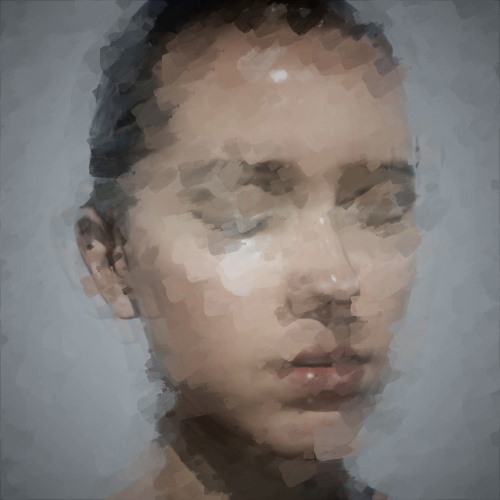 |
| Different OSL-authored styles applied to the same render via the Shader Imager | Painterly brush strokes applied to a portrait render via the Shader Imager |
- Faster imager updates: During CPU renders, intermediate imager results appear sooner and more regularly, especially with the Imager Shader, Imager Lens Effects and Imager Denoiser OIDN, while the time spent running imagers stays closer to its target share of the render time. Changing an imager after a render has finished now reports progress until the imagers are done. (ARNOLD-18500, ARNOLD-12642, ARNOLD-15447, ARNOLD-16372)
Global Light Sampling Enhancements
- Control indirect light samples with Global Light Sampling: When Global Light Sampling is enabled (Light Samples above 0), Arnold previously used a single light sample per shading point on indirect (secondary) bounces. The new Light Samples Indirect setting, in the Sampling settings of the Arnold ROP and of the Arnold Render Settings LOP, lets you increase the number of indirect lighting samples to reduce noise in scenes with many lights, at the cost of additional sampling. The default is 1, matching the previous behavior. (ARNOLD-17084)
 |
| Indirect passes brightened +2 EV. Left of each diagonal: Light Samples Indirect 1; right: Light Samples Indirect 16. |
Accelerated Viewport Enhancements
Accelerated Viewport in Solaris: The new Accelerated Viewport option gives you a faster, more responsive interactive render in the Solaris viewport when rendering on the GPU. It keeps the image clean as the camera moves, so you see a useful rendered image sooner and can stay in the viewport while you light and do look development. You can turn it on with the Accelerated Viewport icon in the Solaris viewport's right-hand toolbar, in the viewport's Arnold display options, or on the Interactive tab at the top of the Rendering folder of the Arnold Render Settings LOP. On the default Render Settings LOP it is under Rendering > Device. Imagers, including the new Shader Imager, are not applied to the Accelerated Viewport image. It is off by default and is not available on macOS. (HTOA-3386, HTOA-3390, HTOA-3420, HTOA-3435, ARNOLD-17608, ARNOLD-18151)
Responsive navigation: When you move the camera, the Accelerated Viewport gets to an interactive frame rate quickly and holds it, then returns to full quality once the camera settles. To keep up, it can drop several quality settings in one step and render at a reduced resolution. (ARNOLD-18083, ARNOLD-18181, ARNOLD-17770)
A cleaner, sharper image: The Accelerated Viewport shows a cleaner, sharper image closer to the final result while you navigate and edit the scene. (ARNOLD-18001, ARNOLD-18113, ARNOLD-18197, ARNOLD-18252, ARNOLD-18418, ARNOLD-18401, ARNOLD-18459, ARNOLD-18572, ARNOLD-18608)
Rendering Enhancements
Pause and resume renders in Solaris: You can now pause an Arnold render in the Solaris viewport and resume it later without starting over. Pixels already rendered are kept, and rendering continues from where it stopped. (HTOA-3375, ARNOLD-11048)
Stop a render after a fixed time: A new Frame Time Limit setting stops a batch render after roughly that much time and writes out the image rendered so far. This is useful when a shot has to be delivered by a deadline. You can set it in seconds, minutes or hours. It is on the new Batch tab of the Arnold ROP and of the Arnold Render Settings LOP, and in the Flow Render submitter. The image is complete but noisier than a fully converged render, because the render uses progressive sampling. The limit is approximate, and the render can run longer if some pixels don't have valid data yet. The default of 0 means no limit, and interactive renders ignore the setting. (HTOA-3408, ARNOLD-18340, ARNOLD-18416)
Shader Enhancements
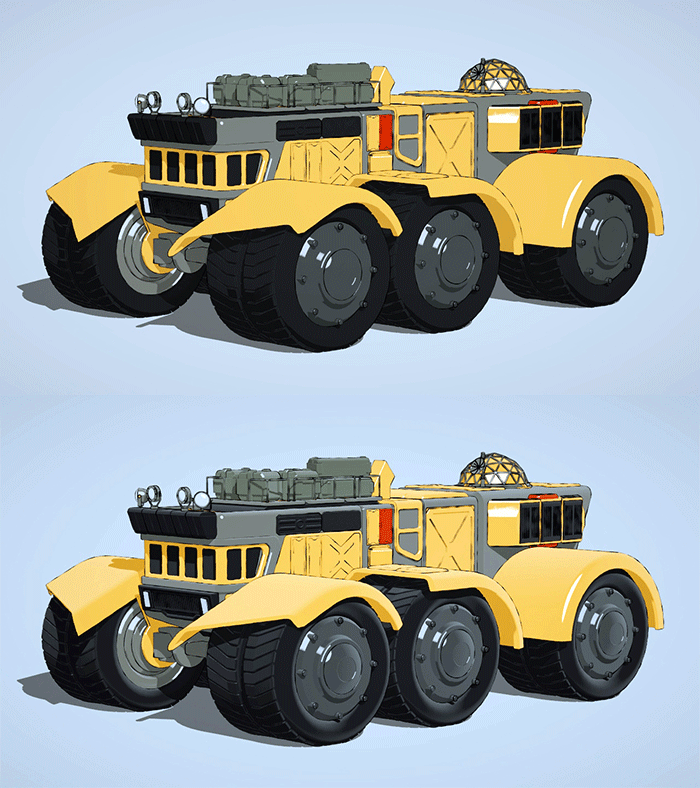
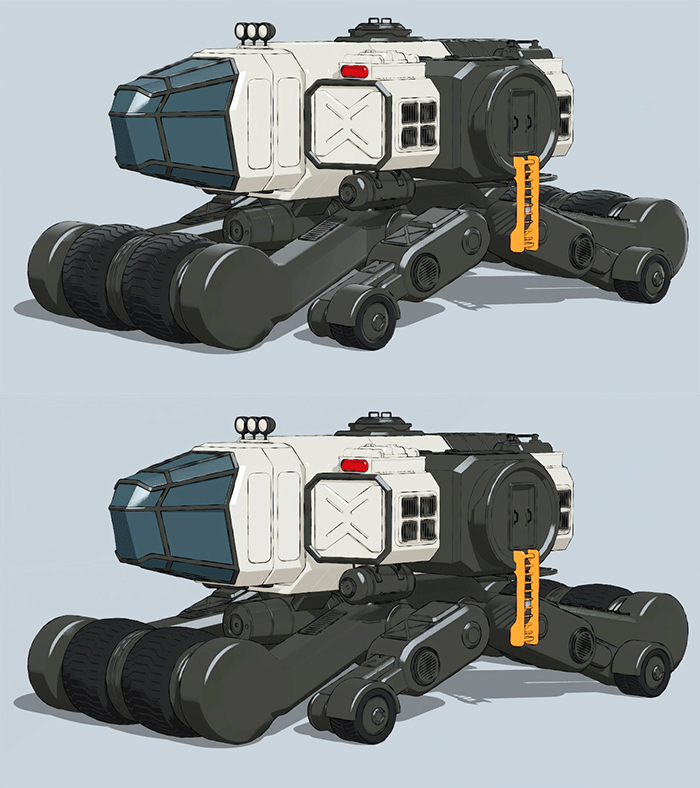
New Rim Light shader: The Rim Light shader is a standalone node that outputs the same rim lighting that you get from the Toon shader. For stylized rendering, such as non-photorealistic rendering (NPR), you can layer the rim light into any shader network, without using Toon, and use the rim lighting as a discrete RGB component rather than a fixed, built-in effect. (HTOA-3379, ARNOLD-17744)

 |
 |
Specular BSDF's Specular Weight renamed Reflectivity: The Specular Weight parameter of the Specular BSDF shader is now called Reflectivity, which describes better what it does: it multiplies the dielectric Fresnel reflectivity without affecting refraction. The old name is still accepted as a synonym, so existing scenes keep working. (HTOA-3378, ARNOLD-18136)
Detect Arnold from OSL shaders: OSL shaders can now call
getattribute("renderer:name", ...)andgetattribute("renderer:version", ...)to check whether they are running in Arnold, and in which version. This lets you write shaders that use Arnold-specific behavior and still work in other renderers. (ARNOLD-18066)
Denoising Enhancements
Better Noice denoising through glass and in reflections: HtoA now sets up the AOVs that the improved Noice denoiser needs. Noice keeps detail in objects seen through transparent surfaces like glass, and in reflective surfaces like mirrors.
- In Classic HtoA, turning on Output Variance AOV on the Arnold ROP now writes
denoise_albedo_noisyand itsdenoise_albedo_noisy_varianceAOV. - In Solaris, the Arnold Render Settings, Arnold Render Vars and Arnold Denoise Render Vars LOPs now offer Denoise Albedo (Noisy) in place of Denoise Albedo. Arnold Render Settings LOPs in existing hip files keep their Denoise Albedo settings when upgraded. (HTOA-3357, ARNOLD-10252)
- In Classic HtoA, turning on Output Variance AOV on the Arnold ROP now writes
Noice denoiser:
--filter_strengthnow behaves consistently across all rendering filters, instead of requiring a different optimal value per filter as before. The recommended range is 0.6 to 0.8, depending on your preference for the detail/noise tradeoff. The default has increased from 0.45 to 0.6. (ARNOLD-18168)Automatic configuration of variance_filter parameters: The variance filter, used by the Arnold Denoiser (Noice), has parameters
widthandfilter_weightsthat need to match the filter settings of the corresponding AOV. Incorrectly setting this will hurt denoiser quality. Arnold now sets thewidthandfilter_weightsautomatically, so you can ignore them. Using them will trigger a deprecation warning. A future version of Arnold will remove these now unused parameters. (ARNOLD-17982)
GPU Enhancements
Faster GPU scene updates: GPU renders of scenes with many objects or instances now start sooner and react faster to interactive edits, such as moving objects or adding, removing, or changing instances. In scenes with many instances, the GPU acceleration structures also use less memory. (ARNOLD-17900, ARNOLD-18140, ARNOLD-18160, ARNOLD-18179, ARNOLD-18376, ARNOLD-18380, ARNOLD-18384) For example:
- In a scene with 100,000 instances, the GPU scene update before rendering starts is 3x faster (660 ms to 214 ms). With 1 million instances, it went from 9.8 s to 4.1 s.
- In a scene with 500,000 instances, the GPU acceleration structure over them is 34% smaller (113 MB to 75 MB).
- When deforming every mesh in the Caldera USD scene interactively, the GPU scene update per frame is 10% faster (445 ms to 401 ms) and sends a third as much data to the GPU (371 MB to 120 MB).
Warning when the GPU is out of video memory: On Windows, Arnold now warns you when a GPU render is close to exceeding the GPU memory budget provided by the operating system. When GPU memory goes over budget, GPU renders become very slow, followed by possible crashes and hangs. (ARNOLD-17693)
Better accounting of GPU memory in stats: Previously unaccounted-for GPU memory is now reported in the stats as
compute stacks. This is the GPU memory allocated by each GPU thread to do its computation. This memory increases with the number of GPU cores, not with scene complexity, and is usually a few GBs in size. (ARNOLD-17310)
General Performance Enhancements
Faster updates when deforming meshes: When a mesh deforms in an interactive session, such as when animating or sculpting, Arnold can now process it faster (ARNOLD-18289, ARNOLD-18321, ARNOLD-18544). For example:
- Deforming a subdivided and displaced test character (17M polygons after subdivision) is 43% faster on both CPU and GPU.
- Deforming a non-subdivided test character (1M polygons) with authored normals is 65% faster on CPU and 68% faster on GPU
- Deforming every mesh in the 27,000-mesh Caldera USD scene is up to 78% faster on CPU and 75% faster on GPU.
Faster motion blur with varying motion keys: Arnold now renders scenes more efficiently when objects have different numbers of motion keys or different motion start and end values. Previously, these differences could cause significant slowdowns. In a test scene with 39k moving objects, render time dropped from 3.76s to 0.28s (13.4x faster) when 90% of objects had 5 keys and 10% had 2. Another scene with 30 different motion time ranges and 1–9 keys per object improved from 1.37s to 0.31s (4.4x faster). This optimization increases acceleration structure memory usage based on the maximum number of motion keys per object. Performance and memory usage remain unchanged for scenes where objects already use consistent motion keys. (ARNOLD-6597)
Faster light importance map calculation: Quad light importance maps are now multithreaded and significantly faster. For example, a 4096x4096 quad light map went from 3.7s to 0.12s. Skydome light importance maps are now built before rendering starts, and are up to 2x faster with 32 or more threads. Rendered results and memory use are unchanged. (ARNOLD-18155)
Faster BVH builds for objects with invalid geometry: Some objects contain primitives that are invalid or have unusable bounds, such as NaN or infinite vertex positions, or points with a negative radius. Building the BVH for these objects used to include a pass over every one of their primitives that ran on a single thread. That pass has been removed, so these objects no longer slow BVH builds down on machines with many cores. In a stress test with a 387-million-primitive object on a 24-core machine, this step went from 2.1s to under a millisecond. (ARNOLD-16616)
Optimized dependency graph: The Arnold dependency graph used in interactive sessions is now more efficient and uses about half as much memory. For example, in a test scene with 1 million dependencies between nodes, each dependency now uses 203 bytes instead of 405 bytes. (ARNOLD-16102)
Parallelized nodes destruction: When the Arnold universe is deleted, the nodes are now deleted in parallel, making the shutdown time faster. The USD Caldera scene is now 3.6x faster at render shutdown. (ARNOLD-16156)
Shaders support in the dependency graph: The shading trees are now properly handled by the node dependency graph. Shaders can now be deleted during interactive renders without requiring additional process on the plugin side. (ARNOLD-7064)
Other Enhancements
- New built-in roughness AOV: A new roughness AOV reports the surface roughness seen at the first bounce, so you can check the roughness maps across a whole shot at render time instead of building a custom AOV for every material. You can select it on the Arnold ROP, and on the Arnold Render Settings and Arnold Render Vars LOPs. It accumulates the roughness into a single value, without anisotropy. A material with several lobes returns a weighted average across them, and a surface with no microfacet roughness, and that is pure diffuse, hair, sheen, fuzz, and transmission, returns 1. (HTOA-3427, ARNOLD-17777)
 |
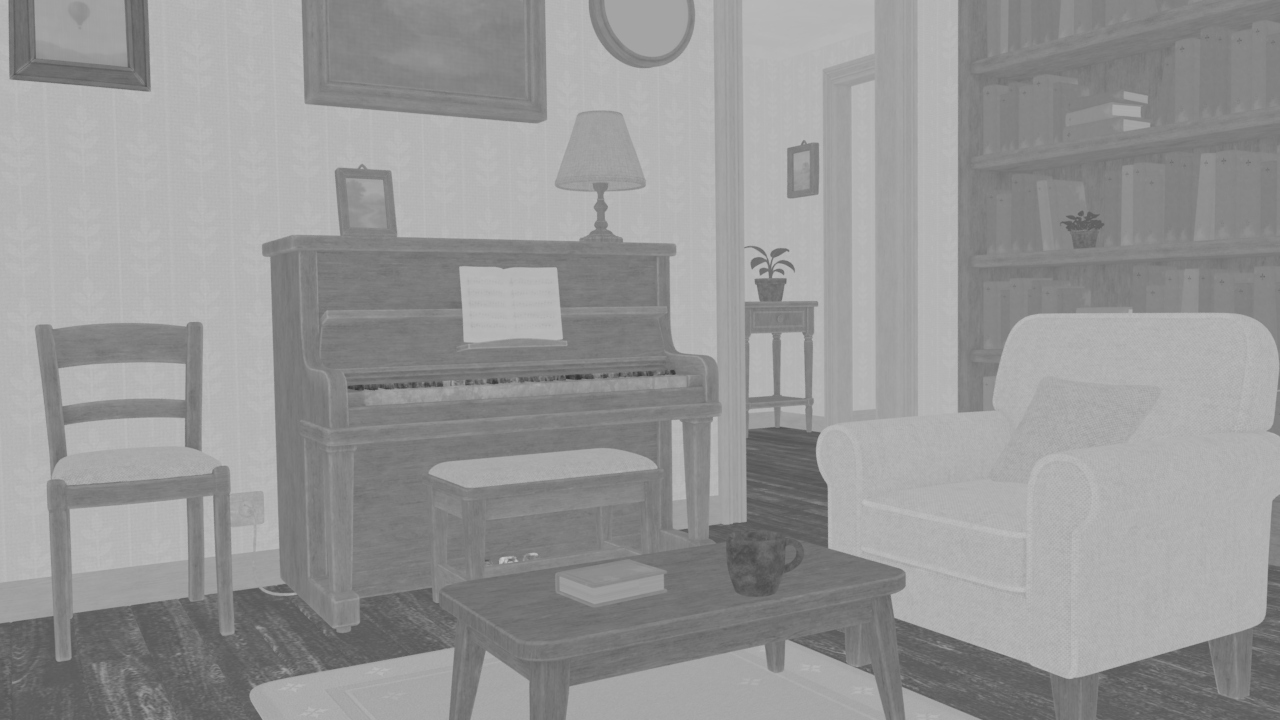 |
| Beauty | Roughness AOV |
Thanks to Alex Mateo for the use of the Salita scene.
More detailed timing stats: Scene creation time now has two subsections: scene setup and scene load (this is for all scene formats, not just ASS scenes). In the general frame time, a new render setup time was added, which covers one-time setup (both CPU and GPU) and has a separate gpu context creation subsection for GPU. Finally, light-tree building is now correctly accounted for and included in light-accel building. (ARNOLD-16395)
Alembic procedural is now a built-in node: The
alembicnode is included in Arnold and is not a separate library in the plugins subdirectory. (ARNOLD-18288)Updated DLSS: The DLSS library used by the Accelerated Viewport is upgraded to version 310.9.1, which includes the newer DLSS 4.5 Ray Reconstruction model. (ARNOLD-18263)
Update network licensing: The Autodesk network licensing library is updated to version 3.4.0.4. (ARNOLD-18220)
HtoA Enhancements
- AOV Write shaders in volume networks: You can now insert an
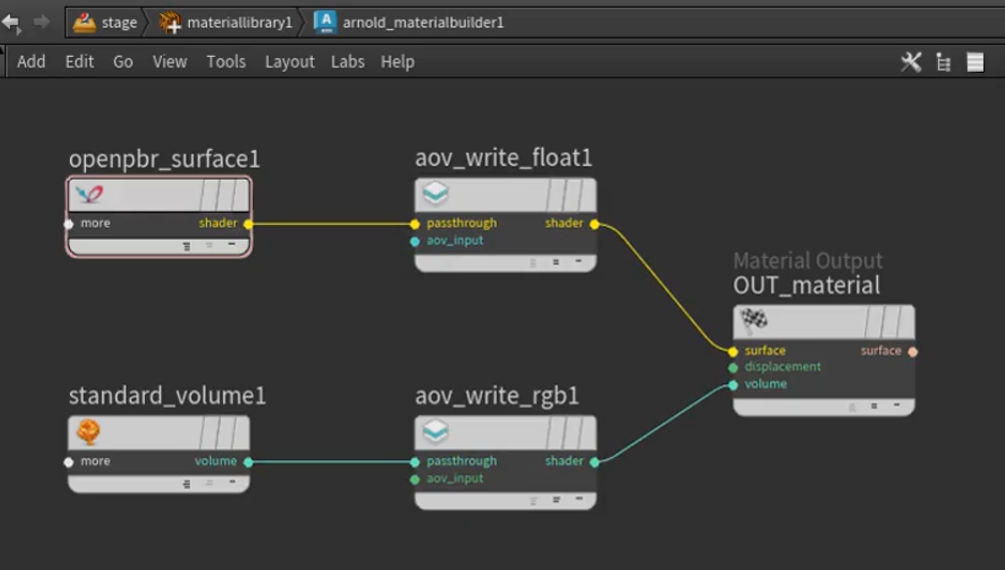
aov_write_*shader (float, int, rgb, rgba, vector) directly into a volume shading network in Solaris, to write a custom AOV from a volume. The passthrough input accepts a surface or a volume shader, and the node's output changes to match what's connected. One AOV Write node therefore works in both surface and volume networks, and you don't need a separate workaround for volumes. Existing surface networks are unchanged. (HTOA-2748)
 |
Per-AOV compression in multipart EXRs: In Solaris you can now set a different EXR compression for each AOV written to the same multipart EXR. For example, use a lossless compression on the beauty and a smaller lossy one such as DWAB on utility AOVs, to cut the size of your files on disk. On the Arnold Render Settings LOP, each AOV has a new Compression setting under its EXR Settings. If you leave it unset, the AOV uses the compression set in Driver Options, so existing scenes render as before. Classic HtoA already supports per-AOV compression on the Arnold ROP. (HTOA-3287, ARNOLD-15669)
Cage baking in Solaris: The Arnold Texture Baker LOP can now project through a custom cage mesh. That gives you control over the projection where the automatic UV Offset cage misses detail or picks up nearby geometry. In a projection Bake Mode, turn on Use Cage for a bake mesh and set Cage Path to the cage. The cage must be an edited copy of the bake mesh: the same points moved around, with no topology changes. Use Cage is off by default, so existing bakes keep using the automatic cage. (HTOA-3353)
Predictable filenames for texture baking: The Arnold ROP has a new Output Texture parameter, in the Baking folder, for texture baking. You write a filename template using the tokens
<mesh>,<uvset>,<udim>,<aov>and<row>, and HtoA fills them in for each bake row. A pipeline can then know the output filenames in advance without cooking the geometry, and you can re-bake a single mesh and UV set combination to the same file. The dropdown offers example templates, such astex_<mesh>_<uvset>.<udim>.$F4.exr. A requested UDIM that has no UVs on a mesh is now skipped, instead of being written as UDIM 1001 without a UDIM token in the filename. If two rows resolve to the same filename, HtoA appends_row<NN>to each of them and logs a warning. If a token has no value for a row, it is removed from the filename and a warning is logged. If you leave Output Texture empty, or the path has no tokens, the bake uses Output Picture with the old naming. Existing scenes therefore bake as before. Turn on Enable Legacy Texture Naming to force the old naming. (HTOA-2843)Shading controls on the Classic HtoA Gaussian Splat object: The Arnold Gaussian Splat object has a new Shading tab, so you can adjust how splats are shaded without building a material. Emission Weight and Emission Tint control the splat's own color, which defaults to full emission. Diffuse Weight, Diffuse Tint and Diffuse Roughness let the splats respond to the lights in your scene. Diffuse is off by default, so existing scenes look the same. These controls are disabled when you assign a material to the object. (HTOA-3316)
Gaussian splats in the viewport for Classic HtoA: The Arnold Gaussian Splat object now shows its splats as colored points in the Houdini viewport. You can see and place a splat cloud without rendering it. HtoA reads the PLY file with the Arnold PLY reader through the viewport proxy. New Gaussian Splat objects default to the points display. (HTOA-3377, ARNOLD-17834, ARNOLD-18269)
Render Pass setup with the Arnold (Setup) tool: In Houdini 22 and later, the Arnold (Setup) LOP tool now also creates a Render Pass LOP. It points the Render Pass at the new Arnold render settings, and points the USD Render ROP at the Render Pass, the same setup Karma uses. Your Arnold LOP network is then ready for render-pass workflows without manual wiring. In earlier Houdini versions the tool works as before. (HTOA-3333)
Arnold logs in the Houdini Log Viewer for Solaris: Arnold messages from Solaris viewport renders now appear in the Houdini Log Viewer under a new HtoA (Solaris Delegate) source. You can now filter, search, and review the Solaris render log next to Houdini's other logs, without watching the console. This brings Solaris in line with Classic HtoA, which already sends its logs to the Log Viewer as HtoA and HtoA-py. (HTOA-3089)
Clearer program names on Windows: The Windows installer now registers HtoA as HtoA for Houdini version, for example
HtoA for Houdini 22.0.429. Before, it was registered asArnold for Houdini 6.5.4.0. Builds for an alternate Python version add the Python version, for exampleHtoA for Houdini 22.0.429 (Python 3.11). When you have several builds installed, you can now tell which Houdini version each one is for. The name now also matches the other Arnold plug-ins, such as MtoA and MAXtoA. (HTOA-3416)ASS and USD export is now supported from Houdini Indie: For example, you can now export scenes from Houdini Indie and batch render them with kick. (HTOA-3430)
Flow Render Enhancements
Custom OCIO configs with Flow Render: You can now submit scenes that use a custom OCIO config to Flow Render. HtoA now also sends the OCIO display as well as the view transform, so Flow Render output matches the color management you see in Houdini. (HTOA-3398, ARNOLD-17134)
Tile token support: The
<utile>and<vtile>tokens are now supported in texture filenames. (ARNOLD-18206)
USD Enhancements
- Render pause in Hydra: The Arnold render delegate now supports pausing usd#2719
- Accelerated Rendering: A new render setting
accelerated_renderingprovides fast viewport updates (GPU-only) usd#2652 - Support points grids in Volumes: When a Volume primitive loads a VDB file having points grids, these grids are then rendered as points in Arnold usd#2740
- CoordSys support in Hydra: Arnold now resolves the USD
UsdShadeCoordSysAPI, so named coordinate systems can be bound to a prim and referenced by the Space parameter of MaterialX shaders such as MtlX Position. See Material X for an example. (ARNOLD-18248) usd#32 - Per-render var EXR compression: EXR compression can now be set separately for each render var (AOV) with the
arnold:driver_exr:compressionattribute. The compression set on the render product is still used as a fallback. usd#2742 usd#2731 - UV camera ray direction and origin in Hydra: The
ray_directionandray_origininputs of theuv_cameraare now supported in Hydra, which fixes cage handling when baking textures in Solaris. usd#2710 - Sequence rendering with Hydra 2 render settings: Sequences now render correctly when the render settings change during the sequence. The render is interrupted before the render settings are updated, and existing Arnold nodes are reused instead of being recreated. usd#2754
- Interactive updates for shader imagers: When an imager shader, or a shading tree connected to it, is modified interactively, only the imager pass is updated instead of the whole render being restarted. usd#2758
- Mesh geometry deduplication in Hydra: The render delegate now finds identical meshes and curves and renders them as instances of one shared node. This reduces memory use and BVH build time in scenes with repeated assets, such as point instancer prototypes. For example, a production Houdini scene with many point instancers and repeated prototypes now uses 15 GB of memory instead of 50 GB. The
HDARNOLD_GEOM_DEDUPenvironment variable sets the mode:0(no deduplication),1(point instancer prototypes only; the default), or2(all duplicate geometry). usd#2749 - Turntable render settings: The turntable command now uses the render settings already in the scene instead of creating new ones with default values. A new option lets you choose a specific render settings prim. usd#2769
- Arnold logs in Houdini: Arnold log messages can now be forwarded to the Houdini logger. usd#2775
API Changes
Render pause API: New
AiRenderPause()andAiRenderIsPaused()functions let a host pause a running render without losing progress, then resume it with the existingAiRenderResume().AiRenderGetStatus()continues to reportAI_RENDER_STATUS_RENDERINGwhile a render is paused. CallAiRenderIsPaused()to check the pause state. (ARNOLD-11048)Imager interrupt and resume APIs: When an imager or a shader under its graph is modified interactively, the imager passes should be interrupted using
AiImagerInterrupt(). This interrupts only the imager passes, not the render itself. Once the imagers and its shaders have been modified, they can be resumed withAiImagerResume(), which replaces the previousrequest_imager_updaterender hint. (ARNOLD-11648)Detect shaders used only by imagers: New
AiShaderInImagerTree()function tells a host application whether a shader is used only by an Imager Shader. The host can call it on each shader edit during an interactive session, because it is fast enough to call every time. If it returns true, the host can make the edit betweenAiImagerInterrupt()andAiImagerResume()instead of interrupting the render. (ARNOLD-18297)OSL screen coordinates: OSL shaders evaluated by the Imager Shader can read the screen position of the current pixel, in the 0–1 range, with two new attributes.
getattribute("screen_uv", ...)hasv = 0at the bottom of the image, matching Arnold's convention and the Imager Shader's Screen UV mode.getattribute("screen_st", ...)hast = 0at the top of the image, matching OSL's texture convention, so you can pass it totexture()without flipping. Both return screen-space derivatives, sotexture()lookups are filtered correctly. See OSL Shaders. (ARNOLD-18419)Volume grid type API: New
AiVolumeFileGetChannelTypes()function lets you check whether a vdb grid is a volume channel or a points grid. (ARNOLD-18209)AiGetRenderOutput() output properties:
AiGetRenderOutput()takes a new optionalAtRenderOutputPropertiesargument that sets how an AOV is written into the destination. This lets hosts copy directly into their own buffers without an extra conversion pass.destination_row_pitchlets the render region be copied into a CPU buffer wider than itself, such as a mapped viewport framebuffer.half_floatconverts the AOV to 16-bit half float on the GPU before a CPU transfer, which halves both the destination size and the amount of data copied.alpha_modewrites the alpha as is, inverted, or as a constantalpha_value, for example 1.0 for an opaque result. The defaults keep the existing behavior, so existing code compiles without changes, but it must be recompiled (see below). (ARNOLD-18283, ARNOLD-18284, ARNOLD-18285)
Incompatible Changes
- AiGetRenderOutput() requires recompiling: Adding the
AtRenderOutputPropertiesargument changed the binary interface ofAiGetRenderOutput(). Plugins and applications built against Arnold 7.5.3 that callAiGetRenderOutput()must be recompiled against the 7.5.4 headers. No source changes are needed. Binaries that are not recompiled still load, but their calls toAiGetRenderOutput()may crash or write incorrect data. Plugins and applications that do not callAiGetRenderOutput()are not affected. (ARNOLD-18283)
Bug Fixes
- HTOA-2635 - Camera projection shaders now work correctly in Solaris
- HTOA-3334 - Light linking doesn't work with instanceable references (also logged as HTOA-3288)
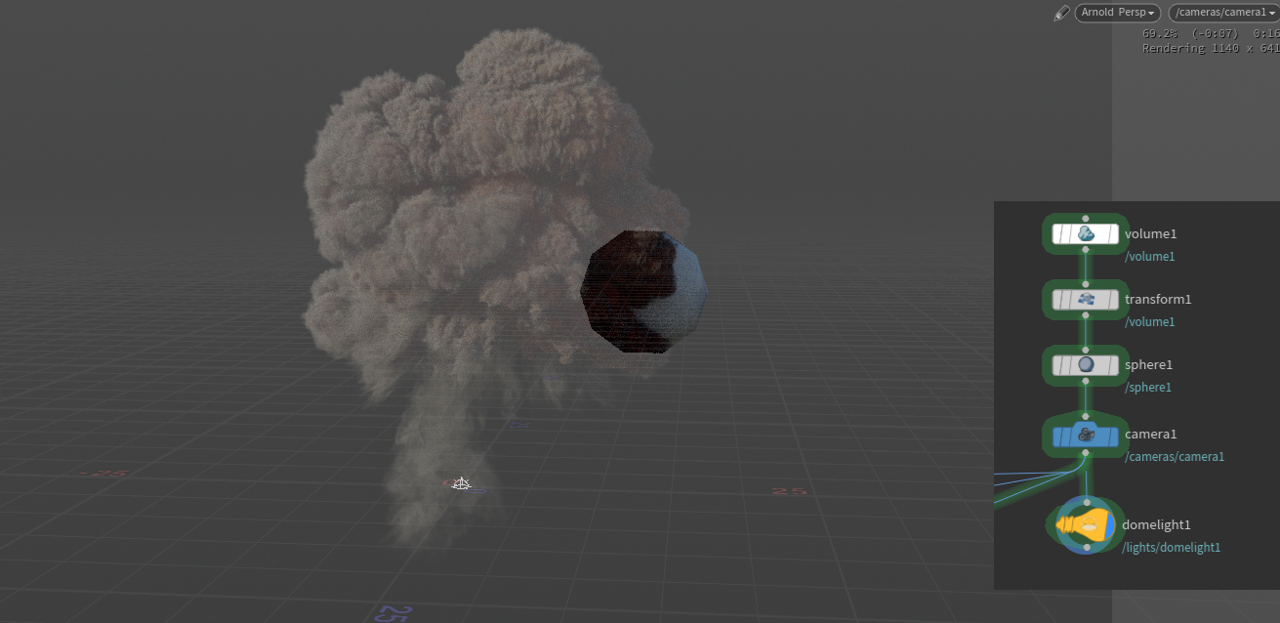
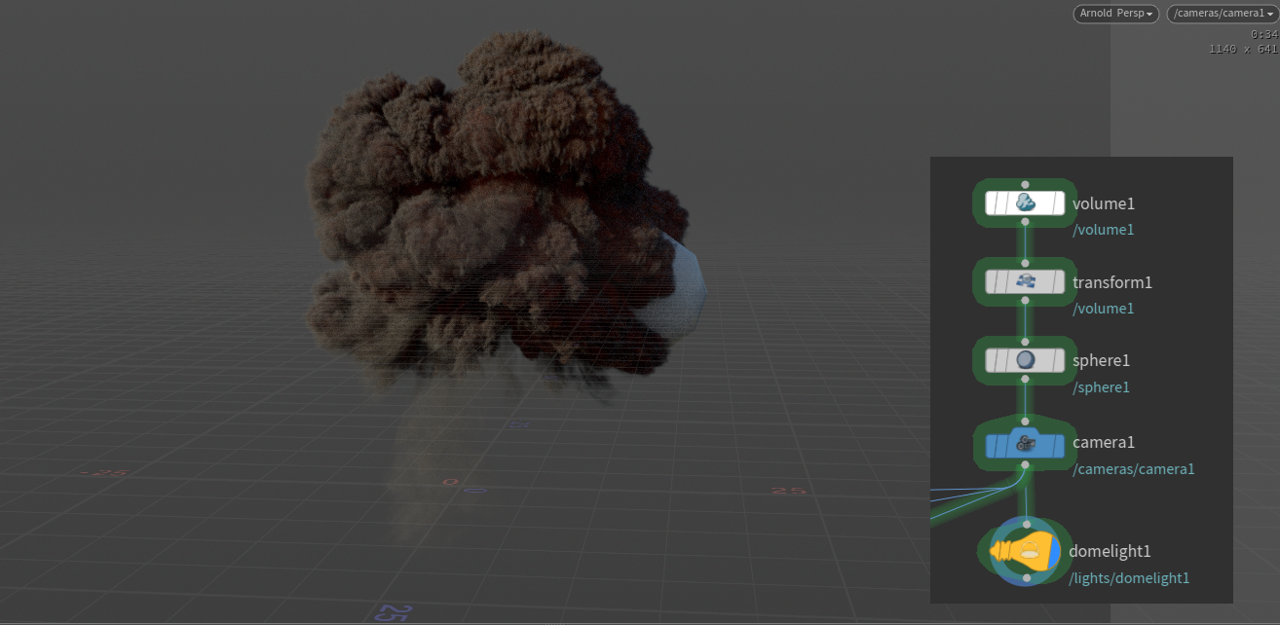
- HTOA-3344 - Fix volume alpha compositing issue in the Solaris viewport
| Before | After |
|---|---|
 |
 |
- HTOA-3365 - Fixed invalid USD prim names generated by Arnold Edit Material, which could cause scene instability and undefined behaviour
- HTOA-3373 - VDBs authored via the the Arnold VDB LOD (or VDB LOD Sop) workflows now work in Solaris
- HTOA-3403 - Fix passthrough for volume plugs
- HTOA-3407 - Segfault in FilterUnusedPoints::filter() rendering unconnected points without full topology
- HTOA-3411 - Use a USD prim picker dialog for shader node parms in a Solaris Material Builder (for example, the camera projection shader)
- HTOA-3421 - Unstable camera while panning in the Solaris viewport
- ARNOLD-6597 - Missing geometry from motion-blurred objects inside moving procedurals when procedural instancing optimization is enabled
- ARNOLD-9430 - Interactive modification of displacement shaders works
- ARNOLD-11648 - Make full frame imager updates thread safe
- ARNOLD-11706 - Tiny transmittance in interiors generates NaNs in CPU rendering
- ARNOLD-14047 - Light linking is not respected through transmission in skydome light
- ARNOLD-15234 - Crash in profiler with multiple render sessions
- ARNOLD-16231 - OSL opacity mask does not respect missingcolor
- ARNOLD-16386 - [GPU] Complex OSL and MaterialX shader networks could fail with an illegal memory access and render black
- ARNOLD-17468 - ar_orientations does not work for curves in Alembic files
- ARNOLD-17668 - kick: -o output file ignored when rendering USD scenes with open render window
- ARNOLD-17871 - Rare OSL crashes, particularly on macos
- ARNOLD-17988 - GPU OIDN crashes in Cinema 4D on Linux
- ARNOLD-18072 - Global operators must not change shared procedural content unless the selection matches every sharer
- ARNOLD-18142 - [FlowRender] Texture baking fails if multiple meshes have the same name
- ARNOLD-18279 - Viewport proxy of VDB points missing with custom point attribute
- ARNOLD-18322 - OSL texture() lookups on a missing file are slow
- ARNOLD-18333 - OSL camera:* attributes crash or return nothing when no object is being shaded
- ARNOLD-18356 - UsdLux: IES angle_scale in range (0, 1) renders too dark
- ARNOLD-18377 - OSL getattribute('uv'/'st') returns a transposed derivative block
- ARNOLD-18407 - Volume AOVs are black or dim in non-deep outputs when also rendering deep EXR or Cryptomatte
- ARNOLD-18446 - Crash when an imager was added to a driver's imager chain during an interactive render
- ARNOLD-18506 - [GPU] Crash at exit after a GPU render when AiEnd() is not called
- usd#2705 - Bind volume shaders on step-sized meshes
- usd#2730 - Use the OCIO config file path from the settings map when $OCIO is not set
- usd#2745 - Support renderingColorSpace in the hydra2 render_settings
- usd#2747 - Fix nodes destruction during interactive sessions under a procedural
System Requirements
Houdini, Houdini FX, Houdini Indie, and Houdini Education
- 20.5.684
- 21.0.792
- 22.0.466
Flow Render is available for the default Houdini Qt versions ( Qt6 for Houdini 22 and Houdini 21, and Qt5 for Houdini 20.5 and Houdini 20.0)
Linux with at least glibc 2.28 and libstdc++ 11.2.1 (gcc 11.2.1). This is equivalent to Rocky 8.
macOS 11 or later
Apple Mac models with M series chips are natively supported by HtoA
x86-64 CPUs need to support the SSE4.1 instruction set.
GPU rendering and OptiX denoising work on Windows and Linux only, and require an NVIDIA GPU with the Maxwell architecture or later.
- On Linux, we recommend 590.48 or higher drivers.
- On Windows, we recommend 591.28 or higher drivers.
Intel OIDN runs on all CPUs. GPU support is limited to:
- macOS
- Apple silicon GPUs (M1 and newer)
- Linux
- NVIDIA GPUs with Turing, Ampere, Ada Lovelace, Hopper, and Blackwell architectures
- Windows
- Intel Xe and Intel Arc dedicated and integrated GPUs
- NVIDIA GPUs with Turing, Ampere, Ada Lovelace, Hopper, and Blackwell architectures
- AMD GPUs with RDNA 2, RDNA 3, RDNA 3.5, and RDNA 4 architectures
- macOS