Create the model JSON
JSON is flexible in that you can write code for reading and writing the data in many programming languages. The JSON file can be created from scratch programmatically or by hand using an online editor. If created manually, it is easier to start with a similar file and modify to suit. Any existing SAM or SST file can be saved as JSON as a starting block as ASBD can now read and write JSON in addition to the previous binary format.
Here is a JSON example, showing the higher-level objects:
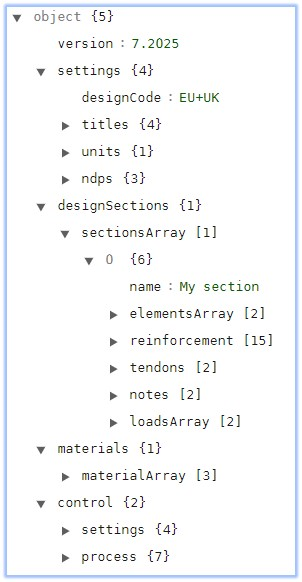
It contains 5 main blocks:
settingsThis object contains parameters relating to the Design Code, Titles, Units, and for Eurocodes only, the Nationally Determined Parameters.
designSectionsThis object contains parameters relating to one or more Design Sections.
designBeamsThis object contains parameters relating to one or more Design Beams.
materialsThis object contains parameters relating to the material definitions (concrete, steel, reinforcement, prestress, etc.).
controlThis object 'controls' automation and will be discussed below.
The example above defines a single section made up of 2 elements. There is a block which details the reinforcement and tendon location, an optional notes object and an array containing 2 load cases.
Design Sections or Beam sections can be made up of parametric shapes; user defined elements of any shape defining the perimeter which can include arcs; or can be from standard concrete or steel libraries. Here are some examples of these different types:
Parametric shape
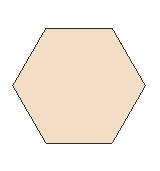
Simple hexagon polygon definition
{
  "shape": "6_BASE",
  "side": 0.5,
  "hookref": 0,
  "hookY": 0,
  "hookZ": 0,
  "propertyRef": "MP1"
}
Simple rectangle definition
{
  "shape": "RECTANGLE",
  "width": 0.8,
  "depth": 0.95,
  "hookref": 0,
  "hookY": 0,
  "hookZ": 0,
  "propertyRef": "MP1"
}
User defined shape
Precast section with curved sides

{
  "type": "PRECAST",
  "originType": "USER",
  "perimeter": {
    "nodes": [
      0.35,
      0,
      0.375,
      0.025,
      0.37,
      0.202,
      0.1533,
      0.3441,
      0.1169,
      0.3866,
      0.1091,
      0.442,
      0.2255072463768116,
      1.245,
      0.2205072463768116,
      1.25,
      0.1855072463768116,
      1.25,
      0.1855072463768116,
      1.3,
      -0.1855072463768116,
      1.3,
      -0.1855072463768116,
      1.25,
      -0.2205072463768116,
      1.25,
      -0.2255072463768116,
      1.245,
      -0.1091,
      0.442,
      -0.1169,
      0.3866,
      -0.1533,
      0.3441,
      -0.37,
      0.202,
      -0.375,
      0.025,
      -0.35,
      0
    ],
    "arcs": [
      5,
      16
    ]
  },
  "propertyRef": "MP2",
  "name": "Y7 Beam",
  "precastAge": 4
}
Standard libraries
Standard concrete or steel components are referenced by their identifier. The list of identifiers can be found in the following default installation location:
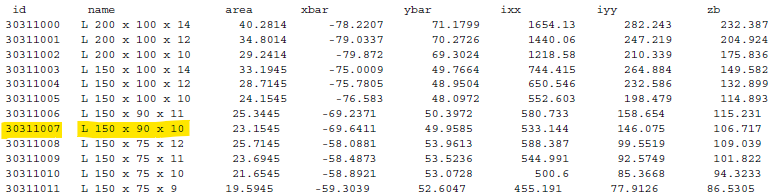
C:\Program Files (x86)\Autodesk\Structural Bridge Design 2022\Schema For example, to define a European unequal angle 150 x 90 x 10, the identifier (id) can be found in the document European_Sections_Steel.pdf.
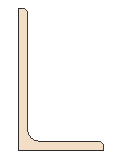
The JSON to describe this shape is:
{
  "shape" : "STANDARD_STEEL",
  "id": 30311007,
  "hookRef": 1,
  "hookY": 0,
  "hookZ": 0,
  "propertyRef": "MP1"
}