Compile Loading Patterns - Dynamic
Description
A loading compilation is a group of basic load cases that are each factored and then summed to always act together to represent the complete loading from a particular source. For dynamic analysis the basic load cases are either explicitly defined as lumped masses or are implicitly defined as nodal loads (eg vehicle loading). All relevant lumped mass loadings, applicable to a particular structure, must be included in the compilation(s) analysed if the correct modes of vibration are to be identified.
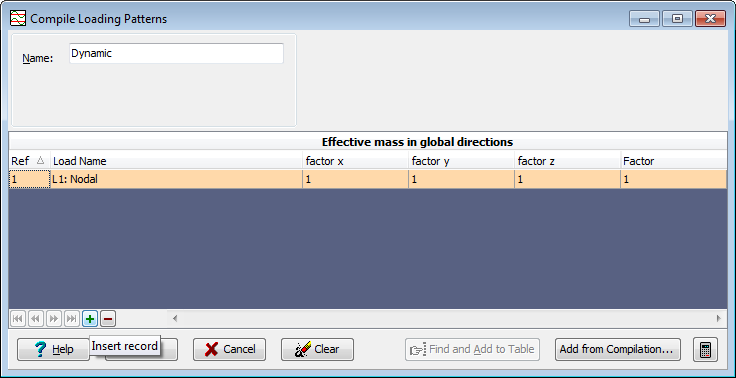
Each instance (use) of this 'Compile Loading Patterns-Dynamic' form applies to just one compilation at a time. A table in the form allows selection of all lumped masses that are to be included in the current compilation with adjacent 'Factor' column specifying what proportion of each lumped mass is incorporated in the compilation.
Dynamic compilations are analysed (along with structural dynamic mass) using the Dynamic Analysis Control.
Outline Procedure
This 'Compile Loading Patterns-Dynamic' form is accessed from the Structure Compilations Group button in the Explorer Navigation Pane as described in 'Using Compilations'.
Lumped mass loadings (whether explictly or implicitly defined) are selected individually in the 'Load Name' column and then appropriate factors are set in the adjacent column. Their sum is the compilation load.
Factors in this form reduce or remove the effect of explicit or implicit loadings They may be used, for example, if it is assumed that a heavy lorry is parked without its handbrake applied, in which case the effect of the mass in the longitudinal direction will be considerably reduced.
Reduction factors may be used in all three directions if standard HA or HB loading is the static load intensity. Since HA and HB already have a 'built-in' dynamic amplification factor the actual masses of the vehicles they represent may be only 0.7 (perhaps) of the vertical load divided by the acceleration due to gravity.
For details of the table features, and navigation, see the help topic Table Features & Navigation.
Notes
Clicking on the Add from Compilation button will open a child 'Compilations' dialog that contains a list of all the dynamic compilations presently created. On selecting one and confirming with OK the lumped masses in the selected compilation are added to the current compilation. Optionally the associated factors may be updated to maintain consistency.
Form Graphic
Field Help
Name
The program generates a short name that is used for identifying the loading compilation. The default name may be changed by entering an alternative name in this field.
Ref
Display only - not editable.
Load name
A basic load case is added to the list by selecting from the list of load cases that appears in the field under the heading 'Load name'.
A warning is issued if a conflict of load cases is detected.
Factor
The value that is used when combining the loads may be altered by entering an alternative value here. For example, it may be set to 1.0 to apply lumped masses as defined or changed to apply a factor to them. The default is 1.0.