Modify Assemble Properties
As you import data, create properties and create groups to add to your list of Assemble properties, you may want to become familiar with a few data management techniques in Assemble.
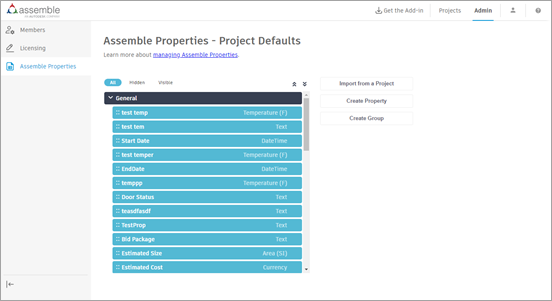
View or Hide Properties
There are three ways to view properties at the top of the Assemble Properties page.
- All displays all properties.
- Hidden displays specific properties that are not able to be seen by others.
- Visible display all properties that are visible to others.
View Properties from Multiple Categories
- When you assign a property group to specific model categories, the group in the properties panel only displays those categories.
- When selecting multiple objects across different categories, only the property groups that are common between the categories of all selected objects will be visible in the properties panel.
- When selecting a single object or multiple objects within the same category, property groups dedicated to that category and groups dedicated to all categories will be visible in the properties panel.
Move Properties
With Assemble, moving a property is as simple as dragging it over to the new location in the Assembles Properties list.
- Move a property from one group to another. Select and drag the property to the new group.
- Reorder a group. Select and drag the group to its new position within the Asssemble Properties list.
- Reorder properties in a group. Select and drag each property that you want to move to a new position within the group.
Edit or Delete a Group
To edit or delete a group in Assemble, point your cursor to the far right of the group name until the hover ellipsis appears.
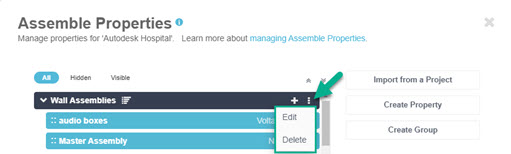
Do one of the following:
Select Edit to rename the group or to change the display for categories.
Select Delete to permanently remove the group from Assemble.
- A property that you delete at the account level is permanently removed from the account, and will no longer be available to use in future projects. Properties in existing projects won't be removed.
- A property that you delete from the the project level is permanently removed.
- Verify that it is OK to delete a property before completing this task.
Edit, Hide, or Delete a Property
To edit, hide or delete a property in Assemble, point your cursor to the far right of the property name until the hover ellipsis appears.
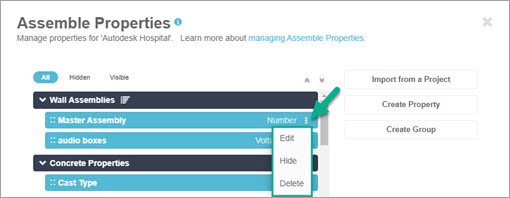
Do one of the following:
Select Edit to rename the property.
Select Hide to keep the property from being seen by others in the Assemble Properties list.
Select Delete to permanently remove the property from Assemble.
- A property that you delete from the account level will not be removed for existing projects and will not be available to use for future projects.
- A property that you delete from the the project level is unrecoverable.
- Verify that it is OK to delete a property before completing this task.