Project Administrators
Project administrators adjust project details, add project members and control their access to all activated modules, and activate project services.
To get up and running as a project administrator:
- Click Get Started in the email from Autodesk for Government notifying you that an account administrator has added you as a project administrator.
- Click Create Account and complete the fields in the dialog.
- Complete the account verification process, as needed, which may include entering a code sent via text message to your mobile phone.
Account administrators can add one or more project administrators to handle all project-level administrative responsibilities. For more information about how account administrators add project administrators, see Add Project Administrators.
Once you access the Project Admin module, you can start managing members, companies, and services, and edit the project profile.
Navigate the Project Admin Module
Familiarize yourself with the basic user interface (UI) components to more efficiently navigate the Project Admin module.
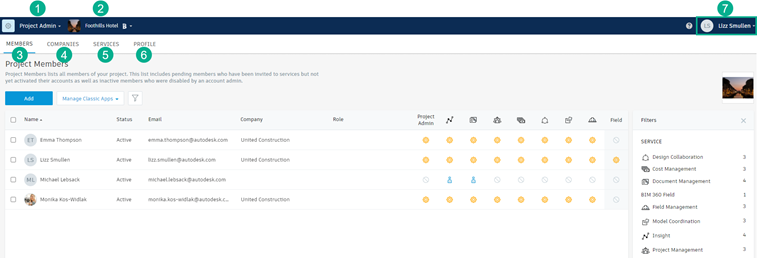
- Project Selector: Toggle between projects you have access to.
- Module Selector: Toggle the Autodesk for Government module you want to work with. You can only select currently activated project services.
- Members tab: Invite account members to a project and determine their access to activated modules.
- Companies tab: View a list of project members' company affiliations.
- Services tab: Activate and manage project services and add project administrators.
- Profile tab: Edit the project name and logo.
- Help Menu and Autodesk Profile: Find additional resources, including Forums, Support, and the Learning Panel.
Tasks
Project administrators are responsible for project-specific management workflows, including details such as services, companies, and members. Basic project administrator workflows include:
- Manage project member and module access: Learn about inviting members to an account and controlling their access to product modules.
- Activate project services: Learn about activating services for your assigned projects and add project administrators.
- Edit a project profile: Learn about modifying the profiles of previously created projects.
- Work with the Activity log: Learn about working with a record of project activities associated with the Autodesk Docs for Government module.
Refer to Visual Workflow: Project Administrators to see project administrator tasks in a workflow diagram.
For more in-depth information about project administrator responsibilities, refer to Project Admin.