ViewCube
While working with 3D models the Viewcube can help you orient views.
Reorient the Current View to a Preset Orientation
Click one of the faces, edges, or corners on the ViewCube.
Reorient to an Adjacent Face
Click one of the triangles displayed near the edges of the ViewCube tool.
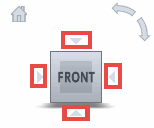
Note: A face view must be current.
Roll a Face
Click one of the roll arrows displayed above, and to the right of, the ViewCube.
The left roll arrow rotates the view 90 degrees counterclockwise, while the right roll arrow rotates the view 90 degrees clockwise.
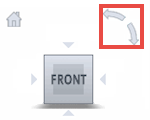
Note: A face view must be current.
Orbit the Model
- Click the ViewCube, hold down the left mouse button on your pointing device, and drag to orbit the model.
- Drag in the direction that you want to orbit the model.
When you drag or click the ViewCube tool, the view of the model reorients around a pivot point. The pivot point is displayed at the center of the object.
Reorient Model to Home View
Right-click the ViewCube, and click Home.
Set Home View
Right-click the ViewCube, and click Set Home View.