Data Connector
Data connector allows project administrators and members with executive overview access to extract data from projects by running or scheduling data extractions. The easy extraction offers you the flexibility to analyze data using your own business intelligence tools.ls.
Extracted data includes:
| Account-Level | Project-Level |
|---|---|
| Activated services | Assets |
| Business units | Checklists |
| Companies | Cost |
| Projects | Daily logs |
| Users | Construction IQ |
| Roles | Issues |
| Locations | |
| Meeting minutes | |
| Relationships between data. For example, RFIs that relate to PCOs |
|
| Reviews | |
| RFIs | |
| Submittals | |
| Transmittals | |
| Daily Logs |
Access Data Connector
Project administrators can access Data Connector to extract data for a single project they are currently in.
Members with executive overview access enabled can choose to access Data Connector to extract data for all projects at account level, or a single project at project level. Account administrators can grant executive access to members.
Once access is enabled:
- Select the Insight module.
- Click
 on the left panel under Dashboards.
You can now run or schedule a data extraction.
Run Extraction
- Click Run extraction.
The data extraction will now start processing. Depending on the number of projects included, data extraction may take some time. While the extraction is in progress, you can navigate away and return later to check on progress.
Schedule Extraction
You can automate regular data extractions by using scheduling.
Click Schedule.
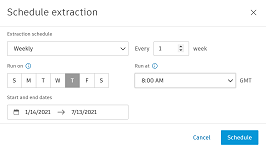
You can edit the following fields:
- Extraction schedule: Select Daily,Weekly, or Monthly
- Every: Select the number of days, weeks, or months
- Run on: Select the date that you want the schedule to run
- Run at: Select the time
- Start and end dates: Select the start and end dates
Click Schedule.
Notification and Download
You will receive an email once the extraction is complete after which you can download a ZIP file containing a series of CSV files from the Data Connector area of Insight. Each CSV file represents a different set of data for the categories listed previously.
The files generated during the extraction are available for download for 30 days.