Find a node in the graph
Use the Search box at the top of the Bifrost Graph Editor to find existing nodes anywhere they are used in the current graph. You can enter a search string directly, or right-click on a node in the graph to find instances of the same node type.
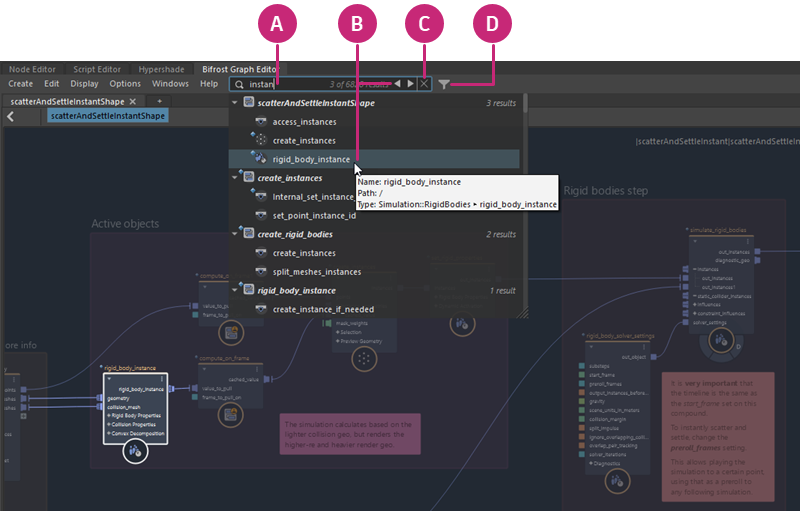
| A | Enter a string of consecutive characters anywhere in a node name or type into the Search box. You can use regular expressions (regex), for example, You can enter the exact path to a specific node to navigate directly to it, for example `/compound1/compound2/node`. To go to the top of the graph, type `/` and press enter. When the Search box is empty, click to select from a list of previous searches in the current session. |
| B | Use the mouse or the arrow buttons to select from the list. The selected node is framed and highlighted in the Bifrost Graph Editor. |
| C | Click the X button to clear the current search. |
| D | Click the Filter button to include or exclude nodes inside referenced compounds from the search. Nodes inside referenced compounds can't be edited, so it's helpful to exclude them when searching for nodes with editable parameters. However, you can include them in case you want to understand where particular values might be being set even if it's not editable. |