Budget and Contract Tables
Cost Management provides two ways to view your project's financial information through the Budget and Contract tables. These tables help you track all incoming and outgoing cash for your project:
- Budget table: Organizes incoming budget, outgoing costs, and changes by your preferred budget coding structure.
- Contract table: Organizes the same financial data by supplier contract.
Both tables contain identical financial information but present it differently based on your tracking needs.
Each table is organized into main sections:
- General: Contains defining information about each line item, such as the budget code.
- Budget: Shows incoming values that will be paid to your company.
- Budget Forecast: Show budget projections. Visible when project administator turn on budget revenue forecast. See Budget Forecast and Date Range Based Resources to learn more.
- Cost: Shows outgoing project expenditures.
- Cost Forecast: Shows cost projections.
- Variance: Shows money gained or lost for budget items.

Budget Columns
The values in these columns update as the budget status changes:
Original Budget: Populates as the budget is entered or imported.
Internal Budget Transfers: Populates by internal budget transfers and transfers from forecast adjustments.
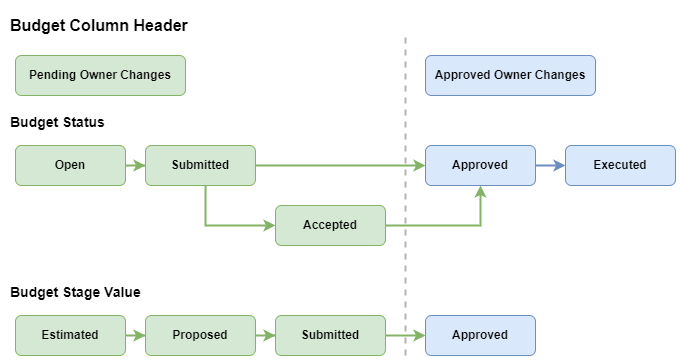
Approved Owner Changes: The sum of the approved value of cost items with a budget status of Approved or Executed.
Revised Budget: Populates with the sum of the Original Budget, Internal Adjustments, and Approved Owner Changes.
Pending Owner Changes: The sum of the value of cost items with a budget status of Open, Submitted, Accepted, or Revise and Resubmit.
Tip: To break out accepted pending changes or adjust how owner changes roll up by status, scope, or change order type, see Example: Reconcile pending owner changes with a custom column and Reconcile Pending Owner Changes in the Budget Table.Projected Budget: The sum of the Revised Budget and Pending Owner Changes.
Billed To Date: Shows the Approved Budget Payment Application. Visible when project administator turn on budget revenue forecast. See Budget Forecast to learn more.
The colors in the following image represent the column where values appear based on their budget status. The value entered comes from the budget stage of the cost item.
Budget Forecast Columns
Columns in this section show budget projections and adjustments. These columns help you forecast total project revenue alongside costs to calculate projected fees and manage scenarios where resources change without exceeding contract limits.
- Budget Forecast Adjustments: Manual adjustments for expected budget revenue changes. You can generate PCOs from these adjustments to request additional budget.
- Forecast Budget To Complete: The projected budget revenue remaining to complete the project.
- Forecast Final Budget: The total forecasted budget revenue including original budget, transfers, and adjustments.
- Calculated Final Budget: The forecasted final budget revenue derived from Date Range Based Resources. This value auto-updates based on the Date Range Resource update schedule and can also be used as a base value in custom calculated columns.
Cost Columns
The values in these columns update as the cost status changes:
Original Commitment: The projected or actual initial contract cost.
Note: If there is no contract linked with this budget, the Original Commitment value will be equal to the Revised Budget value. Therefore, the Variance column will display zero.Approved Change Orders: Approved contract change orders.
Uncommitted Change Orders: Cost items that have their budget status approved or executed, but cost status is not approved or executed.
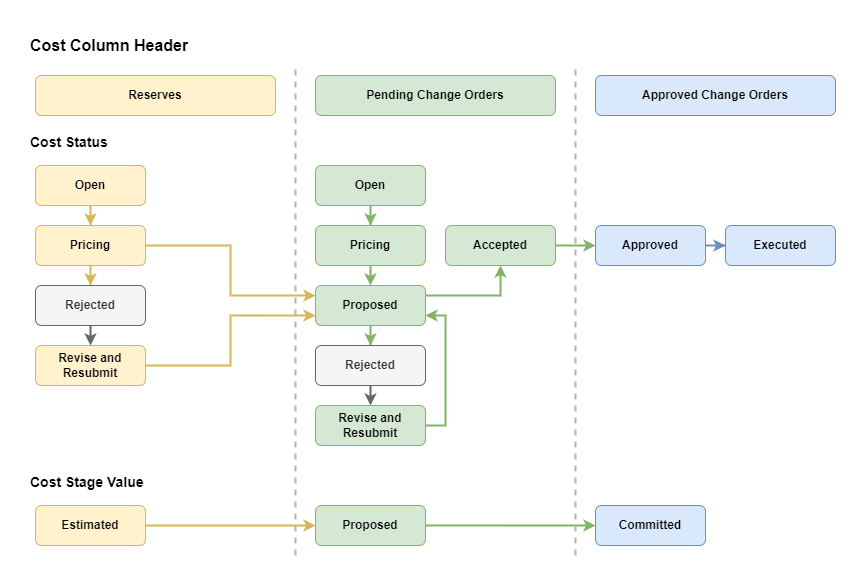
Pending Change Orders: Contract change orders that are calculated on the cost item's Proposed Value (if Committed Value is empty) or Committed Value with a cost status of Proposed or Accepted.
Reserves: Allowance calculated using the "Estimated" value of a cost item with a cost status of Open, Pricing, or Revise and Resubmit.
Commitment & Changes: The sum of Original Commitment, Approved Change Orders, Pending Change Orders, and Reserves. The Original Commitment column populates Contracted Commitment unless it's empty - then, Revised Budget.
Projected Cost: The sum of Original Commitment, Approved Change Orders, Pending Change Orders, and Reserves (the same components as Commitment & Changes). When auto cost overrun adjustments are enabled and approved actual costs exceed Forecast Final Cost, Cost Management creates a system-generated cost overrun adjustment instead of promoting actual cost into this column.
Actual Cost: The sum of Approved Expense, Approved Cost Payment Application, and Direct Input. Direct Input shows any expenses processed in a company's ERP system and integrated into Cost Management.
The colors in the following image represent the column where values appear based on their cost status. The value entered comes from the cost stage of the cost item.
Cost Forecast Columns
The values populate and move across the columns in the forecast section as the cost status changes.
- Cost Forecast Adjustments: Manual or system-generated adjustments for expected cost changes. You can generate PCOs from these adjustments to request additional budget.
- Forecast Cost to Complete: The projected amount to be spent to complete the project.
- Forecast Final Cost: Sum of Original Commitments, Approved Owner Changes, Pending Owner Changes, and Reserves.
- Calculated Final Cost: The forecasted final cost derived from Date Range Based Resources. This value auto-updates based on the Date Range Resource update schedule and can also be used as a base value in custom calculated columns.
Variance Columns
The values populate and move across the columns in the variance section as the cost status changes.
- Variance: The difference between Projected Budget and Projected Costs. If the Projected Budget value is 11,900 and the Projected Costs value is 9,900, the value in the Variance column is 2,000.
- Forecast Variance: The amount of money made or lost due to midproject adjustments.