Share Closed RFIs Through Bridge
Share an RFI During Closure
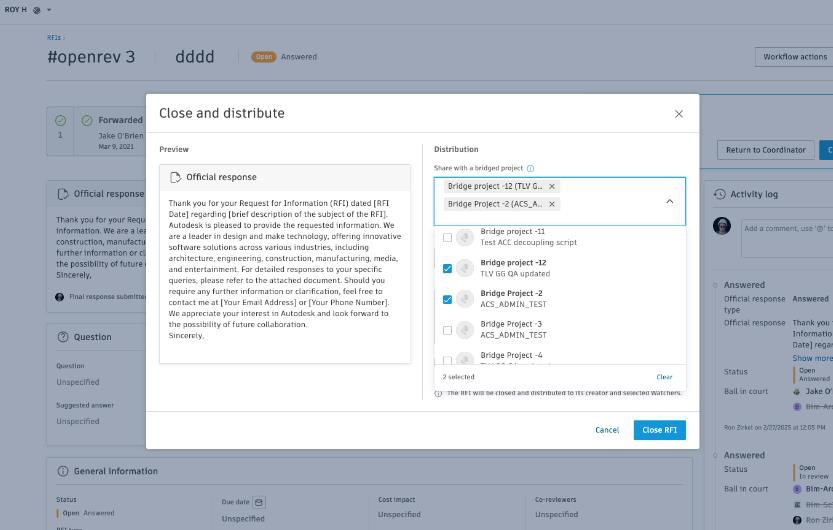
When you close an RFI, you can share it with other Bridge-connected projects:
- From the RFI you want to close, choose Close and Distribute (or Close RFI).
- Choose Share the RFI with other projects.
- Choose the projects you want to share with. The list shows project and account names in alphabetical order.
- Optionally, include an RFI report. Bridge attaches it to the shared RFI in the target projects and adds it as a reference in Files.
- Close the RFI.
Bridge creates a closed copy of the RFI in each project you chose. You get a message that confirms the sharing process has started.
Sharing RFIs through Bridge complements sharing sheets, files, and folders between projects. You no longer need to export RFIs to Files first, and the shared RFI keeps its context and metadata. For more details, see Bridge Workflows.
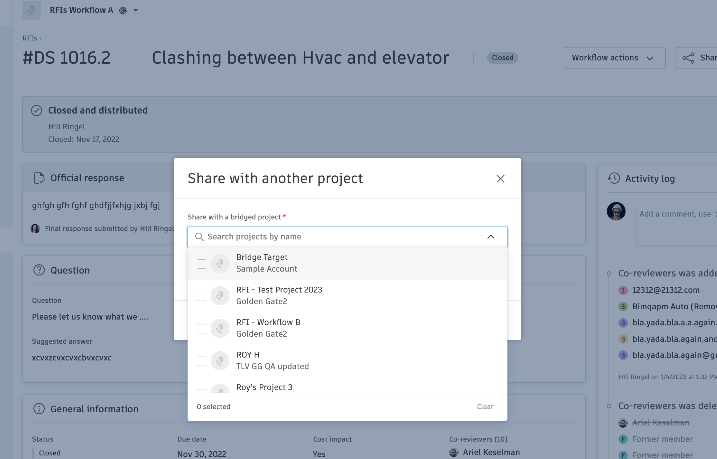
Share a closed RFI
- Go to the closed RFI you want to share.
- Choose Share. You can also choose Share from the quick actions for the RFI.
- Choose the target projects.
- Choose Share to confirm. A message confirms the sharing process has started.
Tip:
You can share an RFI with several projects at once.
Once you share an RFI through Bridge:
- A read-only copy appears in each target project.
- The shared RFI displays Bridge indicators in both source and target projects.
- Activity log entries track the sharing action.
- Target project members receive notifications based on their settings.
For information about what data is included when sharing, see What's Shared in Target Projects.