Tool Settings
Workdays Management
Customize your calendar to match your needs and maintain consistent availability across Plans.
- Customizing Your Calendar: Your calendar's appearance can be tailored to offer a personalized touch.
- Setting Workdays: You have the freedom to select your preferred working days of the week. Additionally, designate the first day of each week to your liking.
- Adding Non-working Days: For those special non-working occasions, such as holidays, you can easily add specific dates.
- Importing and Exporting Dates: Begin by downloading the provided template.
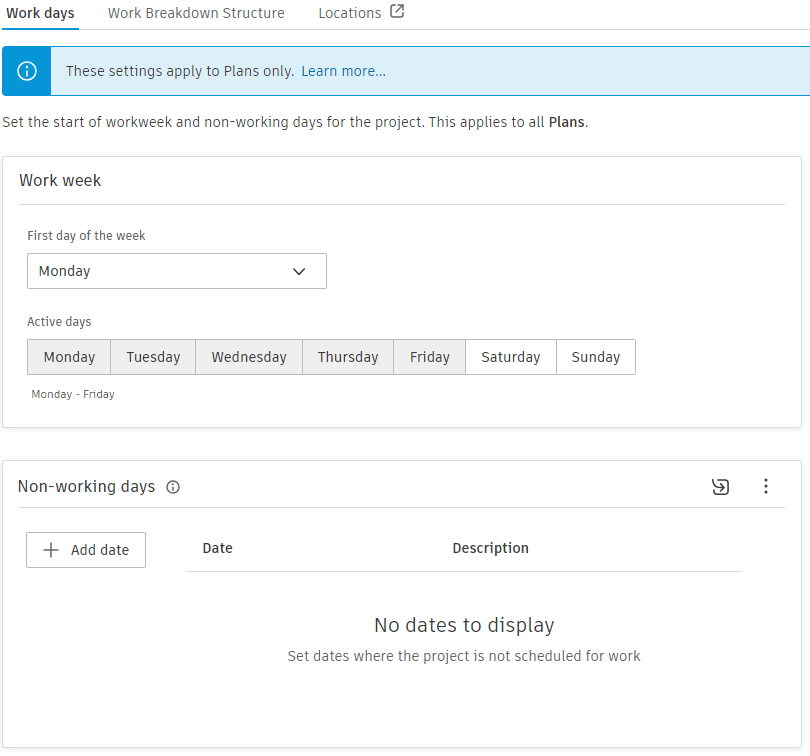
To set up work days for plans:
- Select First day of the week.
- Select Active days.
- Add Non-working days.
You can add single days or date ranges by checking the Range selection checkbox.
Once you've filled in the dates and descriptions, you can choose to either append to the existing dates or overwrite them. Should you need to use this information elsewhere, you can export your dates to an Excel file.
WBS (Work Breakdown Structure)
Organize your tasks efficiently using a structure that you define.
- Defining Structure: Craft a unique breakdown structure to meet the needs of your tasks.
- Importing and Exporting WBS: Excel integration makes it easy to import structures or export them for use in other platforms.
The Work Breakdown Structure currently affects only the Plans.
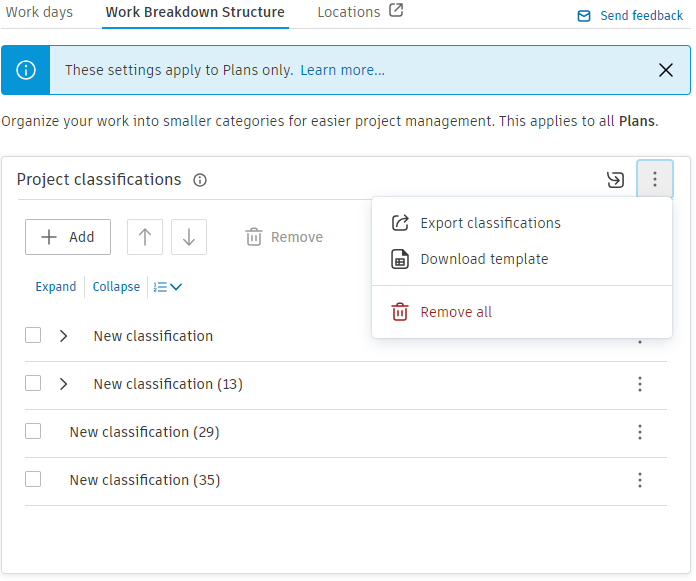
To set up Work Breakdown Structure for plans:
- Click Add to add first level of classification.
- Repeat step 1. until all first-level classifications are set.
- To add subclassification click Additional options menu on far right and click Add sub-classifications.
- Repeat step 3. until all sub-classification levels are set.
Users have the capability to import a Work Breakdown Structure (WBS) using our provided downloadable template. It's important to note that any information imported from this template will overwrite existing data in the tool. Additionally, for broader applicability, users can export the tool's information for use in other projects.
Locations
Utilize locations to bring structure and hierarchy to your project.
- Overview: Locations provide a way to hierarchically organize a project.
- Hierarchy Levels: Regardless of your project's complexity, you can tailor the organization to fit its scope.
- Management: To ensure there's no deviation, locations are managed at the project level, bringing uniformity across the board.
- Access: For all location management needs, head over to the Project Admin module.
Users can be designated as either a Manager or a Creator. While the Manager role retains its traditional functionalities, the Creator role introduces enhanced capabilities. Specifically, a Creator has the authority to import schedules and establish a standalone plan.
To set up tool-level permissions:
- Click Settings.
- Inside the Settings menu click Add Roles.
- In Add Roles, input a Member, Company, or Role, then assign the relevant permission to each.
| Feature | Manager | Creator |
|---|---|---|
| Import and Update schedule |  |
|
| Create plans | |
|
| Access all existing timelines (schedules and plans) | |
 |
| Grant tool-level permissions | |
|
Check out our video course to learn more.