Properties Panel
Model Coordination uses an updated version of the Properties panel, offering enhanced capabilities for managing and viewing model properties.
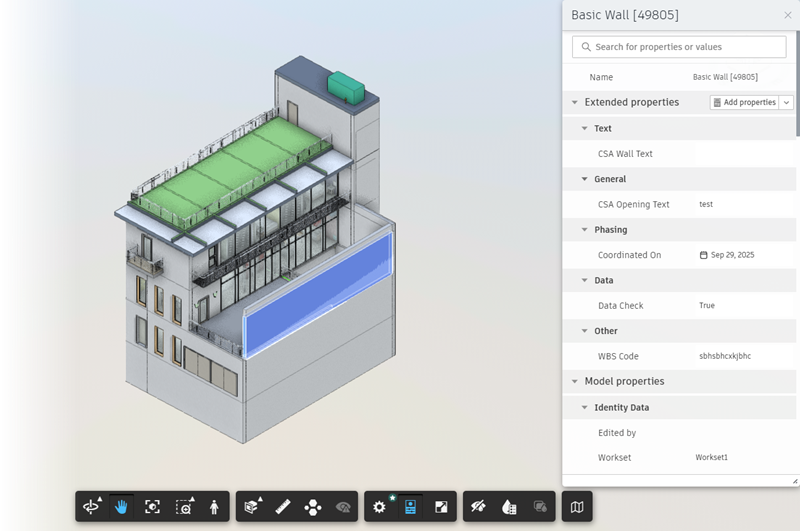
Key Features
View Properties
The Properties panel displays properties in two sections (as applicable):
- Extended Properties: Custom properties imported to Model Coordination using the Parameters Service. See Extended Properties for more information.
- Model Properties: Properties that were added to the model in the upstream authoring software.
Add and Manage Extended Properties
Use the Add properties button, or click the drop-down and to access the Manage properties button, to add and edit extended properties directly in the Properties panel.
See Import and Add Extended Properties and Manage Extended Properties for more information.
Edit Extended Properties
Extended property values can be edited directly in the Properties panel for the model objects selected in the viewer.
Search for Properties
Use the search bar at the top of the Properties panel to search the selected model objects for specified properties and values.
Differences between Model Coordination and Docs/Build
Shared Properties Display: When multiple model objects are selected, the Properties panel in Model Coordination only shows the properties that are shared by all the selected objects. In Docs and Build, the Properties panel displays all the properties that are present for any selected object.
Rollup Functions for Numeric Properties: When multiple model objects are selected, and those objects have varying values for a numeric property, the Properties panels in all products provide a drop-down list that allows you to select a rollup function, for example sum, minimum, or mode. However, there are the following differences between products:
- Rollup values may differ between the Properties panels due to calculation methods.
- Docs and Build treat objects with no value as having a value of "0".
- Model Coordination excludes objects with no value from calculations, for example when calculating a mean.