Home and ViewCube
While working with models, you can use home and the Viewcube can help you orient views.
- Home
- ViewCube
- Change View to a Preset Orientation
- Change View to an Adjacent Face
- Roll a Face
- Orbit the Model
- ViewCube Settings
Home
 : Click the home icon to reset the view of your model back to default.
ViewCube
The ViewCube is a navigation tool that allows you to switch between standard and isometric views. The ViewCube provides visual feedback about the current viewpoint of the model as view changes occur. You can drag or click the ViewCube, switch to one of the available preset views, roll the current view, or change to the Home view of the model.
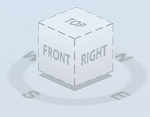
Change View to a Preset Orientation
Click one of the faces, edges, or corners on the ViewCube.
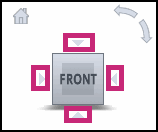
Change View to an Adjacent Face
Click one of the triangles displayed near the edges of the ViewCube tool.
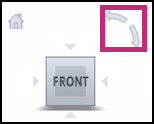
Roll a Face
Click one of the roll arrows displayed above, and to the right of, the ViewCube.
The left roll arrow rotates the view 90 degrees counterclockwise, while the right roll arrow rotates the view 90 degrees clockwise.
Orbit the Model
- Click the ViewCube and hold down the left mouse button.
- Drag in the direction that you want to orbit the model.
When you drag or click the ViewCube tool, the view of the model reorients around a pivot point. The pivot point is displayed at the center of the object.
ViewCube Settings
Right click the ViewCube to view more orientation options:
- Go Home: Reorients the model to the home view
- Orthographic: Shows the model in a 3D view where all components are at the same depth.
- Perspective: Orients the view to a perspective view which portrays height, width, and depth.
- Perspective with Ortho Faces: Orients all views to be displayed in perspective projection unless the model is being viewed from one of the face views: Top, Bottom, Front, Back, Left, or Right.
- Set current view as Home: Defines a current view as Home.
- Focus and set as Home: Defines the Home view of the model based on the current view.
- Reset Home: Resets home to the original home view.
- Set current view as Front: Defines a current as Front
- Set current view as Top: Defines a current view as Top
- Reset orientation: Restores the default value.