Submit for Review
You can send files for review directly from the Files tool either by manually selecting files and folders, or automatically by creating and applying review auto-triggers to folders.
Permissions Required
You need View only folder permission or above to submit files for review.
How to Submit Files for Review
Select one or more files from the files list and either:
- Right-click any of the selected files; or
- Click the More menu
 in the action bar above the files list.
Select Submit for review
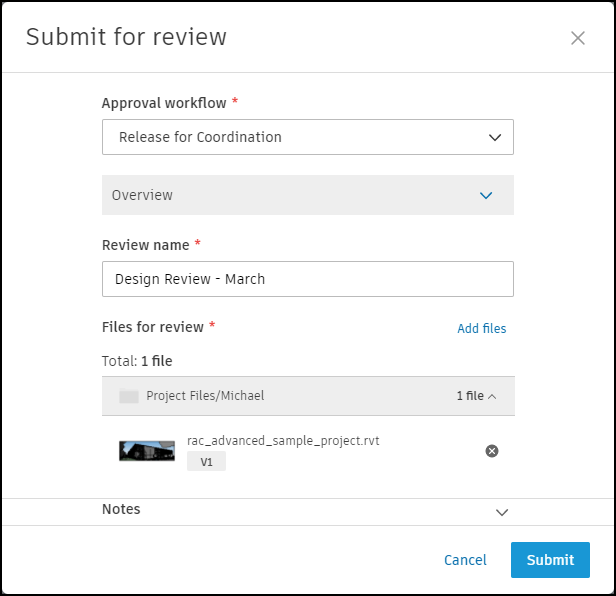
Select the Approval workflow that you want to use.
If no workflows are available, an administrator can create approval workflows in Forma Data Management. See the Create and Edit Approval Workflows to learn more.
Enter a Review name.
If necessary, add more files and enter any notes you want to include. You can also edit the folder the files are copied to when the review is complete.
Note: Rename any non-complying files which are copied to a folder with a naming standard applied.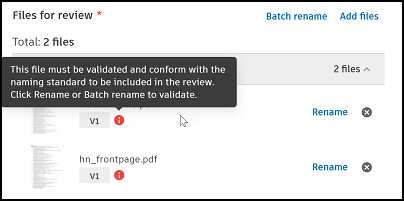
Click Submit to initiate the review.
Optionally, send an email notification to the reviewers, approvers, and(or) other project members to let them know the review is ready.
Review are listed in the Reviews tool in Forma Data Management, awaiting action by the reviewer or approver.
Tip: The Review status attribute value will display any in progress files as In review. When the review is completed, the file will display as Approved or Rejected. See Reviews FAQs and Review File Statuses for more information.Note: To monitor a review that you have initiated, go to the Reviews tool in Forma Data Management and click your review to open it. Use the Progress panel to check the review status. You can also send email notifications to remind the assigned reviewers and approvers to take action.
Other Considerations
In Forma Data Management, you can also create and edit approval workflows, Review, and Approve Files and export a reviews report from the Reviews tool.