Resolve Naming Standard Attribute Conflicts
When creating or importing a naming standard, you will need to resolve naming standard attribute conflicts between existing attributes and those in the naming standard.
You will also need to ensure that each naming standard is unique.
How to Make a Naming Standard Unique
A naming standard is unique if it differs to other naming standards in terms of any of the following:
- Number of attributes
- Types of at least one attribute
- The order of the attributes.
For example for an existing naming standard with naming convention attributes: Project - Originator - Type and Related attributes: Status.
| Naming convention | Related attributes | Uniqueness |
|---|---|---|
| Project - Originator - Number | Status |  - Different attribute selection - Different attribute selection |
| Project - Originator - Status | Number | - Different attribute order |
| Project - Originator - Type | Status, Revision | - Different attribute selection |
| Project - Originator - Type - Number | Status | -Different number of attributes, attribute selection |
| Project - Type - Originator | Status | - Different attribute order |
| Project . Originator . Type | Status |  - Different delimiter doesn't make a naming standard unique - Different delimiter doesn't make a naming standard unique |
Resolve Naming Standard Attribute Conflict Errors
When you create or import a naming standard, you need to resolve any conflicts between existing custom attributes and those in the naming standard.
A conflict arises when creating or importing a naming standard if:
An attribute in the naming standard has the same name as an existing attribute in the project but a different description, type, constraints, or values.
A naming standard attribute is set as Uniclass and an existing attribute is already set as Uniclass (even if the attributes have different names)
When you create or import a naming standard and there are conflicts, the Resolve attribute conflicts dialog opens. Any naming convention or related attribute conflicts are highlighted in red.
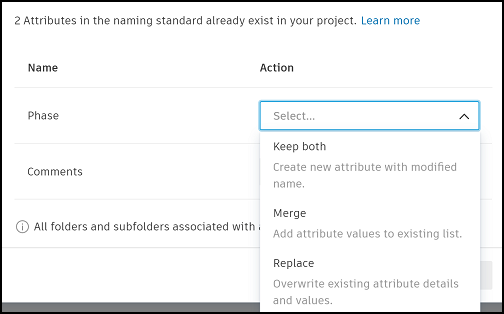
The conflicted attributes are listed below. You can hover the info icon to view the attribute details of the conflicting attribute in the naming standard compared with the same attribute which exists in the project.
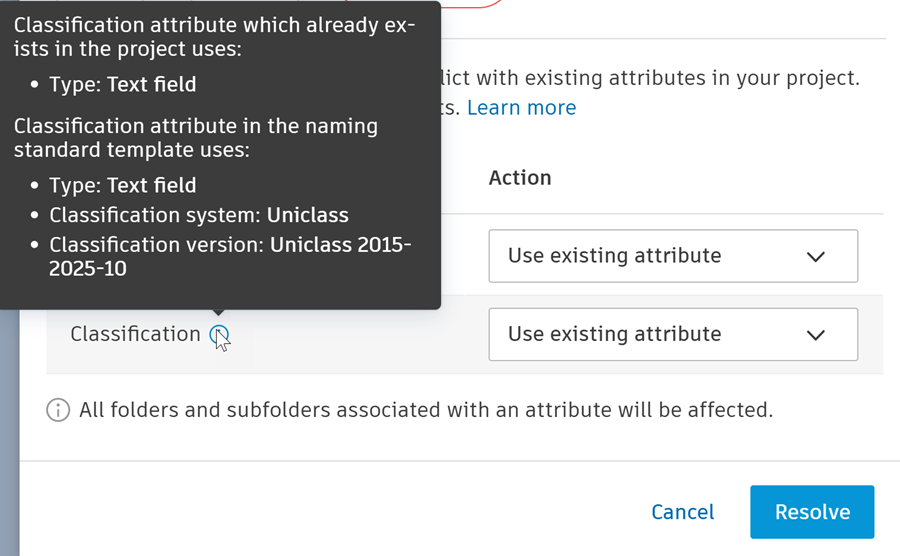
This may help you to work out which option to use to resolve the conflicts. You can resolve these conflicts by clicking the drop-down for each listed attribute. You have the following options which will display according to the attribute error:
Use existing attribute: Use the attribute which already exists in the project instead of the conflicting attribute in the new naming standard.
Overwrite existing attribute: Overwrite the existing attribute with the details and values of the new naming standard attribute.
Important: If the existing attribute had values which were previously added to files, those values will be outdated if they don't exist in the new naming standard attribute.Create and use new attribute: Create a new attribute by copying the new naming standard attribute and giving it a modified name.
Merge existing and template attribute: Add the values from the new naming standard attribute to the existing attribute.