The Configuration Rules API lets you read and author the rules that drive and limit the configured aspects of a Configured Design in Fusion — the same rules you can build on the Rules Canvas, expressed as typed objects in code.
Preview: The Configuration Rules API is provided in preview. Its objects, methods, and properties may change in a future release.
Overview — what a configuration rule is and the object model.
Getting Started — prerequisites, reaching the manager, and the script scaffold the examples use.
Reading Rules — getRules, itemById, itemByIds.
Modifying Rules — add, update, delete, reorder, and round-trip as JSON.
Building Rule Bodies — the typed statement and condition blocks.
Columns and Values — the columns a rule can target, the value to use for each, and expressions.
Issues and Errors — handling problems reported by a call you made.
Rule Statuses — getStatuses, getStatusesByRuleId, getStatusesByConfigurationId.
Best Practices — writing predictable rules.
See also
A configuration rule is a logical rule that limits or drives the values of the configured aspects of a Configured Design. Each rule is evaluated against every configuration in the design — the configurations in order from left to right — and the rules themselves are evaluated from top to bottom. A rule produces one of two kinds of result for a configured aspect:
In the user interface, you author rules on the Rules Canvas by connecting blocks from the Toolbox into conditional statements. The API works with the same rules and the same building blocks, but you construct them as typed objects in code. A rule you create with the API appears on the Rules Canvas, and a rule authored in the user interface can be read and modified with the API.
Access begins with the configurationRulesManager property of the Design object. It returns a ConfigurationRulesManager, or null if the design is not a Configured Design. Because rules are stored with the design rather than held in memory, each read is a discrete request, so read what you need into your own variables rather than calling the manager repeatedly. Through the manager you can:
getRules returns every rule in one request; itemById and itemByIds return specific rules.
modifyRules applies a batch of additions, updates, deletions, and reordering in a single call; addRule and deleteRule are conveniences for the single-rule cases.
getStatuses reports what the rules engine found the last time the rules ran; getStatusesByRuleId and getStatusesByConfigurationId narrow that to one rule or one configuration. See Rule statuses.
Each rule is a ConfigurationRule with a name, an optional comment, an isActive flag, and a body. The body is an ordered list of typed blocks in two families — statement blocks (the actions a rule performs) and condition blocks (the tests an If block evaluates) — plus the typed values those blocks carry. See Building rule bodies for the full block reference.
In the user interface, these blocks sit inside a Rule block on the Rules Canvas that carries the rule's name and on/off state. In the API that container is the ConfigurationRule object itself — its name, isActive, and body — not a block within the body.
Reads and modifications both return a result that carries an issues array alongside the affected rules. An empty issues array means the operation was applied or read cleanly; entries describe non-fatal problems. Fatal problems are reported as an error instead (see Issues and errors).
Issues and statuses are different things. An issues entry describes what went wrong with the call you just made — a malformed block, an id that matched nothing. A status describes what the rules engine found when the rules last ran, for one rule on one configuration. A call can return no issues at all while a rule is switched off on half the design's configurations, so check both (see Rule statuses).
Configuration rules act on the columns of the configuration table's top table — not on theme tables directly, though a top-table theme column's value is a theme-table row key (see Columns and values).
Before using the API, create and edit some configuration rules through Fusion's user interface so you are familiar with how they behave; this document explains the equivalent functionality in the API. All examples are Python, intended to be run from the Fusion Script Editor (Utilities > Scripts and Add-Ins) with a Configured Design open and active.
Design.configurationRulesManager returns null. See the Configurations topic for how to create a Configured Design.getRules they make no round trip and never trigger a rules run.Every example in this document runs inside the following scaffold, which connects to the manager and handles fatal errors. Later snippets show only the lines that matter and assume rulesManager, app, ui, and design are in scope from here.
import adsk.core, adsk.fusion, traceback

def
run(context):
    ui = None
    try:
        app = adsk.core.Application.get()
        ui = app.userInterface
        design: adsk.fusion.Design = app.activeProduct

        # The manager is null for a design that is not a Configured Design.
        rulesManager = design.configurationRulesManager

        if rulesManager is None:
            ui.messageBox('The active design is not a Configured Design.')
            return

        # ---- example code goes here, using `rulesManager` ----
except:
        # Fatal problems, such as a missing extension entitlement, arrive here.
        if ui:
ui.messageBox('Failed:{}'.format(traceback.format_exc()))All three read methods return the affected rules together with an issues array. Inspect issues even on a read — a non-empty array describes a non-fatal problem, such as a CONVERSION_WARNING encountered while reading a rule back.
getRules() returns a ConfigurationRulesResult with every rule on the design in evaluation order. Iterate its rules collection rather than indexing the manager.itemById(id) returns a ConfigurationRuleResult for a single rule. It reports an error if the id is empty or does not match an existing rule (in Python, a raised exception), so use it when you expect the rule to exist.itemByIds(ids) returns a ConfigurationRulesResult for a list of ids. A miss is reported as a RULE_NOT_FOUND entry in issues and is simply absent from rules, rather than being reported as an error — unless none of the requested ids match, in which case the call fails with an error (NO_MATCHING_RULES) instead of returning a result. An empty array returns every rule, like getRules.result = rulesManager.getRules()
app.log(f'The design has {len(result.rules)} configuration rule(s).')
for rule in result.rules:
state = 'active' if rule.isActive else 'inactive'
app.log(f' {rule.name} (id={rule.id}, {state})')
for issue in result.issues:
app.log(f' issue: {issue.code} - {issue.message}')Each ConfigurationRule exposes its id, name, comment, isActive flag, and body. To work with the blocks in a body, see Building rule bodies.
All changes go through modifyRules, which takes a ConfigurationRulesModifyInput built with ConfigurationRulesModifyInput.create(). The input has three optional collections:
rules — the rules to add or update.deleteRuleIds — the ids of rules to delete.orderedRuleIds — the desired final order of the rules.The request is applied in a fixed order — deletes first, then reorder, then adds and updates — but it is not all-or-nothing: a per-rule or per-block problem does not roll back the rest of the batch. If an individual block fails validation, it is replaced with an empty placeholder and a VALIDATION_FAILED issue is recorded, while the rest of the rule and the batch still apply. Always inspect issues after a call. modifyRules returns a ConfigurationRulesResult whose rules collection holds the post-mutation state of the added or updated rules (in input order), which is how you recover the ids assigned to new rules.
A rule with an empty id is treated as new. Create it with ConfigurationRule.create(), populate it, and add it to the input's rules collection. (See Building rule bodies for populating body.)
newRule = adsk.fusion.ConfigurationRule.create()
newRule.name = 'Power requires table'
newRule.comment = 'Created from the API'

# newRule.body = [ ... ]  # see Building rule bodies

modifyInput = adsk.fusion.ConfigurationRulesModifyInput.create()
modifyInput.rules = [newRule]

result = rulesManager.modifyRules(modifyInput)

for rule in result.rules:
    app.log(f'Added "{rule.name}" with id {rule.id}.')

for issue in result.issues:
app.log(f' issue: {issue.code} - {issue.message}')Submit a ConfigurationRule with a non-empty id. The name, comment, and isActive fields are merged individually — you can change one without affecting the others. The body, however, is replaced as a whole: setting body replaces the existing body completely. To change a single block, read the rule, modify its body, and submit the whole rule (see Building rule bodies).
# Deactivate a rule without touching anything else about it.
existing = rulesManager.itemById(ruleId).rule
existing.isActive = False

modifyInput = adsk.fusion.ConfigurationRulesModifyInput.create()
modifyInput.rules = [existing]
rulesManager.modifyRules(modifyInput)List the ids to remove in deleteRuleIds. Deletes run before reorder and add/update. An id that does not match an existing rule is reported as a RULE_NOT_FOUND issue; the remaining ids are still deleted.
modifyInput = adsk.fusion.ConfigurationRulesModifyInput.create()
modifyInput.deleteRuleIds = [ruleId]
rulesManager.modifyRules(modifyInput)Because rules are evaluated top to bottom, order matters when more than one rule affects the same column. Set orderedRuleIds to the desired final order. When non-empty, it must list exactly one entry for every rule that remains after the delete phase. An empty orderedRuleIds leaves the order unchanged.
currentIds = [rule.id for rule in rulesManager.getRules().rules]
modifyInput = adsk.fusion.ConfigurationRulesModifyInput.create()
modifyInput.orderedRuleIds = list(reversed(currentIds))  # reverse the current order
rulesManager.modifyRules(modifyInput)For single-rule cases you can skip building a ConfigurationRulesModifyInput:
addRule(name) creates one rule with the given name and an empty body, and returns a ConfigurationRuleResult with the new rule and any issues.deleteRule(id) deletes one rule and returns True if a rule was deleted, or False if no rule with that id exists.added = rulesManager.addRule('Width minimum').rule
app.log(f'Added rule with id {added.id}.')
wasDeleted = rulesManager.deleteRule(added.id)
app.log(f'Deleted: {wasDeleted}')Use a ConfigurationRulesModifyInput when you need to populate a body before submitting, or to batch several changes together.
A rule's id identifies an existing rule, so to copy a rule you detach the copy from that id. ConfigurationRule.toJson() returns a JSON string capturing the rule's full state; the static ConfigurationRule.fromJson(ruleJson) parses it back into a detached rule. Call clearId() on the copy so the next submit treats it as new.
clearId() clears the rule id only. Each block in the copied body still carries the blockId of the original rule's block, so submitting the copy as-is records a BLOCK_ID_CONFLICT issue per block while Fusion mints fresh ids. The copy is still created correctly, but clear blockId on the copied blocks to duplicate without those issues (see Block IDs).
original = rulesManager.itemById(ruleId).rule
copy = adsk.fusion.ConfigurationRule.fromJson(original.toJson())
copy.clearId()
copy.name = original.name + ' (copy)'

# Detach the copied blocks from the original's block ids as well.
for block in copy.body:
    block.blockId = ''

modifyInput = adsk.fusion.ConfigurationRulesModifyInput.create()
modifyInput.rules = [copy]
rulesManager.modifyRules(modifyInput)
This example clears the ids on the body's top-level blocks. A body with If blocks nests further blocks inside condition, thenBlocks, elseIfBranches, and elseBlocks; clear those too, or accept the BLOCK_ID_CONFLICT issues and let Fusion mint the ids.
Rule names are disambiguated automatically on submit — a second "Width minimum" becomes "Width minimum 2". JSON is also useful for storing a rule outside the design or exchanging rules with external tooling. Round-tripping preserves blocks this version of the API does not recognize: an unknown block kind is kept as a read-only ConfigurationRuleRawStatement or ConfigurationRuleRawCondition and re-emitted unchanged.
A rule body is an ordered list of blocks that fall into two families: statement blocks and condition blocks. Each slot in a rule accepts only one family — a rule's body and an If block's branches take statement blocks, while a condition slot takes condition blocks.
Statement blocks are the actions a rule performs. They derive from ConfigurationRuleStatement and are legal in a rule's body and in an If block's thenBlocks and elseBlocks:
ConfigurationRuleSetBlock — assigns a value to a column (drives or limits it).ConfigurationRuleIfBlock — evaluates a condition and runs statements conditionally.ConfigurationRuleCommentBlock — documents a section of the body; it does nothing when the rule runs.Condition blocks are the tests an If block evaluates. They derive from ConfigurationRuleCondition and are legal only as a condition or as the operand of another condition (an If block's condition, an If branch's condition, the left/right of an And/Or block, or the operand of a Not block):
ConfigurationRuleGetBlock — reads a column and compares it against a value.ConfigurationRuleAndBlock / ConfigurationRuleOrBlock — combine two conditions.ConfigurationRuleNotBlock — negates a condition.Both Get and Set blocks carry a value — a subclass of ConfigurationRuleBlockValue — whose class depends on the column's type and the operator; see Columns and values.
Construct every block with the static create factory on its class, set its fields, and assemble the blocks. This example builds if the width is less than 400 mm, set the shelf count to 1. Column ids come from the configuration table — see Columns and values. Both values are expressions, which carry their own units.
# The condition: width < 400 mm.
condition = adsk.fusion.ConfigurationRuleGetBlock.create()
condition.columnId = widthColumnId
condition.operatorType = adsk.fusion.ConfigurationRuleGetOperators.LessThanConfigurationRuleGetOperator
condition.value = adsk.fusion.ConfigurationRuleExpressionValue.create('400 mm')

# The action: set the shelf count to 1.
action = adsk.fusion.ConfigurationRuleSetBlock.create()
action.columnId = shelfCountColumnId
action.operatorType = adsk.fusion.ConfigurationRuleSetOperators.EqualsConfigurationRuleSetOperator
action.value = adsk.fusion.ConfigurationRuleExpressionValue.create('1')

# The If block ties them together.
ifBlock = adsk.fusion.ConfigurationRuleIfBlock.create()
ifBlock.condition = condition
ifBlock.thenBlocks = [action]

rule = adsk.fusion.ConfigurationRule.create()
rule.name = 'Narrow shelves have one shelf'
rule.body = [ifBlock]

modifyInput = adsk.fusion.ConfigurationRulesModifyInput.create()
modifyInput.rules = [rule]
rulesManager.modifyRules(modifyInput)A ConfigurationRuleIfBlock evaluates its condition and runs thenBlocks when it is true. It also carries:
elseIfBranches — an ordered list of ConfigurationRuleIfBranch objects, each with its own condition and thenBlocks.elseBlocks — statements that run when no condition is true.Evaluation follows a fixed order: the primary condition, then each branch in elseIfBranches in order; the first true branch runs its thenBlocks and no others; if none is true, elseBlocks runs.
getOps = adsk.fusion.ConfigurationRuleGetOperators
setOps = adsk.fusion.ConfigurationRuleSetOperators

def widthLessThan(width):
    block = adsk.fusion.ConfigurationRuleGetBlock.create()
    block.columnId = widthColumnId
    block.operatorType = getOps.LessThanConfigurationRuleGetOperator
    block.value = adsk.fusion.ConfigurationRuleExpressionValue.create(width)
    return block

def setShelves(count):
    block = adsk.fusion.ConfigurationRuleSetBlock.create()
    block.columnId = shelfCountColumnId
    block.operatorType = setOps.EqualsConfigurationRuleSetOperator
    block.value = adsk.fusion.ConfigurationRuleExpressionValue.create(count)
    return block

ifBlock = adsk.fusion.ConfigurationRuleIfBlock.create()
ifBlock.condition = widthLessThan('400 mm')
ifBlock.thenBlocks = [setShelves('1')]

branch = adsk.fusion.ConfigurationRuleIfBranch.create()
branch.condition = widthLessThan('800 mm')
branch.thenBlocks = [setShelves('2')]
ifBlock.elseIfBranches = [branch]

ifBlock.elseBlocks = [setShelves('3')] # otherwiseConfigurationRuleAndBlock is true when both its left and right operands are true; ConfigurationRuleOrBlock is true when either is; ConfigurationRuleNotBlock is true when its operand is false. Operands are themselves condition blocks, so you can nest them to any depth.
# width >= 400 mm AND height >= 600 mm
widthOk = adsk.fusion.ConfigurationRuleGetBlock.create()
widthOk.columnId = widthColumnId
widthOk.operatorType = getOps.GreaterThanOrEqualConfigurationRuleGetOperator
widthOk.value = adsk.fusion.ConfigurationRuleExpressionValue.create('400 mm')

heightOk = adsk.fusion.ConfigurationRuleGetBlock.create()
heightOk.columnId = heightColumnId
heightOk.operatorType = getOps.GreaterThanOrEqualConfigurationRuleGetOperator
heightOk.value = adsk.fusion.ConfigurationRuleExpressionValue.create('600 mm')

bothOk = adsk.fusion.ConfigurationRuleAndBlock.create()
bothOk.left = widthOk
bothOk.right = heightOkWhen you read a rule, its body contains the same block objects typed as their abstract base classes. Use the cast method on a concrete class to work with a block as its specific type; cast returns None if the block is not of that type, which is how you branch on block kind.
for block in rulesManager.itemById(ruleId).rule.body:
    ifBlock = adsk.fusion.ConfigurationRuleIfBlock.cast(block)

if ifBlock is
not
None:
        getBlock = adsk.fusion.ConfigurationRuleGetBlock.cast(ifBlock.condition)

if getBlock is
not
None:
            app.log(f'If block reads column {getBlock.columnId}.')

continue
    setBlock = adsk.fusion.ConfigurationRuleSetBlock.cast(block)

if setBlock is
not
None:
        app.log(f'Set block writes column {setBlock.columnId}.')
A Get or Set block with no operator, no value, or no columnId is an unconfigured placeholder: it is valid to store but does nothing until completed. A block whose columnId cannot be resolved, or whose operator or value is not valid for the column, is also reduced to a placeholder on submit and records a VALIDATION_FAILED issue. The read-only ConfigurationRuleRawStatement and ConfigurationRuleRawCondition wrappers hold block kinds a newer Fusion produced that this version does not recognize; they round-trip unchanged and are never constructed directly.
Every block carries a blockId — a stable id that identifies it within its rule. It is defined on both family base classes, ConfigurationRuleStatement and ConfigurationRuleCondition, so every statement and every condition has one.
A block you have just created with create() has an empty blockId. Fusion mints one when the rule is submitted and reports it back on the next read, so a body read with getRules or itemById has ids on all of its blocks.
You can also set blockId yourself, and Fusion honours it wherever it does not collide with a block that already exists. On a collision Fusion mints a fresh id instead; the rule still applies, and a BLOCK_ID_CONFLICT issue records that the id you asked for was not the id used. Always read the id back rather than assuming the one you supplied was kept.
Block ids matter because of the round trip. Setting body replaces the body as a whole, so a read-edit-submit cycle rebuilds every block. Carrying each block's existing blockId back through that cycle is what keeps the ids on the blocks you did not change — which in turn is what lets a rule status name the block that raised it (see Rule statuses). Blocks read back from Fusion already carry their ids, so a cycle that edits a body in place preserves them for free.
# Read, edit one block, and submit. The other blocks keep their ids because the
# objects read back from Fusion still carry them.
rule = rulesManager.itemById(ruleId).rule

for block in rule.body:
    setBlock = adsk.fusion.ConfigurationRuleSetBlock.cast(block)
    if (setBlock is not None and setBlock.columnId == shelfCountColumnId
            and setBlock.operatorType == setOps.EqualsConfigurationRuleSetOperator):
        setBlock.value = adsk.fusion.ConfigurationRuleExpressionValue.create('2')

modifyInput = adsk.fusion.ConfigurationRulesModifyInput.create()
modifyInput.rules = [rule]
result = rulesManager.modifyRules(modifyInput)

# Read the ids back; a BLOCK_ID_CONFLICT means an id you supplied was replaced.
for block in result.rules[0].body:
app.log(f'block {block.blockId}')A Get or Set block targets a column of the configuration table by its columnId, which is the id of a ConfigurationColumn. Never invent a columnId — obtain it from the top table (below). A columnId Fusion does not recognize at all, or an operator or value not valid for the column, is reduced to a placeholder with a VALIDATION_FAILED issue. A columnId Fusion recognizes but does not support for rules (see Known limitations) is reduced the same way but reported as COLUMN_NOT_SUPPORTED instead, so you can tell a typo apart from a column that will never work. Neither case raises an error, so always inspect issues after submitting.
Each column has a leaf type that determines the value class a block must carry:
| Leaf type | Value class |
|---|---|
| number | ConfigurationRuleExpressionValue wherever the operator accepts an expression; otherwise ConfigurationRuleNumberValue (or ConfigurationRuleGetRangeValue / ConfigurationRuleSetRangeValue for ranges, or ConfigurationRuleNumberSelectionValue for AnyOf/NoneOf) |
| text | ConfigurationRuleExpressionValue wherever the operator accepts an expression; otherwise ConfigurationRuleStringValue |
| boolean | ConfigurationRuleBooleanValue |
| dropdown / list | ConfigurationRuleStringListValue (a ConfigurationRuleStringValue is accepted on write and reads back as a list) |
Column ids and the valid values for list columns come from Design.configurationTopTable, not from the rules API. Iterate its columns; every ConfigurationColumn has an id, a title, and a type you can test with isinstance.
top = design.configurationTopTable

for column in top.columns:
    columnId = column.id                       # use this as the block's columnId

if isinstance(column, adsk.fusion.ConfigurationParameterColumn):
        app.log(f'{columnId}: parameter "{column.parameter.name}"')

elif isinstance(column, adsk.fusion.ConfigurationSuppressColumn):
        app.log(f'{columnId}: suppression of "{column.feature.name}"')

elif isinstance(column, adsk.fusion.ConfigurationVisibilityColumn):
        app.log(f'{columnId}: visibility of "{column.entity.name}"')

elif isinstance(column, adsk.fusion.ConfigurationInsertColumn):
        app.log(f'{columnId}: insert of "{column.occurrence.name}"')

elif isinstance(column, adsk.fusion.ConfigurationThemeColumn):
        app.log(f'{columnId}: theme column')
For a dropdown column (a theme column or an insert column) the value you supply is an option key — the id of a ConfigurationRow in the referenced table, not its display name. Enumerate the referenced table's rows to get the keys:
for theme in top.customThemeTables:

for i in range(theme.rows.count):
        row = theme.rows.item(i)
        app.log(f'  option key {row.id} = "{row.name}"')
The Configuration Name aspect has no physical column; address it with the fixed id "CONFIGURATION_NAME", and its valid values are the top table's row names.
| Column type | Controls | Read | Write | Value class |
|---|---|---|---|---|
ConfigurationParameterColumn (numeric) | A numeric parameter | ✅ | ✅ | ConfigurationRuleExpressionValue where the operator accepts one; otherwise ConfigurationRuleNumberValue, or range values for ranges |
ConfigurationParameterColumn (text) | A text parameter | ✅ | ✅ (Equals only) | ConfigurationRuleExpressionValue; ConfigurationRuleStringValue for Contains and NotContains |
ConfigurationSuppressColumn | Feature/occurrence suppression | ✅ | ✅ | ConfigurationRuleBooleanValue |
ConfigurationVisibilityColumn | Entity visibility | ✅ | ✅ | ConfigurationRuleBooleanValue |
ConfigurationThemeColumn | Active theme-table row | ✅ | ✅ | ConfigurationRuleStringListValue (option keys) |
ConfigurationInsertColumn | Inserted configuration row | ✅ | ✅ | ConfigurationRuleStringListValue (option keys) |
Configuration Name ("CONFIGURATION_NAME") | The configuration's name | ✅ | ❌ | ConfigurationRuleStringValue |
| Joint feature aspects | A joint's configurable aspects | ✅ | ✅ | ConfigurationRuleBooleanValue / ConfigurationRuleStringListValue |
The operator must be valid for the column's leaf type. Set the Unknown operator to leave a block as an unconfigured placeholder. Each name is a value of ConfigurationRuleGetOperators or ConfigurationRuleSetOperators, suffixed with the operator kind — for example LessThanConfigurationRuleGetOperator and EqualsConfigurationRuleSetOperator.
| Leaf type | Get operators | Set operators |
|---|---|---|
| number | Equals, NotEquals, GreaterThan, GreaterThanOrEqual, LessThan, LessThanOrEqual, Range, AnyOf, NoneOf | Equals, Minimum, Maximum, Range, AnyOf |
| text | Equals, NotEquals, Contains, NotContains | Equals |
| boolean | Equals, NotEquals | Equals, NotEquals |
| dropdown / list | Equals, NotEquals | Equals, NotEquals |
40.0; an angle of 90° is 1.5708.400 mm with no conversion (see Expressions).ConfigurationRuleStringListValue, even when a single value was written with a ConfigurationRuleStringValue, so prefer the list form.True means the feature is present (not suppressed); for a visibility column, True means visible.# Dropdown/theme values take a LIST of option keys, even for a single choice:
themeValue = adsk.fusion.ConfigurationRuleStringListValue.create([optionKey])
# Boolean values follow the aspect's state:
suppressValue = adsk.fusion.ConfigurationRuleBooleanValue.create(True)Instead of a fixed number or piece of text, a Get or Set block on a number or text column can carry an expression — a formula such as Length / 2 that Fusion evaluates when the rules run. This lets a rule compare or drive one parameter relative to another, the same way you would build a parameter's value from other parameters in the Parameters dialog. Expressions are carried by a ConfigurationRuleExpressionValue, created with ConfigurationRuleExpressionValue.create(expression); its value property gets and sets the formula string.
Prefer expressions wherever they are accepted, for fixed values as well as formulas: write 400 mm rather than the number 40.0, and 'Oak' rather than the string Oak. An expression states its units, so it needs no conversion to internal units. Use ConfigurationRuleNumberValue and ConfigurationRuleStringValue only with the operators that do not accept an expression.
An expression uses the same syntax as Parameter.expression:
400 mm or 6.25 in. A number with no units takes the units of the column's parameter.Height, Length / 2, Width + 2 * Thickness.+ and combined with functions such as if — 'Hello Fusion' or if (Length < 20 mm; 'Short'; 'Long'). Numeric expressions are written without quotes; only literal text inside an expression is single-quoted. In Python, wrap an expression that contains single quotes in a double-quoted string, as in the examples below.The result must suit the column: a number column needs an expression that evaluates to a compatible number and unit, while a text column accepts either text or a number. Expressions are accepted only by these operators:
| Block | Operators that accept an expression |
|---|---|
| Get | Equals, NotEquals, GreaterThan, GreaterThanOrEqual, LessThan, LessThanOrEqual |
| Set | Equals |
Every other operator takes its literal value class. The one exception is a Get-side Range, whose bounds can be expressions through minExpression and maxExpression on the range value itself (see Ranges).
On the Rules Canvas, an expression appears in a block's value field in place of a number. The rule below drives a minimum shelf count from the cabinet's proportions: when the width is greater than five times the depth plus 100 mm, it sets the minimum number of shelves to 2.
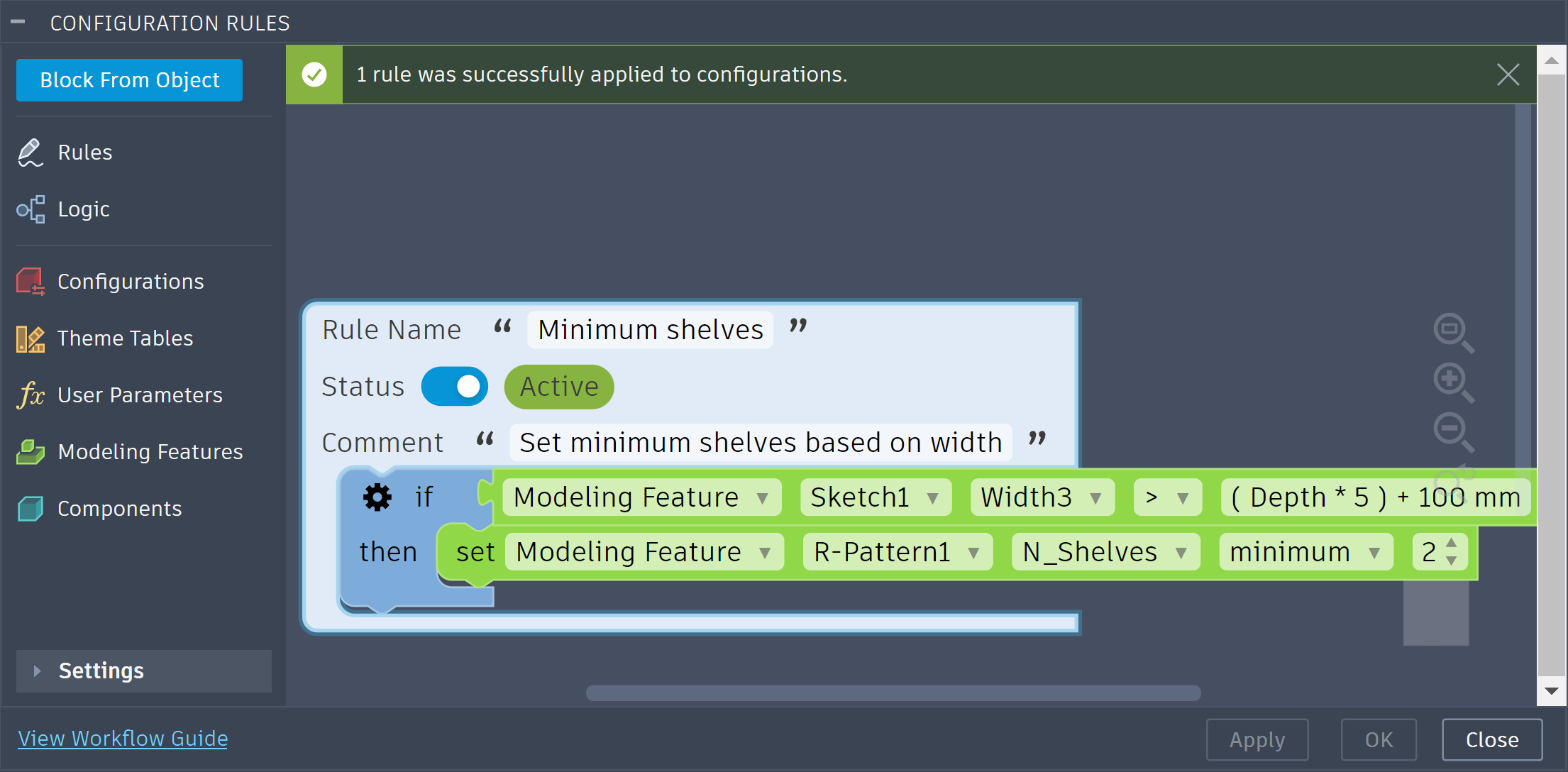
This builds the same rule in code. The Get block compares Width3 against an expression, so the threshold follows Depth in every configuration. The Set block uses Minimum, which takes a literal number rather than an expression.
# The condition: Width3 > (Depth * 5) + 100 mm, evaluated per configuration.
isWide = adsk.fusion.ConfigurationRuleGetBlock.create()
isWide.columnId = width3ColumnId
isWide.operatorType = getOps.GreaterThanConfigurationRuleGetOperator
isWide.value = adsk.fusion.ConfigurationRuleExpressionValue.create('(Depth * 5) + 100 mm')

# The action: at least 2 shelves. Minimum takes a number, not an expression.
minShelves = adsk.fusion.ConfigurationRuleSetBlock.create()
minShelves.columnId = shelfCountColumnId
minShelves.operatorType = setOps.MinimumConfigurationRuleSetOperator
minShelves.value = adsk.fusion.ConfigurationRuleNumberValue.create(2.0)

ifBlock = adsk.fusion.ConfigurationRuleIfBlock.create()
ifBlock.condition = isWide
ifBlock.thenBlocks = [minShelves]

rule = adsk.fusion.ConfigurationRule.create()
rule.name = 'Minimum shelves'
rule.comment = 'Set minimum shelves based on width'
rule.body = [ifBlock]

modifyInput = adsk.fusion.ConfigurationRulesModifyInput.create()
modifyInput.rules = [rule]
result = rulesManager.modifyRules(modifyInput)

for issue in result.issues:
    app.log(f'  issue: {issue.code} - {issue.message}')
A Set block with Equals can drive a column from an expression too. On a text column, that lets the value be built from other parameters:
# Drive a text parameter from the length.
setLabel = adsk.fusion.ConfigurationRuleSetBlock.create()
setLabel.columnId = labelColumnId
setLabel.operatorType = setOps.EqualsConfigurationRuleSetOperator
setLabel.value = adsk.fusion.ConfigurationRuleExpressionValue.create(
    "if (Length < 500 mm; 'Short'; 'Long')")
Expressions are checked when you submit. Fusion validates each expression against the design's current parameters when modifyRules runs. The Configuration Rules API has no call to check a rule expression in advance. UnitsManager.isValidExpression can catch syntax and unit errors beforehand, but only submitting the rule gives the definitive result, so always inspect issues. A block whose expression fails is reduced to a placeholder with a VALIDATION_FAILED issue, and the rest of the rule still applies. The issue's message names the reason, for example:
| Reason in the message | Cause |
|---|---|
emptyExpression | The expression string is empty or contains only spaces. create('') is accepted, but the block is rejected on submit. |
parseError | The expression is not valid syntax. |
variableNotFound | The expression names a parameter the design does not have. |
unitMismatch | The result does not suit the column — for example, a length expression on an angle column, or text on a number column. |
sameVariableUsed | The expression refers to the column's own parameter, such as Width * 2 on the Width column. |
An expression on an operator that does not accept one, or on a boolean or dropdown column, is reported as VALIDATION_FAILED in the same way. Treat these reasons as diagnostic text rather than a fixed list to branch on.
Expressions are evaluated when the rules run. A valid expression is evaluated separately for each configuration, using that configuration's parameter values. If it cannot be evaluated for a configuration — for example, it divides by a parameter that is zero there — the rule reports an ERR_EXPRESSION_INVALID status for that configuration rather than an issue on your call (see Rule statuses).
Read the expression back rather than assuming it is the text you wrote. Fusion stores each expression in a standard form, so the value you read back can differ from what you submitted in spacing, number formatting, or units while meaning the same thing. Compare expressions by what they mean — for example, by checking for the parameter names they reference — rather than by exact string.
A literal value can read back as an expression. On a number or text column with an operator that accepts expressions, Fusion stores a plain ConfigurationRuleNumberValue or ConfigurationRuleStringValue as an expression too, so the block reads back with a ConfigurationRuleExpressionValue — a number comes back as an equivalent expression with units, and the text Oak as the text expression 'Oak'. Code that reads values should check for an expression as well as for the literal class:
getBlock = adsk.fusion.ConfigurationRuleGetBlock.cast(ifBlock.condition)

if getBlock is not None:
    expression = adsk.fusion.ConfigurationRuleExpressionValue.cast(getBlock.value)
    if expression is not None:
        app.log(f'Compares against the expression {expression.value}')
    else:
        number = adsk.fusion.ConfigurationRuleNumberValue.cast(getBlock.value)
        if number is not None:
app.log(f'Compares against {number.value} (internal units)')On a Get block, the Range operator tests whether the column's current value falls within [min, max]. Use a ConfigurationRuleGetRangeValue, and prefer expressions for its bounds: create the range with both bounds unset, then set minExpression and maxExpression. A bound that is not set is open on that side.
# True when the width is between 400 mm and 900 mm, inclusive.
inRange = adsk.fusion.ConfigurationRuleGetBlock.create()
inRange.columnId = widthColumnId
inRange.operatorType = getOps.RangeConfigurationRuleGetOperator
bounds = adsk.fusion.ConfigurationRuleGetRangeValue.create(False, 0.0, False, 0.0)
bounds.minExpression = '400 mm'
bounds.maxExpression = '900 mm'
inRange.value = bounds
create(hasMin, min, hasMax, max) takes only numbers, which is why the expressions are assigned afterwards through the range value's minExpression and maxExpression properties. Each bound is either a number or an expression, never both; setting one replaces the other:
minExpression to a non-empty string also sets hasMin to True and resets min to 0.0. While an expression is the bound, min always reads 0.0 — it does not hold the evaluated result.min clears minExpression, sets hasMin to True, and keeps the number you set.hasMin to False clears both, leaving the range open below.minExpression means "no expression", not an empty expression, so it is never rejected. Setting it to empty leaves min and hasMin as they are, so clearing an expression you set leaves a numeric lower bound of 0.0; set hasMin to False to open the range instead.maxExpression, max, and hasMax behave the same way.
# True when the width is between half the length and 900 mm, inclusive.
bounds = adsk.fusion.ConfigurationRuleGetRangeValue.create(False, 0.0, False, 0.0)
bounds.minExpression = 'Length / 2'    # hasMin becomes True; min stays 0.0
bounds.maxExpression = '900 mm'

inRange = adsk.fusion.ConfigurationRuleGetBlock.create()
inRange.columnId = widthColumnId
inRange.operatorType = getOps.RangeConfigurationRuleGetOperator
inRange.value = bounds
When you read a range back, a bound you submitted as a number may be reported as an equivalent expression, with minExpression populated and min reading 0.0. Test which form a bound is in rather than assuming the form you wrote:
bounds = adsk.fusion.ConfigurationRuleGetRangeValue.cast(getBlock.value)

if bounds is not None and bounds.hasMin:
    if bounds.minExpression:
        app.log(f'Lower bound is the expression {bounds.minExpression}')
    else:
        app.log(f'Lower bound is {bounds.min} (internal units)')
On a Set block, the Range operator constrains the column with a lower bound, an upper bound, an increment, or any combination. Use ConfigurationRuleSetRangeValue.create(hasMin, min, hasMax, max, hasIncrement, increment). Each of the three parts — min, max, and increment — is independently optional, and at least one must be set. Only the parts you set take effect: min is the lowest value the user can choose, max the highest, and increment the step between the allowed values in between. When both min and max are set, min must not be greater than max.
# Constrain the width to 400-900 mm in 5 mm steps.
fullRange = adsk.fusion.ConfigurationRuleSetBlock.create()
fullRange.columnId = widthColumnId
fullRange.operatorType = setOps.RangeConfigurationRuleSetOperator
fullRange.value = adsk.fusion.ConfigurationRuleSetRangeValue.create(True, 40.0, True, 90.0, True, 0.5)
A Set block can also use Minimum and Maximum with a plain ConfigurationRuleNumberValue, but a Range expresses the same intent in one block and can carry an increment, so prefer Range. Do not use a get-range value on a Set block or a set-range value on a Get block — the two classes differ (only the set range has an increment), and each belongs with its own operator.
Where Range tests or constrains a span of numbers, AnyOf and NoneOf test or constrain a number column against a discrete set of candidate values. On a Get block, AnyOf is true when the column's current value equals one of the selected entries; NoneOf is true when it equals none of them. On a Set block, AnyOf limits the column to the selected entries — there is no set-side NoneOf; use AnyOf whenever a Set block needs to offer a discrete list of numbers.
Both operators carry a ConfigurationRuleNumberSelectionValue, built from an array of ConfigurationRuleNumberSelectionEntry objects assigned to its entries property. Each entry pairs a numeric value (Fusion internal units) with its own isSelected flag, so an entry can be carried in the block without being part of the current selection. At least one entry must be selected; an all-false selection is rejected.
# True when the width is 400 mm, 600 mm, or 900 mm.
anyOf = adsk.fusion.ConfigurationRuleGetBlock.create()
anyOf.columnId = widthColumnId
anyOf.operatorType = getOps.AnyOfConfigurationRuleGetOperator
anyOf.value = adsk.fusion.ConfigurationRuleNumberSelectionValue.create()
anyOf.value.entries = [
    adsk.fusion.ConfigurationRuleNumberSelectionEntry.create(40.0, True),
    adsk.fusion.ConfigurationRuleNumberSelectionEntry.create(60.0, True),
    adsk.fusion.ConfigurationRuleNumberSelectionEntry.create(90.0, True),
]
NoneOf reads the same way with NoneOfConfigurationRuleGetOperator; to limit a Set block to the same kind of candidate list, use AnyOfConfigurationRuleSetOperator with a ConfigurationRuleNumberSelectionValue built the same way.
The supported-columns table above lists what a rule can read and write today. A few limitations are worth calling out:
COLUMN_NOT_SUPPORTED issue rather than the generic VALIDATION_FAILED, so you can tell "this will never work" apart from a typo'd or otherwise unrecognized id (see Issues and errors).ConfigurationPropertyColumn) cannot be read or written.Equals; Contains and NotContains exist only on Get blocks. Set NotEquals is valid only on boolean and dropdown columns.NoneOf has no Set-side counterpart — it exists only as a Get operator on number columns; use AnyOf to constrain a Set block to a candidate list.ConfigurationRuleGetRangeValue has expression bounds. Only submitting a rule fully validates its expressions — inspect issues afterwards.This section covers problems with the call you just made. For what the rules engine found when the rules last ran, see Rule statuses.
The API distinguishes two kinds of problem: non-fatal problems, reported as issues on the returned result, and fatal problems, reported as errors. An operation can succeed overall while a part of it silently degrades, so understanding the difference matters.
Non-fatal problems become issues. When a single block or rule in a request has a problem, the API records an issue and continues: the offending block is reduced to an empty placeholder and the rest of the rule and the batch still apply. The batch is not rolled back. Inspect the issues collection after every call, including reads and apparently successful writes.
Fatal problems are reported as an error. An invalid request shape, an uninitialised rules pipeline, or a missing extension entitlement on a write is reported as an error rather than returning a result. In Python the error is raised as an exception (a RuntimeError), so wrap calls in try/except; in C++ the call does not throw — retrieve the error with Application::getLastError.
Every issue is a ConfigurationRulesIssue with a code, a message (developer-facing, not localized), a ruleId, a columnId, a path (such as rules[0].body[2]), and a ruleIndex guarded by hasRuleIndex. To correlate an issue back to a rule in your request, use ruleIndex (when hasRuleIndex is True) rather than parsing path.
| Code | Meaning |
|---|---|
VALIDATION_FAILED | A Get or Set block did not pass validation and was replaced with a placeholder — e.g. a columnId Fusion does not recognize at all, an operator/value not valid for the column, or an expression that is empty or invalid (see Expressions). |
COLUMN_NOT_SUPPORTED | A Get or Set block targeted a columnId that Fusion recognizes but does not support for rules (see Known limitations) — distinct from VALIDATION_FAILED, which covers columns Fusion does not recognize at all. The block is replaced with a placeholder the same way. |
RULE_NOT_FOUND | An id in deleteRuleIds, or requested through itemByIds, did not match an existing rule. |
DELETE_FAILED | A rule could not be deleted. |
CREATE_FAILED | A new rule could not be created. |
CONVERSION_WARNING | A non-fatal problem occurred while reading a rule back. |
EXTENSION_REQUIRED | A write was attempted without the Fusion Design Extension. |
BLOCK_ID_CONFLICT | A blockId you supplied was already in use by a block outside the rule being written, so Fusion minted a fresh id instead. The rule still applies; read the ids back (see Block IDs). |
BLOCK_ID_NOT_PRESERVED | A blockId you supplied did not end up on the rebuilt block. The rule still applies; read the ids back. |
Treat any code you do not recognize as an opaque string — future versions may add more.
result = rulesManager.modifyRules(modifyInput)

if
not result.issues:
    app.log('Applied cleanly.')

for issue in result.issues:
    location = f'rule {issue.ruleIndex}'
if issue.hasRuleIndex else
'request'
app.log(f'{issue.code} at {location} (column "{issue.columnId}"): {issue.message}')A status is what the configuration rules engine found the last time the rules ran, for one rule on one configuration. A rule that fails on four configurations produces four statuses. These are the same errors, warnings, and information the Configuration Rules panel shows against the blocks on the Rules Canvas.
Only problems are reported. A rule that applied cleanly to a configuration reports nothing for it, so the absence of statuses is the signal that all is well.
Statuses answer a different question from issues, and you generally need both:
| Issues | Statuses | |
|---|---|---|
| Answers | What went wrong with the call I just made? | What did the engine find when the rules last ran? |
| Where | The issues array on the result of the call | The three getStatuses methods |
| Scope | The request, or a rule or block in it | One rule on one configuration |
| Message | Developer-facing, not localized | Localized, ready to display to a user |
A modifyRules call can return no issues at all while a rule is switched off on half the design's configurations. Statuses exist only once the rules have run, so a design whose rules have never run returns an empty result — that is not an error.
All three are read-only, need no Fusion Design Extension, and never trigger a rules run. Each returns a ConfigurationRuleStatusesResult.
| Method | Answers | Returns null when |
|---|---|---|
getStatuses() | Everything the engine holds, design-wide | Never — it always returns a result |
getStatusesByRuleId(ruleId) | Is this rule healthy? | ruleId names no rule the engine is running |
getStatusesByConfigurationId(configurationId) | Is this configuration healthy? | configurationId does not match a row on the design's top configuration table |
On the two filtered queries, null and an empty result mean opposite things. An empty statuses array means the subject was found and nothing is wrong — that is the success case. null means there is no such subject. Check for null first: a script that goes straight to result.errorCount == 0 reads a typo'd id as a clean bill of health. Both filtered methods report an error if the id is empty (in Python, a raised exception).
getStatusesByRuleId returns null for an inactive rule as well as an unknown or deleted one, because an inactive rule is excluded from the engine's rule set. Use itemById to tell them apart: it returns the rule when it exists, and ConfigurationRule.isActive then says whether the rule is merely switched off.
A ConfigurationRuleStatusesResult holds the matching statuses, in no guaranteed order, plus errorCount, warningCount, and infoCount. The counts are scoped to the query, so getStatusesByRuleId(ruleId).errorCount is the error count for that one rule. They always sum to the length of statuses, so a health check needs no iteration at all.
A result is a point-in-time snapshot. It does not update when the rules run again or when the design changes — call the query again for current statuses.
| Property | Description |
|---|---|
severity | A ConfigurationRuleStatusSeverities value. Use this for triage rather than inspecting code. |
code | The kind of status, such as ERR_CONSTRAIN. Use this to branch on a specific condition. |
message | The localized, human-readable description, ready to display. This is the same text the Configuration Rules panel shows. |
ruleId | The rule this status belongs to. Matches ConfigurationRule.id, so the rule can be fetched with itemById. |
configurationId | The configuration this status applies to. Matches ConfigurationRow.id on Design.configurationTopTable. Empty when the status is not scoped to a single configuration. |
blockId | The block within the rule that raised the status. Matches blockId on a block in the rule's body (see Block IDs). Empty when the status describes the rule as a whole, which is normal, or when the rule's blocks have no ids yet. |
Severity tells you what happened to the rule on the affected configuration. The Error row is the one that matters most: an error does not mean the rule applied and something looked odd, it means the rule is not running there at all.
Value of ConfigurationRuleStatusSeverities | Was the rule applied? | What it means |
|---|---|---|
InformationConfigurationRuleStatusSeverity | Yes | The configuration is correct as generated. The message is best-practice advice about how the rule is authored or how it applied. |
WarningConfigurationRuleStatusSeverity | Yes, but it may produce unpredictable results | Review the message and confirm the configuration is what you intended. |
ErrorConfigurationRuleStatusSeverity | No | The rule has been turned off for that configuration until the error is resolved. The configuration does not reflect the rule at all, and will not until the reported problem is fixed. |
A configuration with no error statuses for a rule had that rule applied to it.
Branch on severity for general triage and on code only when you need a specific condition. Treat any code you do not recognize as an opaque string — future versions may add more.
| Code | Severity | Meaning |
|---|---|---|
ERR_CONSTRAIN | Error | The aspect is already constrained by another rule or block with a conflicting value, so this rule could not constrain it. |
ERR_EXPRESSION_INVALID | Error | An expression — in a parameter, or in one of the rule's blocks — could not be evaluated for the affected configuration (see Expressions). |
ERR_INVALID_INPUT | Error | The block is missing data it requires. Rebuild the block, and contact Autodesk Support if it recurs. |
ERR_UNHANDLED | Error | The block hit an error Fusion could not classify. Contact Autodesk Support. |
WARN_CUSTOM_CONSTRAIN | Warning | A non-custom aspect is driven by a custom aspect, so only parent-row values change. |
WARN_SNAP_CONSTRAIN | Warning | Both joint snaps point to the same component, which a joint does not allow. |
WARN_INCOMPLETE | Warning | The block is an unconfigured placeholder, so it is ignored when the rule runs. |
INFO_CONSTRAIN | Information | Another block also constrains the aspect, so only the values common to both are valid. |
INFO_SNAP_CONSTRAIN | Information | A joint snap list contains an invalid option; the last valid snap is selected. |
INFO_CYCLE | Information | The same aspect is referenced in a Get block and a Set block, which may create a cycle and produce unstable results (see Avoiding cycles). |
severities = adsk.fusion.ConfigurationRuleStatusSeverities
labels = {
    severities.ErrorConfigurationRuleStatusSeverity: 'ERROR',
    severities.WarningConfigurationRuleStatusSeverity: 'WARNING',
    severities.InformationConfigurationRuleStatusSeverity: 'INFO',
}

result = rulesManager.getStatuses()
app.log(f'{result.errorCount} error(s), {result.warningCount} warning(s), '
        f'{result.infoCount} information.')

for status in result.statuses:
    # blockId is empty when the status describes the rule as a whole.
    block = status.blockId or '-'
    app.log(f'[{labels[status.severity]}] {status.code} rule={status.ruleId} '
f'configuration={status.configurationId} block={block}: {status.message}')A non-null result with a zero errorCount means the rule is active and was applied to every configuration.
health = rulesManager.getStatusesByRuleId(ruleId)

if health is None:
    # Not a rule the engine is running. itemById separates a deleted rule, where it
    # reports an error, from an inactive one, where it returns the rule.
    try:
        rule = rulesManager.itemById(ruleId).rule
        app.log(f'"{rule.name}" is inactive, so it is not evaluated.')
    except RuntimeError:
        app.log('No rule with that id exists.')
elif health.errorCount == 0:
    app.log('Applied to every configuration.')
else:
app.log(f'Turned off on {health.errorCount} configuration(s).')Configuration ids are ConfigurationRow.id values from Design.configurationTopTable. The result also carries every status that names no configuration at all — a rule with an unfilled socket is a problem for this configuration too — so it may contain entries whose configurationId is empty rather than the id you asked for.
rows = design.configurationTopTable.rows

for i in range(rows.count):
    row = rows.item(i)
    health = rulesManager.getStatusesByConfigurationId(row.id)

    if health is None:
        app.log(f'{row.name}: not a row on the top configuration table.')
    elif health.errorCount == 0:
        app.log(f'{row.name}: reflects every rule.')
    else:
        app.log(f'{row.name}: {health.errorCount} rule(s) turned off.')
        for status in health.statuses:
app.log(f' {status.code}: {status.message}')When blockId is not empty, it names a block in the rule's body. Read the rule with itemById and walk the body to find it — remembering that an If block nests further blocks in its condition, thenBlocks, elseIfBranches, and elseBlocks. The example below descends through If blocks; extend it through the left, right, and operand of And, Or, and Not blocks if your rules nest conditions.
def findBlock(blocks, blockId):
    """Depth-first search of a statement list for the block with the given id."""
    for block in blocks:
        if block.blockId == blockId:
            return block

        ifBlock = adsk.fusion.ConfigurationRuleIfBlock.cast(block)
        if ifBlock is None:
            continue

        # Everything an If block can nest: its own condition and then-branch, each
        # else-if branch's condition and then-branch, and the else branch.
        nested = list(ifBlock.thenBlocks) + list(ifBlock.elseBlocks)
        if ifBlock.condition is not None:
            nested.append(ifBlock.condition)
        for branch in ifBlock.elseIfBranches:
            nested += list(branch.thenBlocks)
            if branch.condition is not None:
                nested.append(branch.condition)

        found = findBlock(nested, blockId)
        if found is not None:
            return found

    return None

for status in rulesManager.getStatuses().statuses:
    if not status.blockId:
        continue    # Describes the rule as a whole rather than one block.

    rule = rulesManager.itemById(status.ruleId).rule
    block = findBlock(rule.body, status.blockId)
    if block is not None:
app.log(f'{status.code} raised by {block.objectType} in "{rule.name}".')comment, and use ConfigurationRuleCommentBlock entries to document sections of a body.columnId is ignored when the rule runs; inspect issues to find placeholders.elseIfBranches over nested If blocks, and prefer a Range or a multi-value ConfigurationRuleStringListValue over nested And/Or blocks — a range for a span of numbers, a multi-entry list to accept several dropdown options.Rules are evaluated top to bottom, and the statements within a rule run in order. When more than one rule or block affects the same column, order determines the outcome, so use orderedRuleIds to control it deliberately. When multiple Set blocks limit the same column under the same condition, the result is the intersection of their value lists — you can narrow a list this way but not widen it. If two rules leave no value in common, the configuration has no valid value for that aspect, which is an error; lead with the least restrictive condition and review rules that constrain the same aspect.
A rule can both read and write the configuration, but avoid cycles that never settle. A cycle arises when rules read and write each other's columns in a loop — for example, Rule 1 sets Width from Length while Rule 2 sets Length from Width — so the values oscillate rather than settle. Avoid reading and writing the same column within one rule unless the write immediately satisfies the read, and structure rules so their conditions read from different columns than the ones they set.
Expressions can create the same kind of loop less visibly, because the parameters an expression references are reads too. Setting Width to Length / 2 in one rule while another rule sets Length from Width is a cycle, even though neither Get block mentions the other column. Fusion accepts such rules when you submit them — only an expression that refers to its own column is rejected — and the INFO_CYCLE status does not flag them either, because it only compares the columns of Get and Set blocks. Review the parameters your expressions reference as carefully as the columns your conditions read.