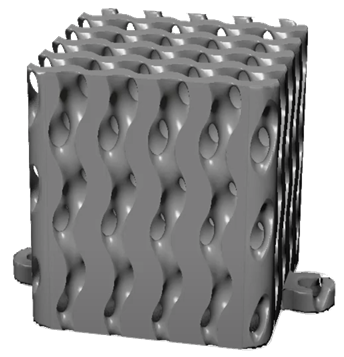
The Fusion volumetric modeling API lets you define and edit implicit geometry programmatically. Functionality is defined in the adsk.volume namespace. You describe a model as a pair of graphs whose output channels are combined into a single signed distance field, then optionally convert the result to mesh geometry.
API-only workflow. Graph editing — wiring nodes, setting properties, and connecting output channels — has no equivalent user interface in Fusion. Volumetric features you create interactively in the Design workspace follow a separate workflow from constructing graphs via the API.
Creating custom volumetric features is an advanced use of the API. You should have previous experience with the Fusion API, custom commands, and ideally custom features. See Commands and Writing and Debugging Scripts and Add-Ins if you are new to scripting.
For general scripting patterns, see the Fusion 360 API documentation. For background on implicit modeling concepts, see Implicit modeling. To build and wire graphs in code, continue with Graphs and channels.
The diagram below shows the main API types that make up a volumetric model. A VolumetricModel belongs to a Component and contains two graphs. Each Graph holds GraphNode objects linked by GraphConnector references. Node parameters are stored in typed GraphNodeProperty objects — for example ScalarGraphNodeProperty, GeometryGraphNodeProperty, and TransformReferenceGraphNodeProperty.
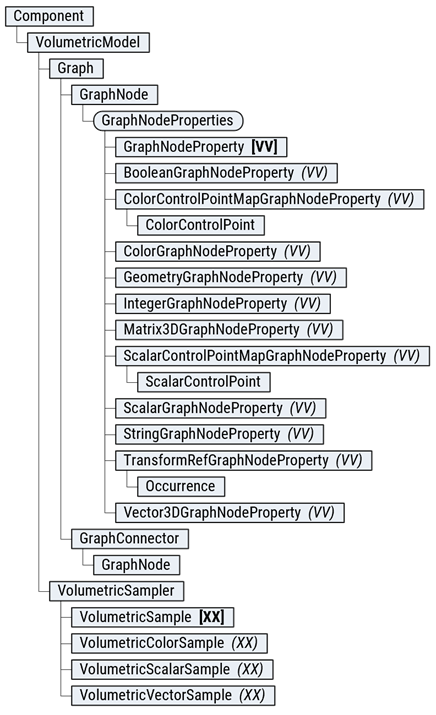
Separately, VolumetricModel.createSampler returns a VolumetricSampler for probing the evaluated field. Sample results are returned as VolumetricSample objects, with concrete types such as VolumetricScalarSample, VolumetricVectorSample, and VolumetricColorSample.
At the feature level, you typically work through:
VolumetricCustomFeatures — create a volumetric custom feature and obtain its VolumetricModel.
GraphNodes — add nodes and access output channels on each graph.
VolumetricModelToMeshFeatures — tessellate the implicit model into a mesh body.
Import adsk.volume into your script or add-in alongside the usual Fusion namespaces:
import adsk.core
import adsk.fusion
import adsk.volume
import { adsk } from "@adsk/fusion";
// adsk.volume is available when the volumetric API is loaded
Guard against missing API support before use:
if not hasattr(adsk, 'volume'):
    raise RuntimeError("adsk.volume namespace is not available.")
if not hasattr(adsk.volume, 'VolumetricModel'):
    raise RuntimeError("VolumetricModel is not available in this build.")
For a complete gyroid lattice workflow including boundary body creation, graph wiring, and mesh conversion, see the Volumetric Custom Feature Sample.