Bottom height
Bottom height determines the final machining height/depth and the lowest depth that the tool descends into the stock. Bottom height needs to be set below the Top. Use Offset to shift the height from the reference selected in From. A positive or negative offset moves the height in either direction.
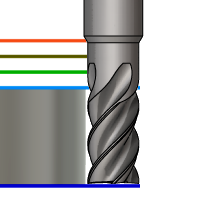
Bottom height.
From
- Clearance height - Incremental offset from the Clearance Height.
- Retract height - Incremental offset from the Retract Height.
- Feed height - Incremental offset from the Feed Height.
- Top height - Incremental offset from the Top Height.
- Model top - Incremental offset from the Model Top.
- Model bottom - Incremental offset from the Model Bottom.
- Stock top - Incremental offset from the Stock Top.
- Stock bottom - Incremental offset from the Stock Bottom.
- Selection - Incremental offset from a Point (vertex), Edge, or Face selected on the model.
- Origin (absolute) - Absolute offset from the Origin that is defined in either the Setup or in Tool Orientation within the specific operation.
Drill only:
- Hole top - Incremental offset from the Hole Top.
- Hole bottom - Incremental offset from the Hole Bottom.
- Hole segment top - Incremental offset from the top of the selected hole segment.
- Hole segment bottom - Incremental offset from the bottom of the selected hole segment.
- To chamfer width - Allows the tool to drill just enough to make the chamfer width match the input parameter. The input parameter should not exceed the tool's chamfer width. The calculated height offset is dependent on the tool's parameters (diameter, tip diameter, and tip angle) and on the diameter of the hole. Acceptable selections include cylindrical faces, circles, or arcs.
- To chamfer diameter - The diameter of the new hole is equal to the input parameter. Therefore, the input parameter should not exceed the tool's diameter. The calculated height offset is dependent on the tool's parameters and independent of the hole selection. Acceptable selections include cylindrical faces, circles, or arcs.