Feed height
Feed height sets the height that the tool rapids to before changing to the feed/plunge rate to enter the part. Feed height should be set above the Top. Use Offset to shift the height from the reference selected in From. A positive or negative offset moves the height in either direction.
In a drilling operation, this height is used as the initial feed height and the retract peck height.
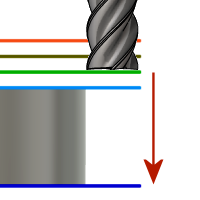
Feed height.
From
- Clearance height - Incremental offset from the Clearance Height.
- Retract height - Incremental offset from the Retract Height.
- Disabled - Disables feed height so the tool rapids down to the lead-in. See Disabled.
- Top height - Incremental offset from the Top Height.
- Bottom height - Incremental offset from the Bottom Height.
- Model top - Incremental offset from the Model Top.
- Model bottom - Incremental offset from the Model Bottom.
- Stock top - Incremental offset from the Stock Top.
- Stock bottom - Incremental offset from the Stock Bottom.
- Selection - Incremental offset from a Point (vertex), Edge, or Face selected on the model.
- Origin (absolute) - Absolute offset from the Origin that is defined in either the Setup or in Tool Orientation within the specific operation.
Drill only:
- Hole top - Incremental offset from the Hole Top.
- Hole bottom - Incremental offset from the Hole Bottom.
- Hole segment top - Incremental offset from the top of the selected hole segment.
- Hole segment bottom - Incremental offset from the bottom of the selected hole segment.
Disabled
Selecting Disabled in From causes the tool to rapid down to the lead-in instead of stopping at a feed height.
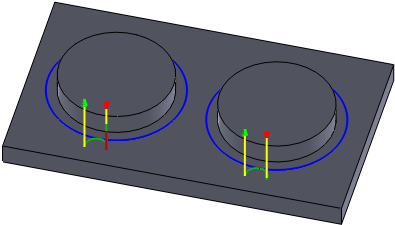
Left toolpath: 2D Contour with feed height set 5 mm from model top. Right toolpath: 2D Contour with feed height disabled.